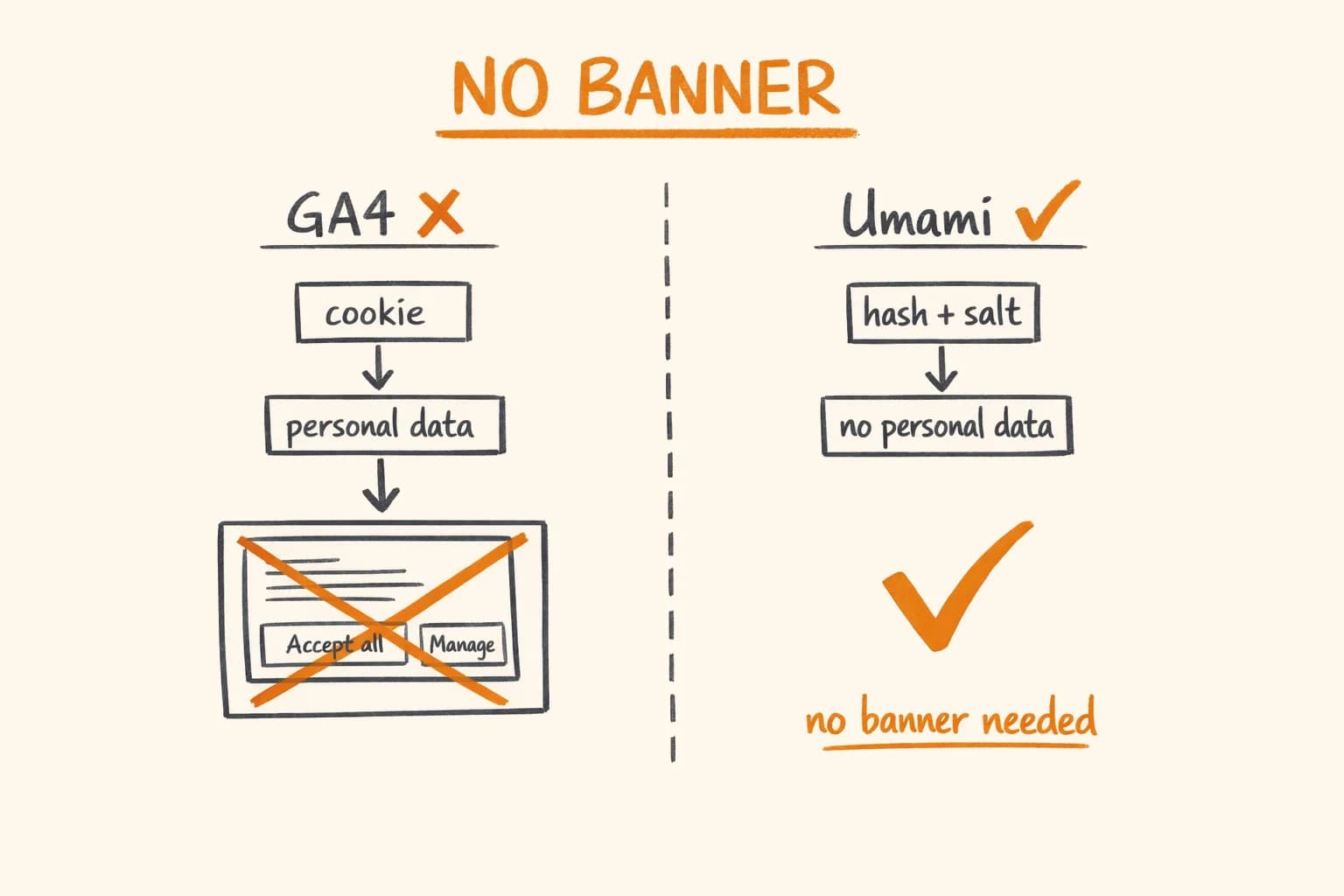
You know what the most dishonest thing on the modern web is? The cookie consent banner that says ‘Accept all’ in a large green button and ‘Manage preferences’ in tiny grey text, where ‘manage preferences’ leads to a screen with 47 vendor toggles that are all pre-checked.
That system exists because of GDPR, yes – but it exists in that specific form because companies want your consent for tracking that you would likely refuse if asked clearly. The banner is designed to extract consent, not inform.
If you’re building a product in the EU, you have a choice: implement that system, or choose analytics that don’t require consent in the first place.
I use Umami for this site. No cookies, no consent banner, no GDPR headache. This is why it works, when it’s the right choice, and when it isn’t.
Why Google Analytics Requires a Banner
GA4 sets cookies. Specifically, it sets _ga and _ga_<MEASUREMENT_ID> – persistent identifiers that tie pageviews to a specific browser across sessions and potentially across sites (via the Google network).
Under GDPR Article 6, processing personal data requires a legal basis. For tracking identifiers that follow a person across sessions, the practical legal basis is consent. So you need a banner. That banner needs to be freely given, specific, informed, and unambiguous – which means ‘accept all’ cannot be the only easy option.
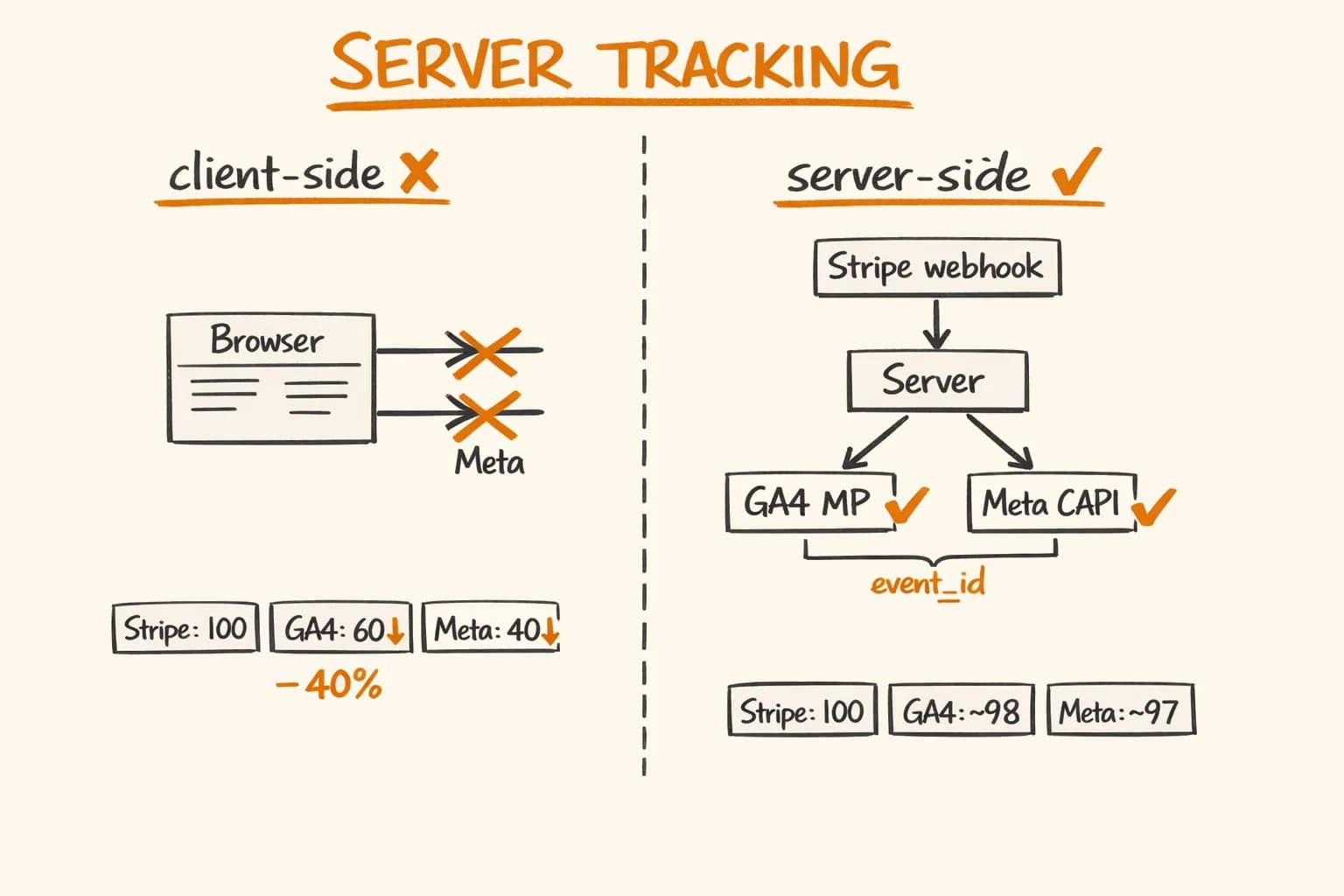
There’s a server-side GA4 approach (Google Tag Manager Server-Side) that avoids client-side cookies and collects data through a first-party proxy. I’ve implemented this for pikkuna.fi where the business needed GA4 specifically – the full detail on that setup is in Server-Side GA4 and Meta CAPI Tracking. It captures the conversions that ad blockers hide from client-side tracking. But it’s architecturally complex, requires a persistent server, and you still technically need a consent banner because you’re processing data about identifiable users.
For this portfolio site, I don’t need GA4’s capabilities. I need to know which articles people read, where traffic comes from, and whether someone from a specific region found something useful. Umami answers all of those questions without touching GDPR.
How Umami Avoids Consent Requirements
Umami is privacy-first by design:
-
No cookies. Umami doesn’t set any cookies – not session cookies, not persistent cookies. Nothing is stored on the user’s device.
-
No cross-site tracking. Each Umami install is isolated. There’s no shared network, no shared identifiers, no way to correlate a visitor on your site with a visitor on someone else’s site.
-
Anonymized data. Each pageview is associated with an anonymized ‘visitor’ identifier derived from a hash of the IP address, user agent, and a daily salt. The salt rotates every 24 hours, so the same browser on two different days produces different identifiers. You can’t track a specific person across sessions.
-
No personal data stored. The IP address is hashed server-side and never stored. The raw IP is not in any database.
Because Umami doesn’t process personal data (by design – the hash with rotating salt means you can’t reverse-identify anyone), it doesn’t require consent under GDPR. No banner needed.
This isn’t a technicality or a loophole – it’s the architecture GDPR was designed around. When you’re not collecting personal data, you don’t need consent for its collection. The question is whether your analytics tool genuinely doesn’t collect personal data, or whether it’s making a misleading claim.
Umami’s approach is auditable: the source code is on GitHub. You can verify that the salt rotation happens, that IPs aren’t stored, that no cross-site identifiers are present.
Self-Hosted vs Umami Cloud
Umami offers a cloud version at umami.is and a self-hosted version you run yourself. I use the cloud version (free tier) for this site because the data is low-volume and I don’t need the operational overhead of a self-hosted PostgreSQL instance for analytics.
If you’re running a higher-traffic site or have strict data residency requirements (your analytics data must stay in the EU), self-hosting makes sense. Umami runs on PostgreSQL or MySQL. A basic Docker Compose setup:
# docker-compose.yml (self-hosted Umami)
services:
  umami:
    image: ghcr.io/umami-software/umami:postgresql-latest
    ports:
      - "3000:3000"
    environment:
      DATABASE_URL: postgresql://umami:${POSTGRES_PASSWORD}@db:5432/umami
      DATABASE_TYPE: postgresql
      APP_SECRET: ${APP_SECRET} # Random secret for session encryption
    depends_on:
      db:
        condition: service_healthy
    restart: unless-stopped

  db:
    image: postgres:16-alpine
    environment:
      POSTGRES_DB: umami
      POSTGRES_USER: umami
      POSTGRES_PASSWORD: ${POSTGRES_PASSWORD}
    volumes:
      - umami_db_data:/var/lib/postgresql/data
    healthcheck:
      test: ["CMD-SHELL", "pg_isready -U umami"]
      interval: 5s
      timeout: 5s
      retries: 10
    restart: unless-stopped

volumes:
  umami_db_data:
Put Caddy or nginx in front of it, get a subdomain like analytics.yourdomain.com, and you have a self-hosted analytics server under your control.
Integrating Umami with Next.js
The integration is a single script tag. I put it in app/layout.tsx:
// app/layout.tsx
export default function RootLayout({ children }: { children: React.ReactNode }) {
  return (
    <html lang="en">
      <head>
        <script
          defer
          src="https://cloud.umami.is/script.js"
          data-website-id={process.env.NEXT_PUBLIC_UMAMI_WEBSITE_ID}
        />
      </head>
      <body>{children}</body>
    </html>
  );
}
Umami’s script automatically tracks:
- Pageviews (including Next.js client-side navigation – it handles pushState)
- Referrers
- Browser and OS (aggregated, not per-user)
- Country (from IP geolocation, IP not stored)
- Screen size buckets (mobile/tablet/desktop)
- Session duration
For custom events – like tracking when someone clicks the contact button or copies a code snippet – the JavaScript API:
// Track a custom event
window.umami?.track("contact_click", {
  source: "blog_post",
  post: "redis-rate-limiting",
});

// Track with just an event name
window.umami?.track("pdf_download");
The ?. optional chaining is important – if Umami’s script is blocked by an ad blocker or hasn’t loaded yet, window.umami is undefined. No error, the event is silently dropped.
What Umami Tracks (and What It Doesn’t)
Things Umami answers well:
- Which pages get the most traffic
- Where traffic comes from (direct, search, social, referral)
- Which countries/regions your visitors are in
- What devices they use
- Roughly how long they stay on a page (via session duration)
- Conversion funnels if you set up custom events
Things Umami can’t answer:
- Who specifically visited (by design – that would require personal data)
- Whether the same person visited twice (rotating salt – you can’t tell)
- What a specific user did across multiple sessions
- Any correlation with your own user accounts
For most content sites, SaaS landing pages, and portfolios, the first list covers everything you need. You want to know which content performs, not which specific person read it.
When You Still Need GA4
There are legitimate reasons to need more sophisticated analytics:
Advertising attribution. If you’re running Google Ads or Meta Ads and you need to attribute conversions to specific campaigns, you need GA4 with the right integrations. Umami doesn’t have conversion attribution to ad networks.
E-commerce revenue tracking. For pikkuna.fi, the client needed to track revenue by product, by source, by campaign. GA4 with server-side tracking (Meta CAPI + GA4 Measurement Protocol) gives the full picture. The implementation captures events that ad blockers would otherwise block, because the tracking calls go from your server to Google/Meta’s servers, not from the user’s browser. No script, no block.
User-level behavioural analytics. If you’re doing product analytics on a SaaS – funnel analysis, user paths, feature adoption – you might need tools like PostHog or Amplitude. Umami isn’t designed for this level of analysis.
Complex segmentation. GA4’s audience builder and segmentation capabilities are genuinely powerful if you need to analyse cohorts, build remarketing audiences, or run A/B tests.
The decision framework I use: if the data you need to answer your business questions genuinely requires personal data (cross-session tracking, advertising attribution, user-level analysis), then use GA4 with proper consent implementation. If you just need traffic and content analytics, Umami is sufficient and removes the consent complexity entirely.
The Fingerprinting Question
A common concern: ‘doesn’t Umami use browser fingerprinting?’ The concern is valid – fingerprinting can identify users without cookies.
Umami uses a combination of IP address, user agent string, and hostname – but the key distinction is the daily rotating salt. The hash SHA256(IP + UserAgent + Hostname + DailyRotatingSalt) cannot be reversed to find the original IP, and the identifier changes every 24 hours. A person who visits today and tomorrow produces different ‘visitor’ IDs.
This is meaningfully different from fingerprinting libraries like FingerprintPro, which are designed to persistently identify the same device across sessions and across sites. Umami’s design explicitly breaks that persistence.
The practical test: could Umami’s data be used to track a specific individual over time? No, not in any meaningful way. Could you identify that ‘someone in Helsinki using Chrome on macOS visited these three pages today’? Yes, for that session window. But that’s not personal data in the GDPR sense – you can’t connect it to a natural person.
What the Dashboard Looks Like
Umami’s analytics UI is minimal and clean. The main view shows:
- Pageviews and unique visitors for any time range
- A graph of traffic over time
- Top pages
- Top referrers
- Device breakdown
- Country map
There’s no configuration overhead, no conversion setup, no goals to define. You install it, it works, you read the numbers. For a portfolio site or content blog, this is exactly the right level of complexity.
Frequently Asked Questions
- Does Umami require a GDPR cookie consent banner?
- No. Umami does not set cookies and does not process personal data. Each visit is hashed with a daily rotating salt – the same browser on two different days produces different identifiers, so you cannot track a specific person over time. Because no personal data is collected, GDPR Article 6 consent is not required. This is not a loophole; it is the architecture GDPR was designed around.
- Umami vs Google Analytics – which should I choose?
- Use Umami if you need traffic data, top pages, referrers, and geographic breakdown without GDPR consent complexity. Use GA4 if you need advertising attribution (Google Ads, Meta Ads), e-commerce revenue tracking by product and campaign, or user-level behavioural analysis across sessions. For most content sites, SaaS landing pages, and portfolios, Umami covers everything you actually need.
- Is self-hosted Umami better than Umami Cloud?
- Umami Cloud (free tier) is the right choice for low-to-medium traffic when operational overhead is not worth it. Self-hosting makes sense when you have strict EU data residency requirements – your analytics data must stay on servers in the EU – or when you need to guarantee that analytics data never leaves your infrastructure. The Docker Compose setup takes about an hour.
- Does Umami work with Next.js and client-side navigation?
- Yes. Umami’s script handles pushState, so client-side navigation in Next.js App Router is tracked automatically as separate pageviews. Add the script tag to your root layout.tsx with defer. For custom events – contact button clicks, PDF downloads, form submissions – use window.umami?.track(‘event_name’, data). The optional chaining handles ad blockers gracefully.
- When do I still need GA4 even for an EU product?
- Three situations: you are running Google Ads or Meta Ads and need conversion attribution to specific campaigns; you need e-commerce revenue tracking by product and traffic source; or you need user-level behavioural analysis like funnel drop-off by cohort. GA4 with server-side tracking via the Measurement Protocol captures conversions that ad blockers hide from client-side tracking.
If you’re building a product for the EU market and you want clean analytics without GDPR consent complexity – or if you need the other end of the spectrum, server-side GA4 + Meta CAPI for advertising attribution – get in touch. For e-commerce specifically, privacy-compliant tracking is one piece of the larger EU launch picture. I’ve implemented both in production. I’m available for freelance projects and long-term engagements.
Further reading: