
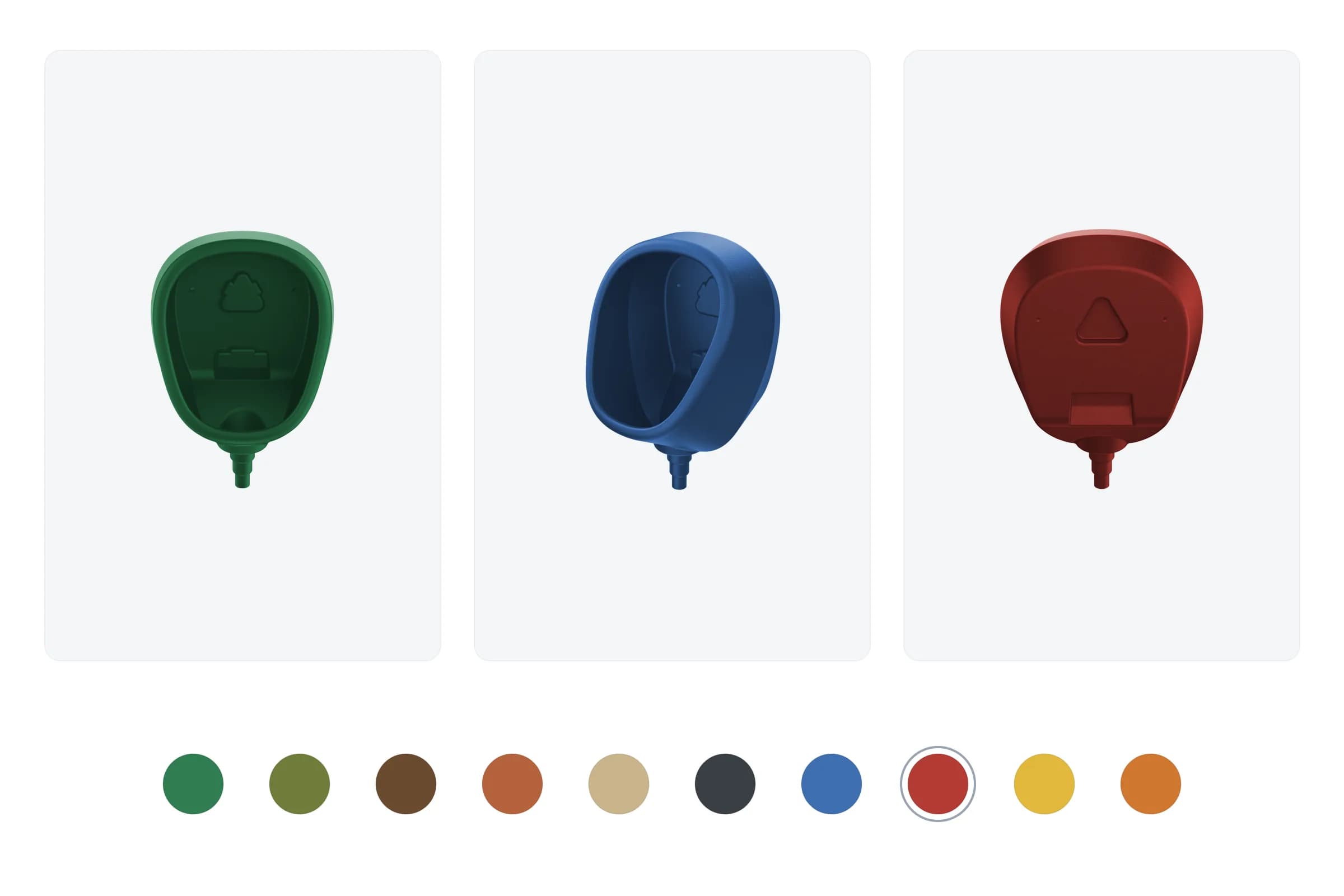
Recolour a product photo to any colour in the browser, instantly – an SVG duotone filter tints transparent master images on the fly.
Looping SVG animation illustrating a PDF verification pipeline – document stack, cloud processing, and green/red folder sorting. Built with pure CSS keyframes, zero dependencies, and 6-track timing synchronization.
Key Results

The HTPBE? API promo block contained only text and a button. Explaining an API product through text alone is hard: a user who has just verified a PDF doesn’t immediately grasp what a REST API is or why they’d want one. The product needed a visual metaphor – ‘PDF goes in → gets processed → sorted into folders’ – readable in 2–3 seconds without words.
A GIF or video would have added network requests and broken theme compatibility. Canvas would have required a JS runtime on the animation thread. An inline SVG with CSS keyframes meant zero dependencies, instant render, and full dark/light mode support with no extra work.
The animation is a single <svg viewBox="0 0 784 200"> with six independent CSS keyframe tracks on a 12-second infinite loop. Two passes per cycle:
The cloud (HTPBE? logo) stays on screen throughout and pulses on each pass.
The animation is embedded below. To see it live in its original context, run any PDF through htpbe.tech – it appears in the API promo block on the results page after verification.
| Metric | Value |
|---|---|
| JS added | 0 KB – pure CSS + SVG |
| Animation tracks | 6 synchronized keyframe sets |
| Loop duration | 12s with 2 passes |
| Frame rate | 60fps (GPU-composited transforms only) |
| SVG markup | ~4 KB |
| Dependencies | Zero |
| Theme support | Full dark/light (SVG colours are independent) |
For the technically curious, here are the tricks that made a dependency-free CSS/SVG animation behave correctly.
The least obvious problem: if an SVG element has both a transform attribute and a CSS @keyframes animation that animates transform, the browser uses only the CSS value and silently ignores the attribute. The element snaps to (0,0) at animation start. No console errors. No DevTools hints.
// ❌ Broken: CSS keyframes override the SVG transform attribute → snap to (0,0)
<g transform="translate(690, 5)" className="apr-green-folder">
  <rect x="0" y="0" width="56" height="68" rx="4" fill="#22C55E" />
</g>

// ✅ Fixed: separate position and animation into two nested <g> elements
// Outer <g> carries position via SVG attribute — no CSS class
// Inner <g> carries CSS animation — no SVG transform attribute
<g transform="translate(690, 5)">
  <g className="apr-green-folder">
    <rect x="0" y="0" width="56" height="68" rx="4" fill="#22C55E" />
    <rect x="50" y="46" width="14" height="22" rx="3" fill="#15803D" />
  </g>
</g>
For flying documents, there is no transform attribute at all – the CSS keyframe carries the full translate(x, y).
All six animations share the same duration (12s), which makes percentages equivalent to absolute time. Pass 1 occupies 0–50%, Pass 2 mirrors it at 50–100%. This eliminates animation-delay entirely and makes timing bugs obvious when reading keyframes.
/* All 6 tracks: 12s duration = percentage-based absolute timing control */
/* PDF leaves stack, arrives at cloud, snaps back invisibly, reappears */
@keyframes apr-pdf {
  0% {
    transform: translate(8px, 66px);
    opacity: 1;
  }
  4% {
    transform: translate(8px, 66px);
    opacity: 1;
  } /* pause on stack */
  24% {
    transform: translate(357px, 66px);
    opacity: 1;
  } /* reach cloud */
  25% {
    transform: translate(357px, 66px);
    opacity: 0;
  } /* behind cloud */
  26% {
    transform: translate(8px, 66px);
    opacity: 0;
  } /* snap back */
  27% {
    transform: translate(8px, 66px);
    opacity: 1;
  } /* reappear */
  50% {
    transform: translate(8px, 66px);
    opacity: 1;
  }
  54% {
    transform: translate(8px, 66px);
    opacity: 1;
  }
  74% {
    transform: translate(357px, 66px);
    opacity: 1;
  }
  75% {
    transform: translate(357px, 66px);
    opacity: 0;
  }
  76% {
    transform: translate(8px, 66px);
    opacity: 0;
  }
  77% {
    transform: translate(8px, 66px);
    opacity: 1;
  }
  100% {
    transform: translate(8px, 66px);
    opacity: 1;
  }
}
ease-in-out shifts the visual arrival point by ~3% earlier than the keyframe percentage. The folder bounce animation is moved 3% forward and uses linear timing to compensate.
Three static PDFs are always visible and never animated. The flying PDF renders on top of them. When it flies away, the stack looks unchanged because the third static document is always in the same position.
{/* Back doc — plain rect */}
<rect x="14" y="72" width="56" height="68" rx="3" fill="white" stroke="#E2E8F0" strokeWidth="1.5" />

{/* Middle doc — full PDF look (visible when top doc is in flight) */}
<rect x="11" y="69" width="56" height="68" rx="3" fill="white" stroke="#E2E8F0" strokeWidth="1.5" />
<path d="M53,69 L67,83 L53,83 Z" fill="#EFF6FF" />
<rect x="19" y="91" width="26" height="9" rx="2" fill="#EF4444" />

{/* Front doc — same position as the flying PDF at rest */}
<rect x="8" y="66" width="56" height="68" rx="3" fill="white" stroke="#E2E8F0" strokeWidth="1.5" />
<path d="M50,66 L64,80 L50,80 Z" fill="#EFF6FF" />

{/* Flying PDF — covers the front static doc while resting on stack */}
<g className="apr-pdf">
  <rect x="0" y="0" width="56" height="68" rx="3" fill="white" stroke="#E2E8F0" strokeWidth="1.5" />
  ...
</g>The checkmark and cross icons inside folders are Font Awesome <path> elements scaled via transform. The formula: translate(target_center) scale(s) translate(-path_center).
// FA checkmark: viewBox 640×640, bbox (92,123)–(548,544), path center ≈ (320.6, 334.2)
// Target: centered at (28, 30) in 56×68 folder, ~25px wide
// scale = 25 / (548 - 92) ≈ 0.060

<path
  transform="translate(28 30) scale(0.060) translate(-320.6 -334.2)"
  d="M530.8 134.1C545.1 144.5 548.3 164.5 537.9 178.8
     L281.9 530.8C276.4 538.4 267.9 543.1 258.5 543.9
     C249.1 544.7 240 541.2 233.4 534.6
     L105.4 406.6C92.9 394.1 92.9 373.8 105.4 361.3
     C117.9 348.8 138.2 348.8 150.7 361.3
     L252.2 462.8L486.2 141.1
     C496.6 126.8 516.6 123.6 530.9 134z"
  fill="white"
/>
No Illustrator, no external icon library, no extra HTTP request.
Flying documents must appear to pass behind the cloud. SVG draws elements in DOM order, so the documents are rendered before the cloud – the cloud naturally overlaps them during flight.
{/* DOM order = paint order = z-order */}
<g className="apr-green-fly"> ... </g> {/* rendered first → behind cloud */}
<g className="apr-red-fly"> ... </g> {/* rendered first → behind cloud */}
<g className="apr-circle"> ... </g> {/* cloud — on top of everything above */}
{/* Folders last — on top of cloud */} Available
Need something similar?
I build custom solutions – from APIs to full products. Let’s talk about your project.
Recolour a product photo to any colour in the browser, instantly – an SVG duotone filter tints transparent master images on the fly.
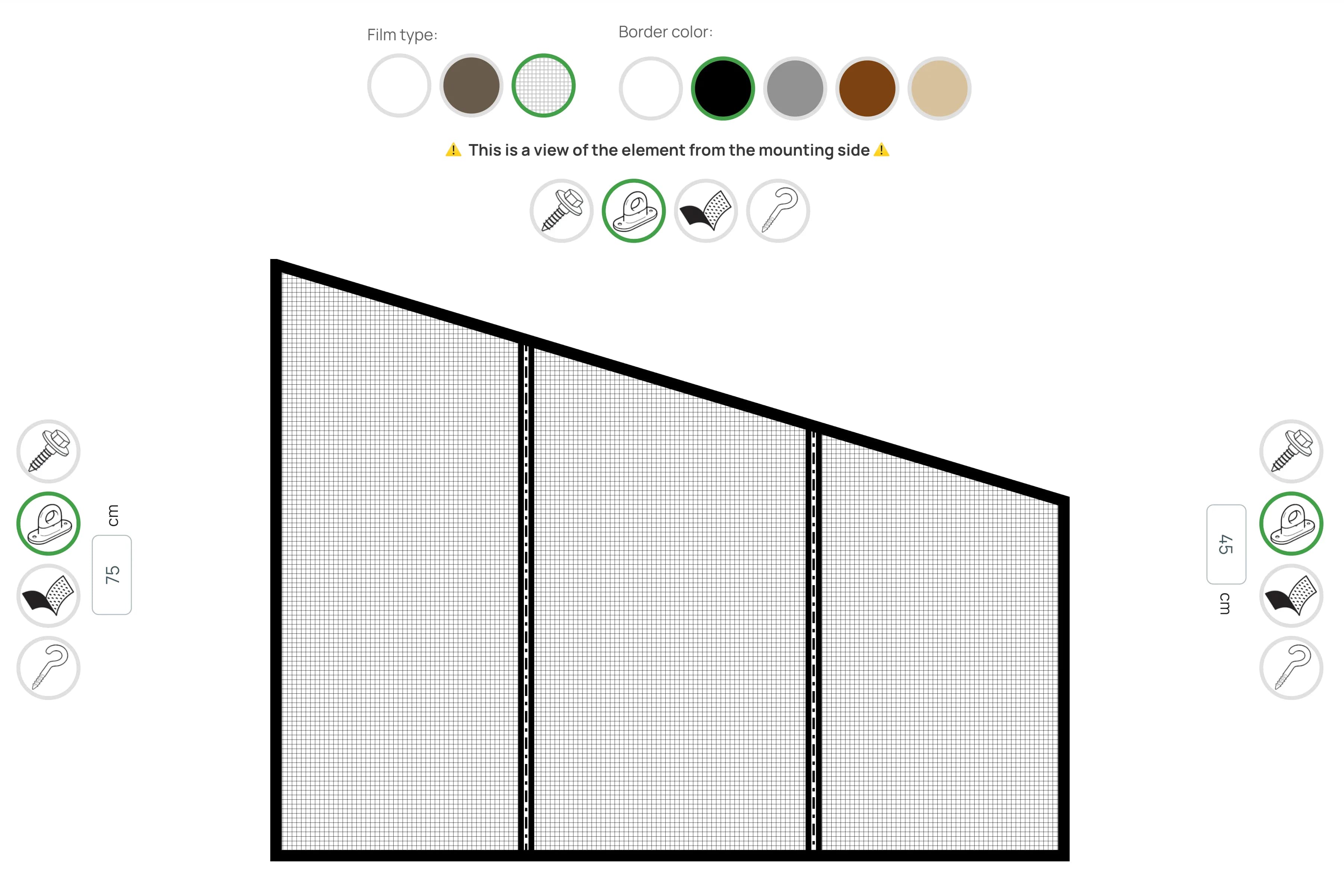
Client-side SVG configurator with live preview for designing vinyl curtains and roofing panels.
Libraries
Services

CSS SVG animation with pure @keyframes: sync multiple tracks, fix the SVG transform override trap, and build smooth loops without GSAP or Framer Motion.
Stack
Topics
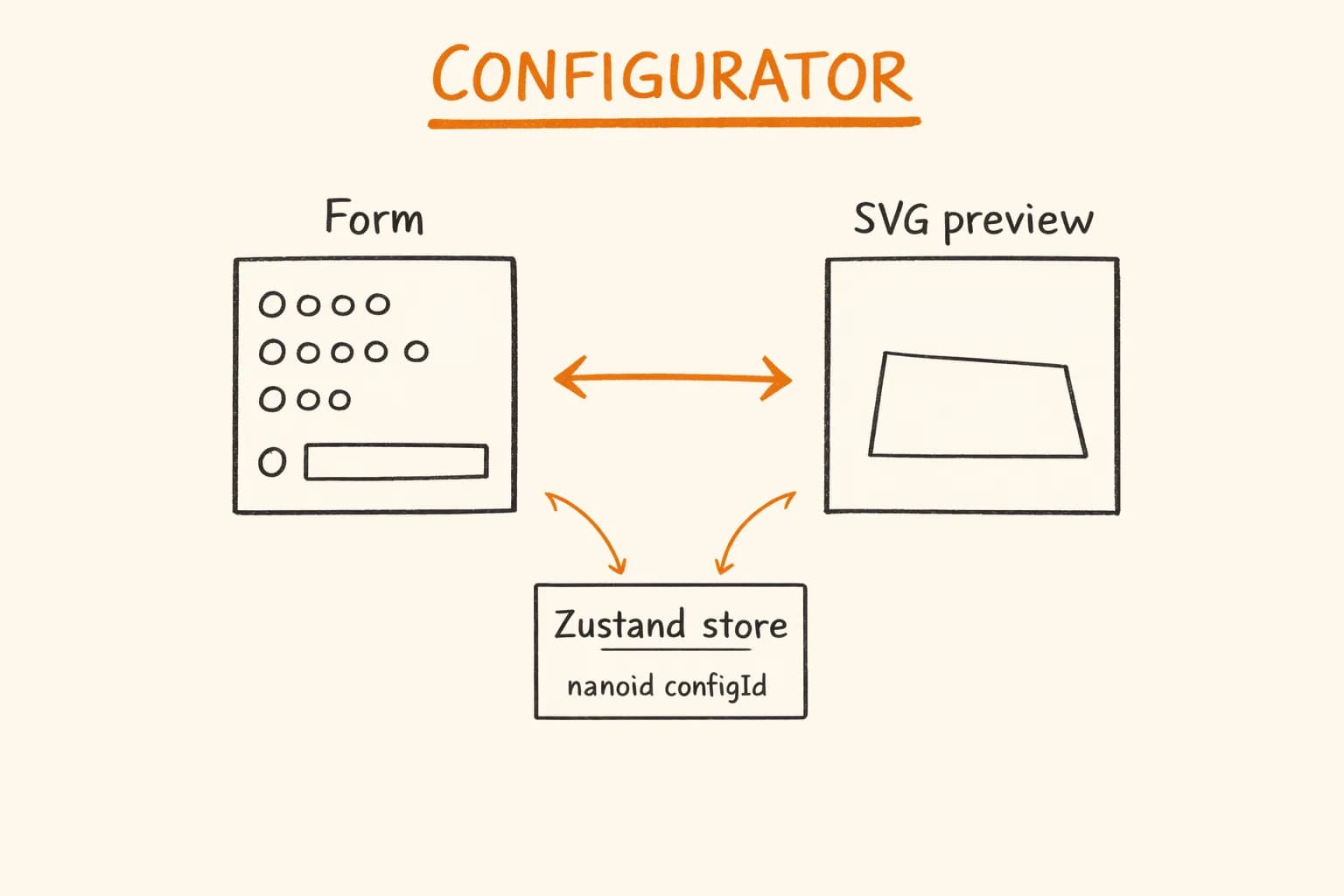
Build a React product configurator with Zustand, DaisyUI, Motion animations and a live SVG preview – architecture, pricing logic, and performance patterns.
