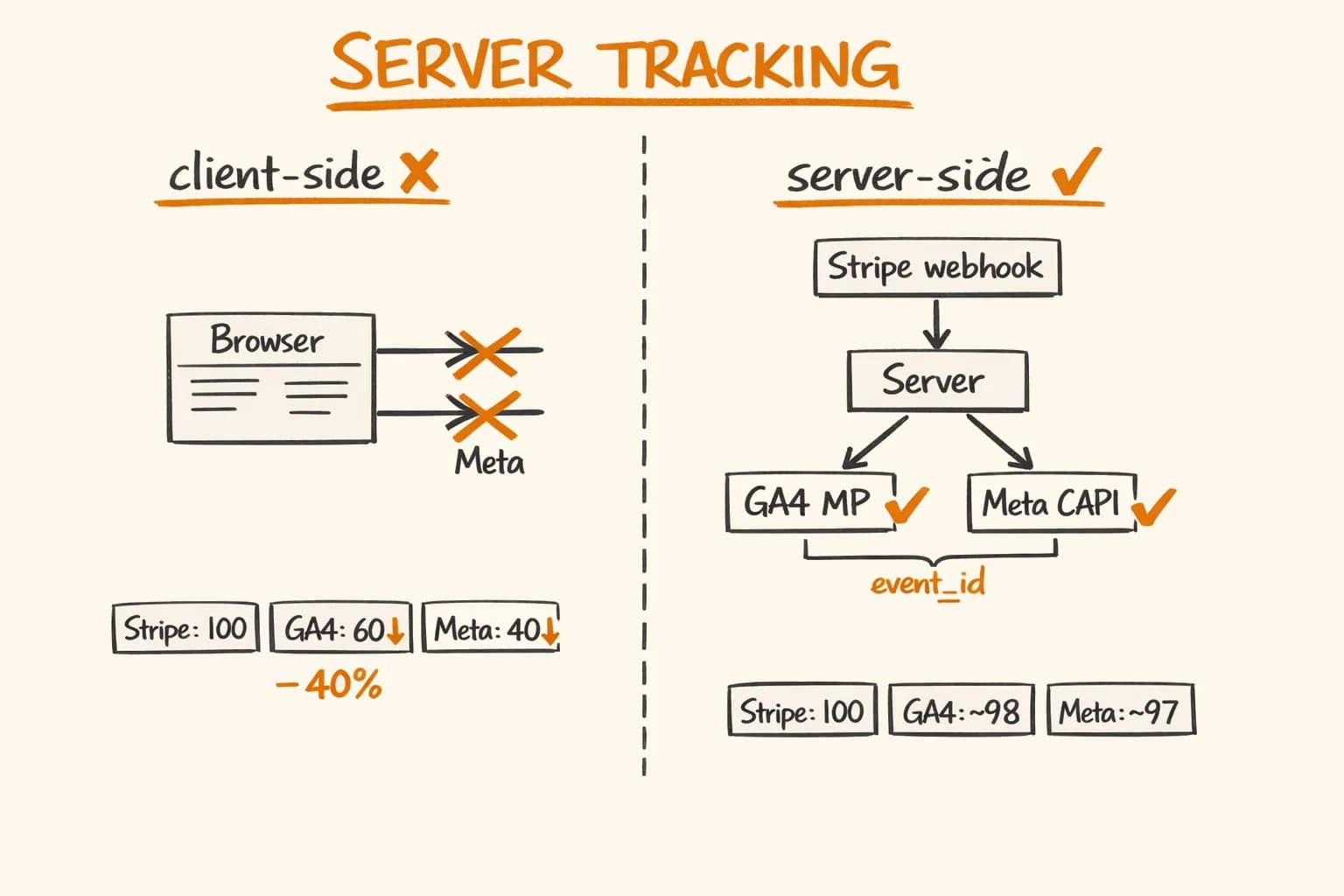
You see 100 sales in Stripe. In GA4 — 60. In Facebook Ads – 40. Which number do you believe?
The Stripe number is right. The others are not. And the gap is getting wider every year.
When I audited analytics on Pikkuna – a Finnish e-commerce platform serving 32 countries – the client-side tracking was missing roughly 35–40% of purchase events. Not because the code was wrong, but because the events were blocked before they ever left the browser. iOS users, Firefox users, anyone with an adblocker – their conversions were invisible to GA4 and Meta.
The fix is moving tracking to the server. When the event fires from your backend, there is no browser, no extension, no ITP to intercept it. Here’s exactly how I implemented it in Next.js.
Why Client-Side Tracking Is Dying
The degradation has been gradual enough that most teams haven’t noticed how bad it’s gotten.
iOS 14.5+ App Tracking Transparency (ATT). Apple now requires explicit opt-in for cross-app tracking. Meta Pixel is the primary casualty – without an IDFA, the pixel can’t match events back to ad impressions. Meta’s own data showed conversion reporting dropping 15–30% after ATT launched.
Safari ITP (Intelligent Tracking Prevention). Safari caps client-side cookies at 7 days, with additional restrictions down to 24 hours for sites that touch known trackers. If your customer discovers your product on Monday through a Facebook ad and converts the following Wednesday, Safari’s ITP may have already expired the fbp cookie that would have attributed the sale. On Pikkuna, where Finnish users disproportionately use Safari, this was a real problem.
Third-party cookie deprecation. Chrome’s long-running deprecation project has stalled, but the direction is set. Third-party cookies that GA4 depends on for cross-session attribution are going away. First-party measurement is no longer optional – it’s the only durable approach.
Adblockers. uBlock Origin, AdGuard, Brave’s built-in blocker – all of them block requests to google-analytics.com and connect.facebook.net by default. Desktop adblocker penetration in Northern Europe runs 35–50% depending on the country. Among developers – who are often the early users of technical B2B products – it runs higher.
Put these together and you routinely lose 30–50% of conversion signals before they reach your analytics platform. The purchase happened; you just can’t see it.
How Server-Side Tracking Works
The principle is straightforward. Instead of relying on JavaScript in the browser to fire tracking events after a purchase, you fire them from your server – after you’ve already confirmed payment.
Browser                    Server                   Analytics
   │                          │                          │
   │  ── Stripe payment ──►   │                          │
   │                          │  payment confirmed       │
   │                          │  ──────────────────────► GA4 Measurement Protocol
   │                          │  ──────────────────────► Meta Conversions API
   │  ◄── success page ───    │                          │
No adblocker can intercept a request from your server to Google or Meta. No ITP can expire cookies that never left your backend. The event fires when the payment is confirmed – not when a JavaScript snippet happens to run in a browser tab that might already be closed.
The tradeoff: server-side tracking sends slightly less context than a browser does. You need to pass user identifiers explicitly rather than relying on cookies auto-attached to requests. Getting client_id for GA4 and fbp for Meta requires reading them from cookies on your server – which works fine in Next.js but requires a little setup.
GA4 Measurement Protocol
GA4’s server-to-server API is called the Measurement Protocol. It accepts the same events as the browser SDK – purchase, add_to_cart, begin_checkout – and attributes them to the same sessions, as long as you pass the right identifiers.
What You Need
Three required pieces:
client_id— GA4’s session identifier, stored in the_gacookie asGA1.1.<client_id>. Read it server-side from the request cookies.session_id— the current session identifier, stored in_ga_<MEASUREMENT_ID>cookie. Parse it out.api_secret— a server-only secret generated in GA4 Admin > Data Streams > Measurement Protocol API secrets. Never expose this client-side.
Reading client_id from Cookies
In Next.js, Server Actions and API routes have access to request cookies via cookies() from next/headers:
// lib/analytics/ga4.ts
import { cookies } from "next/headers";

interface GA4Identifiers {
  clientId: string | null;
  sessionId: string | null;
}

export async function getGA4Identifiers(measurementId: string): Promise<GA4Identifiers> {
  const cookieStore = await cookies();

  // _ga cookie format: GA1.1.1234567890.1234567890
  // The client_id is everything after "GA1.1."
  const gaCookie = cookieStore.get("_ga")?.value;
  const clientId = gaCookie ? gaCookie.split(".").slice(2).join(".") : null;

  // Session cookie format: GS1.1.1234567890.1.1.1234567890.60.0.0
  // The session_id is the third segment
  const sessionCookieName = `_ga_${measurementId.replace("G-", "")}`;
  const sessionCookie = cookieStore.get(sessionCookieName)?.value;
  const sessionId = sessionCookie ? sessionCookie.split(".")[2] : null;

  return { clientId, sessionId };
}
Sending a Purchase Event
// lib/analytics/ga4.ts (continued)

interface GA4PurchaseParams {
  transactionId: string;
  value: number; // In actual currency units (not cents)
  currency: string; // ISO 4217: "EUR", "USD"
  items: GA4Item[];
  coupon?: string;
}

interface GA4Item {
  itemId: string;
  itemName: string;
  price: number;
  quantity: number;
}

interface GA4EventPayload {
  clientId: string;
  sessionId?: string;
  events: GA4Event[];
}

interface GA4Event {
  name: string;
  params: Record<string, unknown>;
}

const GA4_API_ENDPOINT = "https://www.google-analytics.com/mp/collect";

export async function sendGA4PurchaseEvent(
  identifiers: GA4Identifiers,
  purchase: GA4PurchaseParams
): Promise<void> {
  if (!identifiers.clientId) {
    // No client_id means we can't attribute this to a session.
    // Log it, but don't throw — tracking failure should never block checkout.
    console.warn("[GA4] Missing client_id, skipping server-side event");
    return;
  }

  const payload: GA4EventPayload = {
    clientId: identifiers.clientId,
    // session_id ties the event to the right session in GA4 reporting
    ...(identifiers.sessionId && {
      events: [], // placeholder — replaced below
    }),
    events: [
      {
        name: "purchase",
        params: {
          // session_id must be inside the event params, not at the top level
          ...(identifiers.sessionId && { session_id: identifiers.sessionId }),
          transaction_id: purchase.transactionId,
          value: purchase.value,
          currency: purchase.currency,
          coupon: purchase.coupon,
          items: purchase.items.map((item) => ({
            item_id: item.itemId,
            item_name: item.itemName,
            price: item.price,
            quantity: item.quantity,
          })),
        },
      },
    ],
  };

  const url = new URL(GA4_API_ENDPOINT);
  url.searchParams.set("measurement_id", process.env.NEXT_PUBLIC_GA4_MEASUREMENT_ID!);
  url.searchParams.set("api_secret", process.env.GA4_API_SECRET!);

  const response = await fetch(url.toString(), {
    method: "POST",
    headers: { "Content-Type": "application/json" },
    body: JSON.stringify(payload),
  });

  if (!response.ok) {
    // GA4 Measurement Protocol returns 204 on success, errors are rare
    // but worth logging for debugging
    console.error(`[GA4] Measurement Protocol error: ${response.status}`);
  }
}
One thing that trips people up: GA4 Measurement Protocol returns 204 No Content on success, not 200. And crucially, it returns 2xx even for malformed payloads – it swallows errors silently. Use the Measurement Protocol Validation endpoint (/debug/mp/collect) during development to catch payload issues.
Meta Conversions API
Meta’s server-to-server API is called the Conversions API (CAPI). The key difference from GA4: Meta requires you to hash any personally identifiable information before sending.
PII Hashing – Not Optional
Meta’s documentation states plainly: email addresses and phone numbers must be hashed with SHA-256 before transmission. This applies even over HTTPS. The hash must be lowercase, trimmed, and normalized before hashing – not after.
// lib/analytics/meta-capi.ts
import crypto from "crypto";

// Normalize and hash a PII value per Meta's requirements
function hashPII(value: string): string {
  return crypto.createHash("sha256").update(value.toLowerCase().trim()).digest("hex");
}

// Phone: strip all non-digit characters, include country code
function hashPhone(phone: string): string {
  const normalized = phone.replace(/\D/g, "");
  return crypto.createHash("sha256").update(normalized).digest("hex");
}
Sending a Purchase Event to Meta CAPI
// lib/analytics/meta-capi.ts (continued)

interface MetaUserData {
  email?: string;
  phone?: string;
  firstName?: string;
  lastName?: string;
  city?: string;
  countryCode?: string; // ISO 3166-1 alpha-2 lowercase: "fi", "de"
  postalCode?: string;
  clientIpAddress?: string; // From request headers
  clientUserAgent?: string; // From request headers
  fbp?: string; // _fbp cookie value
  fbc?: string; // _fbc cookie value (click ID)
}

interface MetaPurchaseEvent {
  eventId: string; // Used for deduplication — must match client-side pixel
  eventSourceUrl: string; // The URL where the purchase happened
  userData: MetaUserData;
  value: number; // In actual currency units
  currency: string; // ISO 4217 uppercase: "EUR"
  orderId: string;
}

const META_CAPI_ENDPOINT = "https://graph.facebook.com/v20.0";

export async function sendMetaPurchaseEvent(event: MetaPurchaseEvent): Promise<void> {
  const { userData } = event;

  // Build user_data object — only include fields we have
  const hashedUserData: Record<string, string | undefined> = {
    ...(userData.email && { em: hashPII(userData.email) }),
    ...(userData.phone && { ph: hashPhone(userData.phone) }),
    ...(userData.firstName && { fn: hashPII(userData.firstName) }),
    ...(userData.lastName && { ln: hashPII(userData.lastName) }),
    ...(userData.city && { ct: hashPII(userData.city) }),
    ...(userData.countryCode && { country: hashPII(userData.countryCode.toLowerCase()) }),
    ...(userData.postalCode && { zp: hashPII(userData.postalCode) }),
    // IP and user agent are NOT hashed — Meta uses them as-is
    ...(userData.clientIpAddress && { client_ip_address: userData.clientIpAddress }),
    ...(userData.clientUserAgent && { client_user_agent: userData.clientUserAgent }),
    // Cookie values — not hashed
    ...(userData.fbp && { fbp: userData.fbp }),
    ...(userData.fbc && { fbc: userData.fbc }),
  };

  const payload = {
    data: [
      {
        event_name: "Purchase",
        // Unix timestamp in seconds
        event_time: Math.floor(Date.now() / 1000),
        // The URL where the conversion happened
        event_source_url: event.eventSourceUrl,
        // action_source tells Meta this came from a server, not a browser
        action_source: "website",
        // event_id is critical for deduplication — see next section
        event_id: event.eventId,
        user_data: hashedUserData,
        custom_data: {
          value: event.value,
          currency: event.currency,
          order_id: event.orderId,
        },
      },
    ],
    // test_event_code: "TEST12345", // Uncomment during development
  };

  const pixelId = process.env.META_PIXEL_ID!;
  const accessToken = process.env.META_CAPI_ACCESS_TOKEN!;

  const response = await fetch(
    `${META_CAPI_ENDPOINT}/${pixelId}/events?access_token=${accessToken}`,
    {
      method: "POST",
      headers: { "Content-Type": "application/json" },
      body: JSON.stringify(payload),
    }
  );

  if (!response.ok) {
    const error = await response.json();
    console.error("[Meta CAPI] Error:", JSON.stringify(error));
  }
}
Reading fbp and fbc Cookies Server-Side
Meta uses the _fbp cookie (set by the pixel) and _fbc cookie (set when a user arrives via a Facebook click with fbclid in the URL) for matching. Pass them to CAPI for better match quality:
// lib/analytics/meta-capi.ts (continued)

import { cookies, headers } from "next/headers";

export async function getMetaIdentifiers(): Promise<
  Pick<MetaUserData, "fbp" | "fbc" | "clientIpAddress" | "clientUserAgent">
> {
  const cookieStore = await cookies();
  const headersList = await headers();

  return {
    fbp: cookieStore.get("_fbp")?.value,
    fbc: cookieStore.get("_fbc")?.value,
    // X-Forwarded-For contains the real client IP when behind a proxy/CDN
    clientIpAddress:
      headersList.get("x-forwarded-for")?.split(",")[0].trim() ??
      headersList.get("x-real-ip") ??
      undefined,
    clientUserAgent: headersList.get("user-agent") ?? undefined,
  };
}
Deduplication: The Part Nobody Explains Clearly
If you run both a client-side Meta Pixel and server-side CAPI, Meta will count the purchase twice – once from the browser, once from your server. The same problem exists with GA4 if you’re using both gtag.js and the Measurement Protocol.
The fix is an event_id. When the same event arrives from both the browser and the server with identical event_id values, the platform deduplicates and counts it once. The window for deduplication is typically 48 hours.
How to Generate and Pass event_id
Generate a unique ID when the checkout session begins – not when the purchase succeeds. Store it in the session or pass it through your checkout flow as a hidden field or URL parameter.
// lib/analytics/event-id.ts
import { randomUUID } from "crypto";

// Generate at checkout initiation, store in session storage client-side
// and in your order/payment record server-side
export function generateEventId(): string {
  return randomUUID();
}
On the client side (in your checkout success component), pass this ID to the browser pixel:
// app/checkout/success/page.tsx — Client Component
"use client";

import { useEffect } from "react";

interface SuccessPageProps {
  eventId: string; // Passed from the Server Component via props
  orderId: string;
  value: number;
  currency: string;
}

export function TrackPurchaseClient({ eventId, orderId, value, currency }: SuccessPageProps) {
  useEffect(() => {
    // Facebook Pixel — eventID parameter enables deduplication with CAPI
    if (typeof window !== "undefined" && window.fbq) {
      window.fbq(
        "track",
        "Purchase",
        {
          value,
          currency,
          order_id: orderId,
        },
        {
          eventID: eventId, // Must match what you send to CAPI
        }
      );
    }

    // GA4 — use the same transaction_id for deduplication
    if (typeof window !== "undefined" && window.gtag) {
      window.gtag("event", "purchase", {
        transaction_id: orderId, // GA4 deduplicates on transaction_id
        value,
        currency,
      });
    }
  }, [eventId, orderId, value, currency]);

  return null;
}
On the server side, use the same event_id when calling CAPI and the same transaction_id when calling the GA4 Measurement Protocol.
Putting It Together: The Server Action
In Next.js, the cleanest place to fire server-side events is in the Stripe webhook handler – after you’ve confirmed the payment and created the order. For the full webhook architecture that makes this reliable, see Stripe Webhooks Done Right. This runs on every successful payment regardless of what the browser is doing.
// lib/analytics/track-purchase.ts
import { sendGA4PurchaseEvent, getGA4Identifiers } from "./ga4";
import { sendMetaPurchaseEvent, getMetaIdentifiers } from "./meta-capi";

interface PurchaseTrackingParams {
  orderId: string;
  transactionId: string; // Stripe PaymentIntent ID
  eventId: string; // The shared event ID for deduplication
  value: number; // In actual currency units (not cents)
  currency: string;
  items: Array<{ id: string; name: string; price: number; quantity: number }>;
  customer: {
    email: string;
    firstName?: string;
    lastName?: string;
    city?: string;
    countryCode?: string;
    postalCode?: string;
  };
  eventSourceUrl: string; // e.g., "https://pikkuna.fi/checkout/success"
}

export async function trackServerSidePurchase(params: PurchaseTrackingParams): Promise<void> {
  const ga4Identifiers = getGA4Identifiers(process.env.NEXT_PUBLIC_GA4_MEASUREMENT_ID!);
  const metaIdentifiers = getMetaIdentifiers();

  // Fire both in parallel — neither should block the other
  await Promise.allSettled([
    sendGA4PurchaseEvent(ga4Identifiers, {
      transactionId: params.transactionId,
      value: params.value,
      currency: params.currency,
      items: params.items.map((item) => ({
        itemId: item.id,
        itemName: item.name,
        price: item.price,
        quantity: item.quantity,
      })),
    }),
    sendMetaPurchaseEvent({
      eventId: params.eventId,
      eventSourceUrl: params.eventSourceUrl,
      value: params.value,
      currency: params.currency,
      orderId: params.orderId,
      userData: {
        email: params.customer.email,
        firstName: params.customer.firstName,
        lastName: params.customer.lastName,
        city: params.customer.city,
        countryCode: params.customer.countryCode,
        postalCode: params.customer.postalCode,
        ...metaIdentifiers,
      },
    }),
  ]);

  // Promise.allSettled means tracking errors never throw —
  // a failed GA4 call will not roll back your order
}
Call this from your order processing worker – after the order is confirmed in your database, before sending the confirmation email:
// workers/order-processor.ts (excerpt)
import { trackServerSidePurchase } from "@/lib/analytics/track-purchase";

// Inside your BullMQ worker handler:
const order = await fetchOrderDetails(paymentIntentId);

// Create the order, run the pipeline steps...
const { invoiceNumber, trackingNumber } = await processOrder(order);

// Fire analytics — after the order is committed, never blocking it
await trackServerSidePurchase({
  orderId: order.id,
  transactionId: order.stripePaymentIntentId,
  eventId: order.analyticsEventId, // Generated at checkout, stored on order
  value: order.totalAmount / 100,
  currency: order.currency.toUpperCase(),
  items: order.lineItems,
  customer: {
    email: order.customerEmail,
    firstName: order.customerFirstName,
    lastName: order.customerLastName,
    city: order.shippingAddress.city,
    countryCode: order.shippingAddress.country.toLowerCase(),
    postalCode: order.shippingAddress.postalCode,
  },
  eventSourceUrl: `https://pikkuna.fi/checkout/success`,
});
The key architectural point: Promise.allSettled instead of Promise.all. With all, a GA4 network timeout would throw and potentially retry the entire order processing job. With allSettled, tracking failures are logged and swallowed – the order pipeline continues regardless.
Gotchas from Production
GA4 Measurement Protocol validates nothing at the API level. You can send completely malformed events and receive a 204 No Content. Always test with the validation endpoint (/debug/mp/collect) and cross-check in the GA4 DebugView (enable it by adding &debug_mode=1 to your Measurement Protocol URL temporarily). Events should appear within seconds.
Meta’s event deduplication window is 48 hours, not unlimited. If your CAPI event arrives more than 48 hours after the pixel event with the same event_id, Meta treats them as separate events. This matters if your order processing pipeline retries after a long outage.
session_id is required for events to appear in GA4’s funnel reports. Without it, the purchase event lands in GA4 but doesn’t connect to the session that preceded it – so you can’t see the full funnel from landing page to purchase. The session ID lives in the _ga_XXXXXXXXXX cookie and needs to be parsed carefully: the format is GS1.1.<session_id>.<session_number>.<...>.
The _fbp cookie may not exist for new visitors. On Pikkuna, we had cases where the Meta Pixel hadn’t fired yet when the purchase webhook arrived – particularly for users on very fast connections who completed checkout before the pixel script loaded. CAPI still works without fbp; the match rate drops slightly. Meta’s documentation says client_ip_address + client_user_agent together provide a reasonable match even without cookie identifiers.
The GA4 Measurement Protocol api_secret must be server-side only. If it leaks client-side, anyone can inject arbitrary events into your GA4 property. Keep it in environment variables that are not prefixed with NEXT_PUBLIC_.
action_source: "website" is required for Meta CAPI. Omitting it causes the event to be rejected silently. For server-fired events that originated from browser interactions, "website" is the correct value – not "server".
Results from Pikkuna
Before switching to full server-side tracking, Pikkuna was seeing a consistent gap between Stripe’s payment records and GA4’s purchase event count. The differential varied by country – Finnish users, with high Safari and Firefox usage, showed the largest gaps.
After the migration:
- Purchase event parity: GA4 purchase event count now matches Stripe confirmed payments within 2–3% (the remaining gap is test transactions and refunded orders)
- Meta attribution: Return on ad spend calculations became meaningful again – previously Meta Ads was optimizing on incomplete conversion data and misallocating budget
- No checkout impact: Zero instances of a tracking failure blocking or delaying order completion –
Promise.allSettledarchitecture held
The client-side pixel still runs alongside the server-side events. The deduplication handles the overlap, and running both means you capture browser-side events (like add_to_cart and begin_checkout) that are harder to reconstruct server-side from first principles.
If you’re running an e-commerce platform or SaaS and the numbers in your analytics don’t match what you see in Stripe, you’re not imagining it. The gap is real and it’s getting larger as privacy protections tighten.
I’ve implemented server-side GA4 and Meta CAPI tracking on production systems serving 32 countries – including the deduplication, the PII hashing, and the error handling that keeps checkout unaffected when tracking has a bad moment. This tracking layer integrates into the same Pikkuna e-commerce platform that handles fully automated order processing.
If you need a senior developer who can own this end-to-end – get in touch. I’m available for e-commerce development and API integrations projects and longer-term engagements.