I’ve built several SaaS products. Each time I run through the same checklist. Not because I’m following a template – but because I’ve paid for skipping items with production incidents, angry customers, and weekends spent fixing what should have been done at the start.
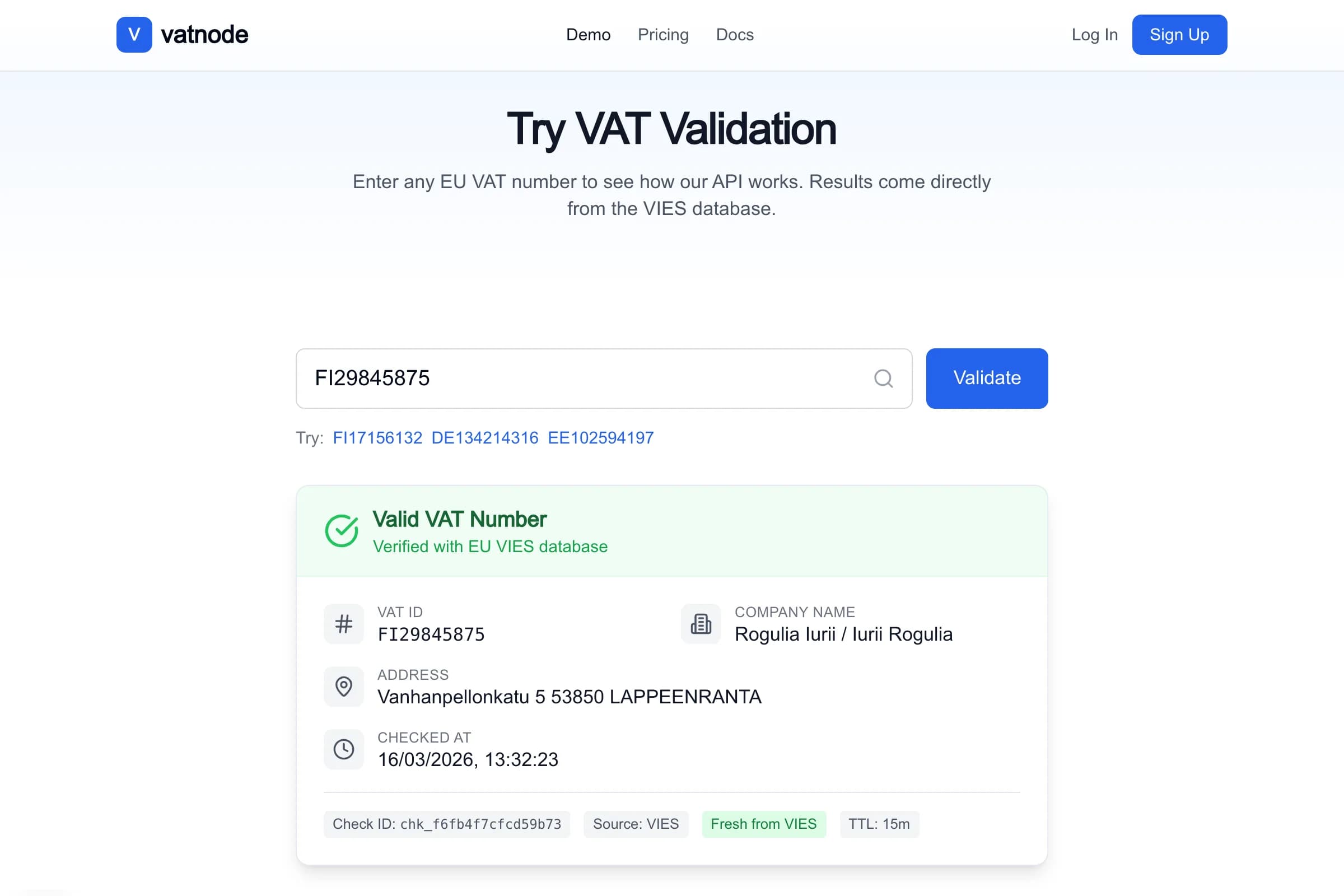
vatnode.dev – EU VAT validation SaaS, running in production with 95% Redis cache hit rate. htpbe.tech – PDF forensics SaaS, 5-layer analysis in under 9 seconds. pi-pi.ee – B2B e-commerce across 32 EU markets. All of them went from zero to production in 6–8 weeks. Here’s exactly what that takes.
The Stack I Start With
Before the checklist, the decision I never revisit: the default stack.
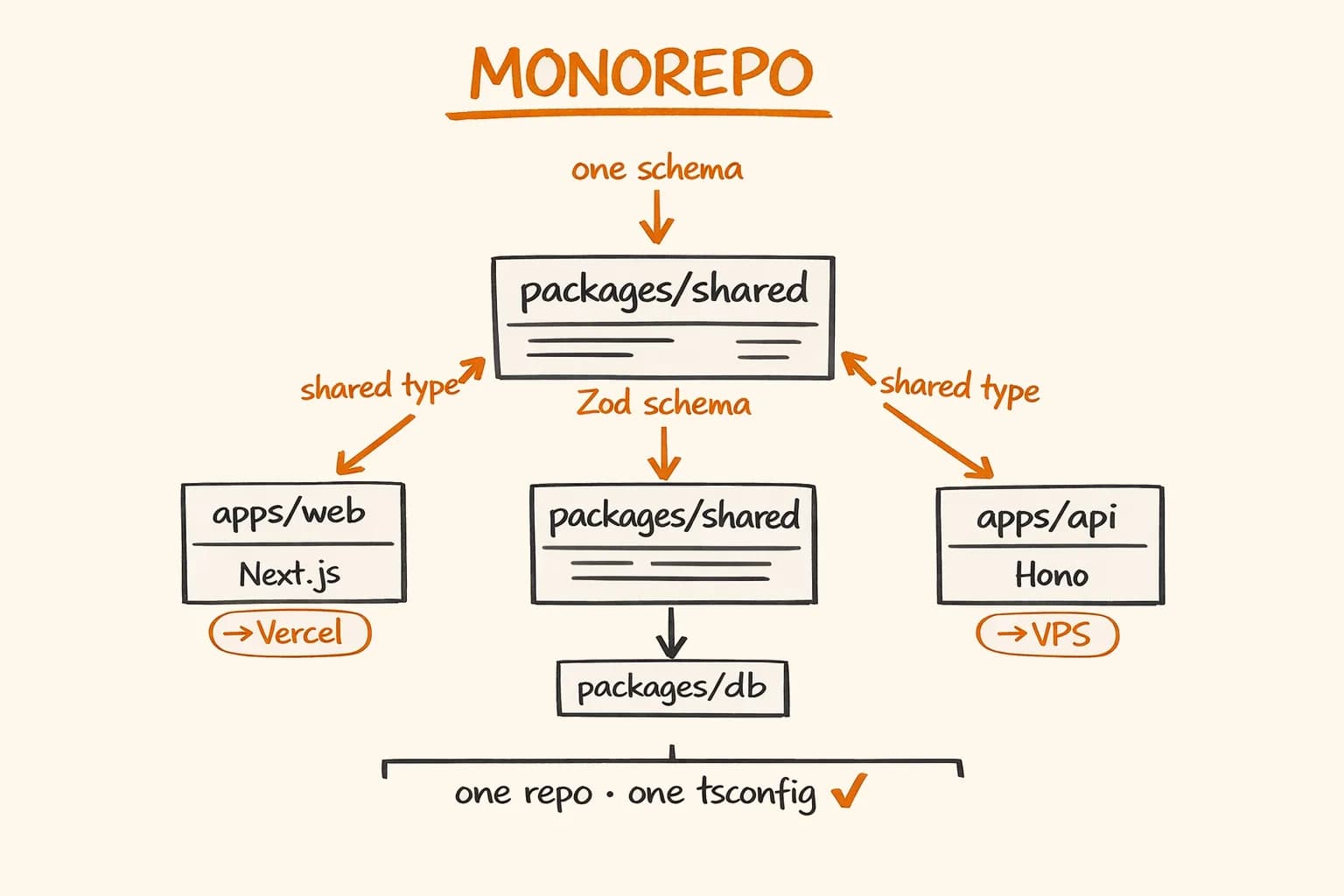
- Next.js 15 (App Router) for the web application – Server Components, Server Actions, API routes in one framework
- Hono 4 when I need a dedicated API server (separate deployment, higher performance needs, BullMQ workers)
- PostgreSQL – the only database I trust for production SaaS
- Drizzle ORM – type-safe, no magic, migrations I understand
- Better Auth – auth library that handles sessions, OAuth, magic links properly
- Stripe – payments, full stop
- Resend – transactional email
- Redis (Upstash or self-hosted) – rate limiting, queues, caching
- BullMQ – background job queue on top of Redis
- Vercel – hosting, with caveats I’ll get to
- Sentry – error tracking
Every project deviation from this stack has cost me time. I now treat any deviation as a decision that requires justification, not exploration.
Auth Checklist
Auth is where most SaaS projects spend too much time if they roll their own, and too little time if they just copy a tutorial.
- Email + password with bcrypt – minimum 12 rounds, store only the hash
- Magic links – better UX for B2B tools where users don’t want another password
- OAuth: Google and GitHub – covers 80% of developer and startup users
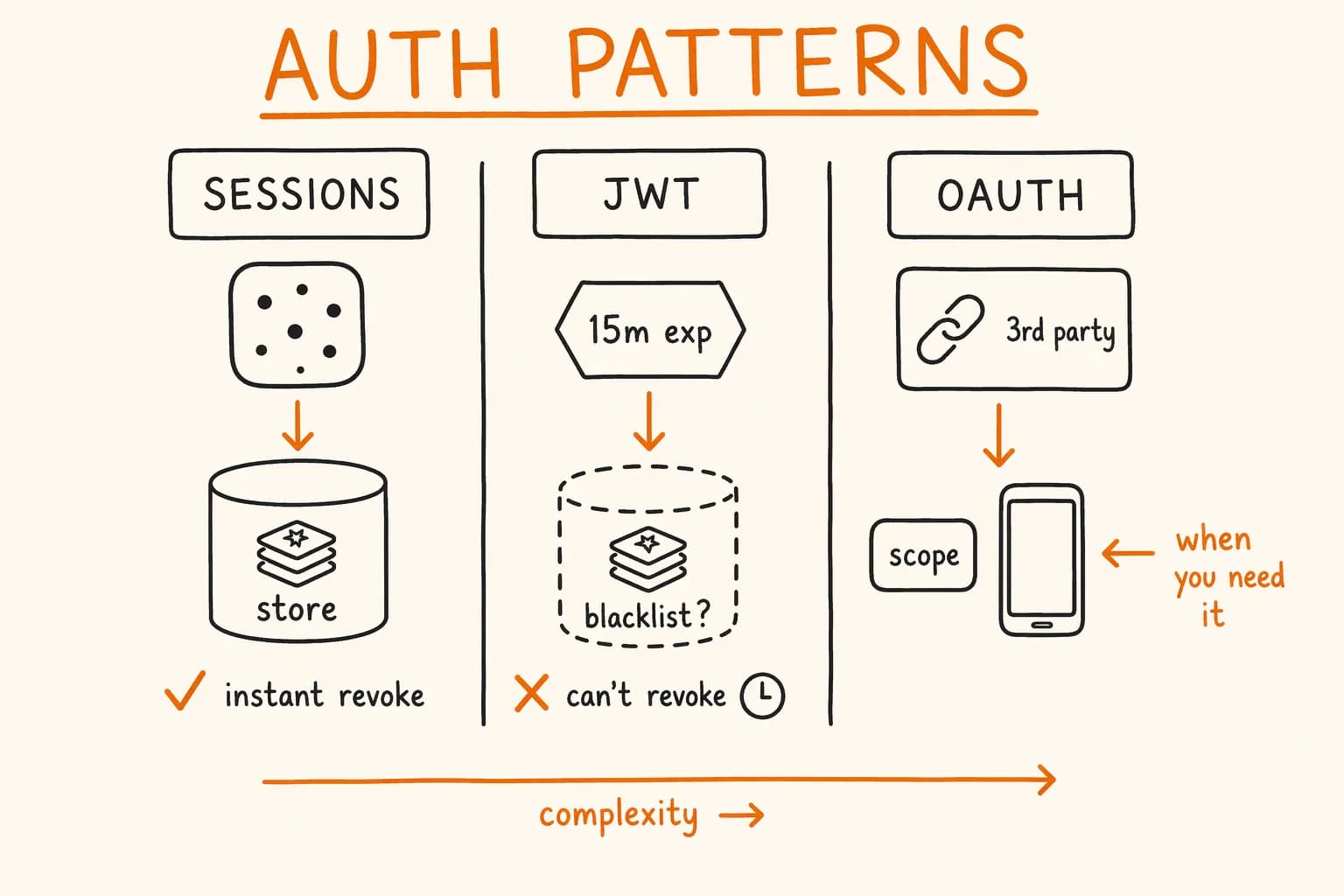
- Session management – use database sessions, not JWT-only (you need the ability to revoke)
- Rate limiting on auth endpoints – login, register, password reset, magic link send
- Email verification – required before first login, not optional
- Password reset flow – expiring tokens, single-use
- Account deletion – GDPR requirement, not an afterthought
I use Better Auth on all current projects. It handles sessions, OAuth providers, email verification, and password reset in one library. NextAuth.js is fine, but Better Auth has better TypeScript ergonomics and the plugin model is cleaner.
Here’s the core Better Auth setup I start every project with:
// lib/auth.ts
import { betterAuth } from "better-auth";
import { drizzleAdapter } from "better-auth/adapters/drizzle";
import { db } from "@/packages/db";
import { magicLink } from "better-auth/plugins";

export const auth = betterAuth({
  database: drizzleAdapter(db, {
    provider: "pg",
  }),
  emailAndPassword: {
    enabled: true,
    requireEmailVerification: true,
  },
  socialProviders: {
    google: {
      clientId: process.env.GOOGLE_CLIENT_ID!,
      clientSecret: process.env.GOOGLE_CLIENT_SECRET!,
    },
    github: {
      clientId: process.env.GITHUB_CLIENT_ID!,
      clientSecret: process.env.GITHUB_CLIENT_SECRET!,
    },
  },
  plugins: [
    magicLink({
      sendMagicLink: async ({ email, url }) => {
        // Resend integration — see Email section below
        await sendMagicLinkEmail({ email, url });
      },
    }),
  ],
  rateLimit: {
    enabled: true,
    window: 60, // 60 second window
    max: 10, // 10 requests per window per IP
  },
});

export type Session = typeof auth.$Infer.Session;
Better Auth generates the database schema automatically. Run npx better-auth generate and it outputs the Drizzle migration.
When to choose NextAuth.js instead: if you’re on an older Next.js Pages Router project or the team already knows NextAuth.js deeply. For new projects starting today, Better Auth is the better choice.
Billing Checklist
Stripe is the only option I consider for EU SaaS. The European payment method support, VAT handling, and customer portal are not features you want to rebuild yourself.
- Stripe Customer created on signup – immediately, even before the first payment
- Subscription or one-time payments – decide upfront, the data model differs significantly
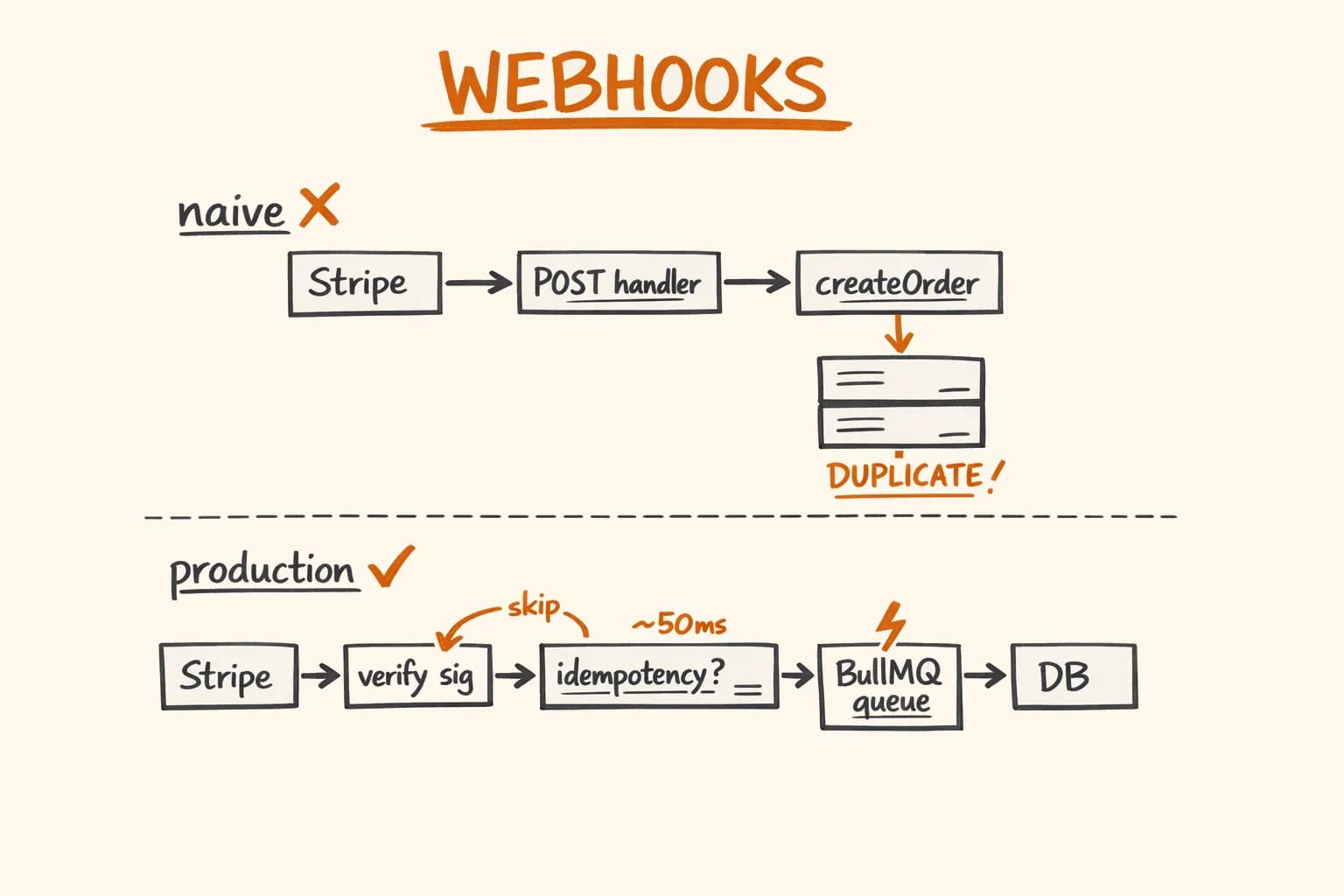
- Webhook handler with idempotency – Stripe retries for 72 hours; duplicates are guaranteed without this
- Redis deduplication layer – fast check before hitting the database
- Self-service portal –
stripe.billingPortal.sessions.create()handles plan changes, cancellations, invoice history - Free trial logic –
trial_period_daysin the subscription, enforce feature gating on trial expiry - Upgrade/downgrade flow – use
stripe.subscriptions.update()withproration_behavior: 'create_prorations' - Invoice generation and delivery – Stripe sends invoice PDFs automatically; for custom invoices, see the PDF generation work I described in the order automation pipeline
- Failed payment recovery (dunning) – three-email sequence, don’t immediately revoke access
- Webhook events to handle:
payment_intent.succeeded,customer.subscription.updated,customer.subscription.deleted,invoice.payment_failed,invoice.payment_succeeded
The idempotency pattern I use – covering both Redis fast-check and PostgreSQL durable record – is documented in detail in Stripe Webhooks Done Right. I won’t repeat it here, but it’s non-negotiable: ship it or ship duplicate orders.
Database Checklist
- PostgreSQL – I’ve used MySQL and SQLite on old projects; I don’t anymore
- Drizzle ORM – type-safe queries, plain SQL migrations, no ORM magic
-
created_atandupdated_aton every table – non-negotiable for debugging production issues - Soft deletes –
deleted_at timestampcolumn instead of hardDELETE; makes recovery and audit possible - Migration strategy – Drizzle migrations committed to the repo, run on deploy
- Backup policy – daily automated backups, tested restore at least once before launch
- Connection pooling – PgBouncer or Neon’s built-in pooling; raw PostgreSQL connections don’t survive serverless
Here’s the table structure I start every project with:
// packages/db/schema/base.ts
import { timestamp, uuid } from "drizzle-orm/pg-core";
import { sql } from "drizzle-orm";

// Reusable column set — spread into every table definition
export const baseColumns = {
  id: uuid("id")
    .primaryKey()
    .default(sql`gen_random_uuid()`),
  createdAt: timestamp("created_at", { withTimezone: true }).notNull().defaultNow(),
  updatedAt: timestamp("updated_at", { withTimezone: true })
    .notNull()
    .defaultNow()
    .$onUpdate(() => new Date()),
  deletedAt: timestamp("deleted_at", { withTimezone: true }),
};

// packages/db/schema/users.ts
import { pgTable, text, boolean } from "drizzle-orm/pg-core";
import { baseColumns } from "./base";

export const users = pgTable("users", {
  ...baseColumns,
  email: text("email").notNull().unique(),
  emailVerified: boolean("email_verified").notNull().default(false),
  stripeCustomerId: text("stripe_customer_id").unique(),
  plan: text("plan").notNull().default("free"),
  planActivatedAt: timestamp("plan_activated_at", { withTimezone: true }),
});
Drizzle vs Prisma: I made the switch after Prisma’s migration behaviour caused a production incident (it tried to recreate an indexed column instead of adding a new one). Drizzle generates raw SQL migrations you can read and verify before running. That’s the property I care about most in production. Prisma is friendlier for beginners; Drizzle is what I trust with real data.
API Checklist
- Rate limiting per IP – protect against unauthenticated abuse
- Rate limiting per API key – per-plan limits for authenticated users
- Error responses with machine-readable codes – not just HTTP status codes, but
{ "error": { "code": "VAT_NUMBER_INVALID", "message": "..." } } - Cursor-based pagination – offset pagination breaks on large datasets and concurrent writes
- API versioning strategy – even if v1 is the only version, establish the URL pattern now (
/api/v1/) - OpenAPI documentation – Hono has built-in OpenAPI support; use it
- Request validation with Zod – validate inputs before touching the database
- Standard rate limit headers –
X-RateLimit-Limit,X-RateLimit-Remaining,X-RateLimit-Reset
For vatnode’s public API, I use a two-tier rate limit: 30 requests per minute per API key (enforced per plan in the database), and a hard 60 requests per minute per IP regardless of auth status. The Redis sliding window implementation is worth a dedicated article – and I wrote one: Redis Rate Limiting for APIs. Building a public-facing API is also part of my API integrations work.
A consistent error response format matters more than most developers realize. When a client’s code breaks at 2 AM, machine-readable error codes are what makes automated retry logic possible:
// lib/api-error.ts
export class ApiError extends Error {
  constructor(
    public readonly code: string,
    public readonly message: string,
    public readonly statusCode: number = 400,
    public readonly details?: Record<string, unknown>
  ) {
    super(message);
  }
}

// lib/api-response.ts
export function errorResponse(error: ApiError) {
  return Response.json(
    {
      error: {
        code: error.code,
        message: error.message,
        ...(error.details ? { details: error.details } : {}),
      },
    },
    { status: error.statusCode }
  );
}

// Usage:
throw new ApiError("SUBSCRIPTION_REQUIRED", "This endpoint requires an active subscription.", 402);
Email Checklist
- Resend or Mailgun for delivery – never send transactional email from your own SMTP
- Welcome / onboarding sequence – triggered on signup, not a bulk newsletter
- Email verification – required before first meaningful action
- Payment confirmation – immediately after
invoice.payment_succeeded - Failed payment recovery – day 1, day 3, day 7; vary the subject and body
- Subscription cancellation confirmation – acknowledge it, include the end date and data export instructions
- Branded HTML templates – React Email for component-based email templates
- Plain text fallback – some clients don’t render HTML; always include it
I use Resend with React Email on all current projects. The developer experience is significantly better than Mailgun templates, and the deliverability is comparable. Here’s the email client setup:
// lib/email.ts
import { Resend } from "resend";
import { MagicLinkEmail } from "@/emails/magic-link";
import { PaymentConfirmationEmail } from "@/emails/payment-confirmation";

const resend = new Resend(process.env.RESEND_API_KEY!);

export async function sendMagicLinkEmail({ email, url }: { email: string; url: string }) {
  await resend.emails.send({
    from: "[email protected]",
    to: email,
    subject: "Your sign-in link",
    react: MagicLinkEmail({ url }),
  });
}

export async function sendPaymentConfirmation({
  email,
  invoiceUrl,
  amount,
  currency,
}: {
  email: string;
  invoiceUrl: string;
  amount: number;
  currency: string;
}) {
  const formatted = new Intl.NumberFormat("en-US", {
    style: "currency",
    currency: currency.toUpperCase(),
  }).format(amount / 100); // Stripe amounts are in cents

  await resend.emails.send({
    from: "[email protected]",
    to: email,
    subject: `Payment confirmed — ${formatted}`,
    react: PaymentConfirmationEmail({ invoiceUrl, amount: formatted }),
  });
}
Monitoring and Observability Checklist
- Sentry – error tracking with source maps; configure
SENTRY_DSNin environment - Uptime monitoring – BetterUptime or UptimeRobot on all public endpoints; alert threshold 1 minute
- Structured logging – JSON logs with correlation IDs so you can trace a request across services
- Performance monitoring – Vercel Analytics or self-hosted Plausible for the frontend; Sentry performance for the API
- Health check endpoint –
GET /api/healththat checks DB connectivity and returns 200 or 503 - Alert channels – Telegram bot for critical errors, email for daily summaries
Correlation IDs are the monitoring item that developers consistently skip and consistently regret. When a user reports an error, ‘I got a 500 error at around 3 PM’ is not debuggable without a correlation ID tying the frontend request to the backend logs.
// middleware.ts (Next.js)
import { NextRequest, NextResponse } from "next/server";
import { v4 as uuidv4 } from "uuid";

export function middleware(request: NextRequest) {
  const correlationId = request.headers.get("x-correlation-id") ?? uuidv4();

  const response = NextResponse.next();
  // Pass through to Server Components and API routes
  response.headers.set("x-correlation-id", correlationId);

  return response;
}
Then in every Server Action or API route:
const correlationId = request.headers.get("x-correlation-id");
console.log(JSON.stringify({ level: "info", correlationId, event: "order.created", orderId }));
Security Checklist
- HTTPS enforced – redirect HTTP to HTTPS at the infrastructure level, not in application code
- Content Security Policy headers – use
next.config.tsheaders configuration, start withreport-onlymode - SQL injection protection – Drizzle ORM parameterizes all queries; never interpolate user input into raw SQL
- XSS protection – React escapes by default; audit any
dangerouslySetInnerHTMLusage - CSRF protection – Better Auth handles this for session-based auth; verify for any custom endpoints
- Secrets management – environment variables only, never committed to the repo; use Vercel env vars or Doppler
- Dependency audit –
npm auditin CI on every PR - Rate limiting on all mutating endpoints – not just auth; account update, file upload, anything that changes state
- Input validation on the server – Zod schemas on all API inputs; never trust the client
// next.config.ts — security headers
import type { NextConfig } from "next";

const nextConfig: NextConfig = {
  async headers() {
    return [
      {
        source: "/(.*)",
        headers: [
          {
            key: "X-Frame-Options",
            value: "DENY",
          },
          {
            key: "X-Content-Type-Options",
            value: "nosniff",
          },
          {
            key: "Referrer-Policy",
            value: "strict-origin-when-cross-origin",
          },
          {
            key: "Permissions-Policy",
            value: "camera=(), microphone=(), geolocation=()",
          },
          // Start with report-only, then enforce once you're confident
          {
            key: "Content-Security-Policy-Report-Only",
            value: [
              "default-src 'self'",
              "script-src 'self' 'unsafe-inline'", // Tighten this after audit
              "style-src 'self' 'unsafe-inline'",
              "img-src 'self' data: https:",
              "connect-src 'self' https://api.stripe.com",
            ].join("; "),
          },
        ],
      },
    ];
  },
};

export default nextConfig;
SEO and Analytics Checklist
- Server-side rendering for all landing pages – Next.js App Router does this by default
-
sitemap.xmlgenerated dynamically –app/sitemap.tswith all public routes -
robots.txt– block/api/*,/dashboard/*, allow everything else - Open Graph tags – title, description, image on every public page
- GA4 server-side tracking – client-side tracking loses 30–60% of conversions to adblockers and iOS
- Structured data (JSON-LD) – at minimum
WebSiteandOrganizationschemas on the landing page - Canonical URLs – especially if you have locale-prefixed routes
For the GA4 server-side tracking implementation I use in production, including the Measurement Protocol setup and deduplication with Meta CAPI, that’s a full topic on its own – I cover it in the Server-Side Tracking article.
What to Build vs. What to Buy
This is where projects waste the most time. Building auth, email delivery, or payment processing from scratch is not a competitive advantage. It’s technical debt with no upside.
| Category | Decision | Why |
|---|---|---|
| Auth | Better Auth library | Rolling your own means managing sessions, hashing, OAuth, CSRF – months of work and still wrong |
| Email delivery | Resend or Mailgun | SPF/DKIM/DMARC setup, deliverability reputation, bounce handling – use a service |
| File storage | S3 or Cloudflare R2 | R2 has no egress fees, compatible S3 API; use it |
| Payments | Stripe only | European payment methods, VAT handling, dispute management – nothing else comes close |
| Search | Algolia or Typesense | Only if you need full-text search; most SaaS don’t need it at launch |
| Email templates | React Email | Component-based email that renders in all clients |
| Background jobs | BullMQ | Battle-tested, Redis-backed, excellent TypeScript support |
| Monitoring | Sentry + UptimeRobot | Both have generous free tiers; set up on day one |
The places I do build custom:
- Business logic specific to the domain (EU VAT rules, PDF forensics analysis, order pipeline orchestration)
- API integrations not covered by existing libraries (PostNord shipping API, Netvisor accounting API)
- Rate limiting with product-specific tiers (covered in the Redis article)
Vercel: What Works and What Doesn’t
I deploy Next.js apps to Vercel by default. The DX is excellent – preview deployments, edge functions, automatic SSL. But there are real constraints to plan for:
Works well:
- Server Components and Server Actions with standard rendering
- API routes that complete in under 25 seconds
- Edge middleware for auth and redirects
- Static assets and image optimization
Requires workarounds:
- Long-running background jobs – use BullMQ on a separate VPS (I run a Vultr instance for workers)
- Puppeteer for PDF generation – bundle size hits function limits; consider a dedicated service or
@sparticuz/chromium - Large file processing – Vercel’s request body limit is 4.5 MB; use presigned S3 URLs for direct browser-to-S3 uploads instead
For vatnode, the Next.js frontend and API routes run on Vercel; the BullMQ workers and long-running processes run on a separate Node.js service deployed to Vultr – as described in detail in the self-hosting on a VPS article.
Honest Time Estimates
These are real numbers from real projects, not optimistic planning estimates.
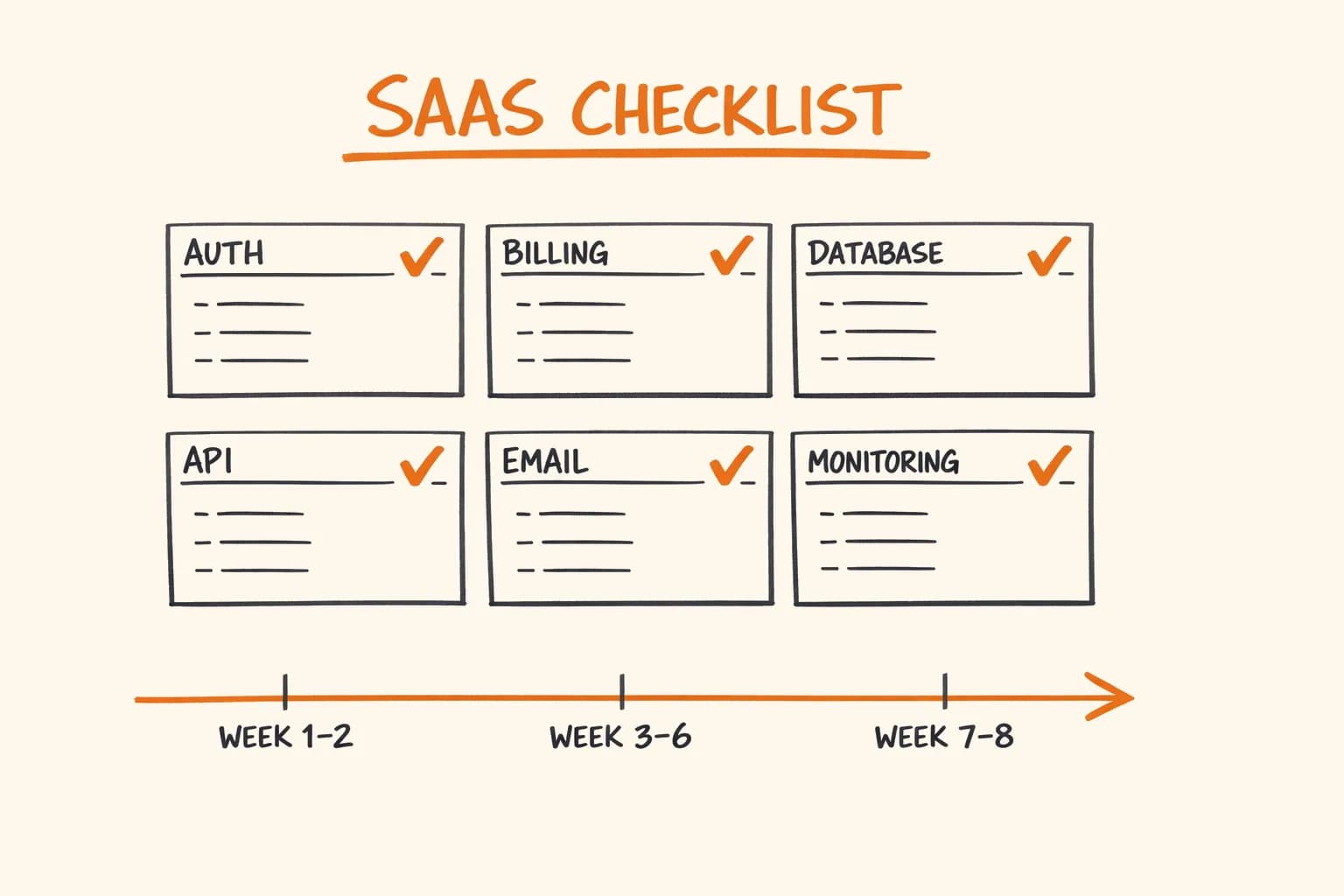
Week 1–2: Foundation
- Auth (Better Auth setup, email verification, OAuth): 3–4 days
- Database schema (users, subscriptions, core tables): 2 days
- Stripe integration (customer creation, subscription, webhook handler with idempotency): 3–4 days
- Base UI (layout, nav, dashboard shell, auth pages): 2 days
Week 3–6: Core Features This is the variable part. For vatnode, the core feature (VAT validation with Redis caching, rate limiting, VIES integration) took 2 weeks. For HTPBE?, the 5-layer PDF forensics engine took 3 weeks to get right across 7 iterations of the algorithm. Your product’s complexity determines this range.
Week 7–8: Production Readiness
- Error monitoring (Sentry integration, alert setup): 1 day
- Performance audit (Core Web Vitals, database query optimization): 2 days
- Security review (CSP headers, dependency audit, secrets audit): 1 day
- Email sequences (welcome, payment confirmation, failed payment recovery): 2 days
- Documentation (internal runbook, API documentation): 1 day
Total to a production-ready MVP: 6–8 weeks.
Not 2 weeks like some frameworks promise. Not 6 months like agencies quote. 6–8 weeks for a solid foundation plus a working core feature set, if you’re a senior developer who’s done it before.
The Complete Checklist (Summary)
Auth
- Email + password with bcrypt (12+ rounds)
- Magic links
- OAuth: Google, GitHub
- Database sessions (not JWT-only)
- Rate limiting on all auth endpoints
- Email verification before first login
- Password reset with expiring single-use tokens
- Account deletion (GDPR)
Billing
- Stripe Customer on signup
- Subscription or one-time payment model
- Webhook idempotency (Redis + PostgreSQL)
- Self-service billing portal
- Free trial with feature gating
- Upgrade/downgrade with proration
- Dunning sequence for failed payments
- All five critical webhook events handled
Database
- PostgreSQL with Drizzle ORM
-
created_at,updated_at,deleted_aton every table - Soft deletes
- Migrations in version control
- Automated daily backups with tested restore
- Connection pooling
API
- Rate limiting per IP and per API key
- Machine-readable error codes
- Cursor-based pagination
- API versioning (
/api/v1/) - OpenAPI documentation
- Zod validation on all inputs
- Standard rate limit headers
- Resend or Mailgun for delivery
- Welcome sequence
- Email verification
- Payment confirmation
- Failed payment recovery (3-email sequence)
- Cancellation confirmation
- React Email HTML templates with plain text fallback
Monitoring
- Sentry error tracking with source maps
- Uptime monitoring with 1-minute alert threshold
- Structured JSON logs with correlation IDs
- Health check endpoint
- Alert channel (Telegram or similar)
Security
- HTTPS enforced at infrastructure level
- Content Security Policy (start report-only)
- Parameterized queries (ORM)
- Secrets in environment variables only
-
npm auditin CI - Rate limiting on all mutating endpoints
- Server-side input validation
SEO and Analytics
- Server-side rendered landing pages
- Dynamic
sitemap.xml -
robots.txt - Open Graph tags on all public pages
- GA4 server-side tracking
- Structured data (JSON-LD)
- Canonical URLs
If you’re building a SaaS for the EU market, you’ll run into every item on this list – plus the EU-specific ones like VAT compliance and GDPR that didn’t make it into the generic sections. I’ve shipped this stack across vatnode, HTPBE?, pi-pi, and pikkuna.fi. The checklist isn’t theory; it’s what I actually verify before I consider a product launch-ready.
If you need a senior developer who can own this end-to-end – architecture through launch and beyond – get in touch. I build production-ready products, not MVPs that need to be rewritten in six months. Available for freelance projects and long-term engagements.