My portfolio site had one static og-image.jpeg for every page. When someone shared a blog post on LinkedIn, the preview showed the same generic image as the homepage. OG images are part of the broader technical SEO foundation I build into every project. The article title, the tags, the author photo – none of it. Just a dark rectangle with my name.
That’s a missed opportunity every time someone shares your content. The OG image is the first thing a person sees before they decide whether to click. For a developer writing technical articles to attract clients, ‘generic image’ is not an option.
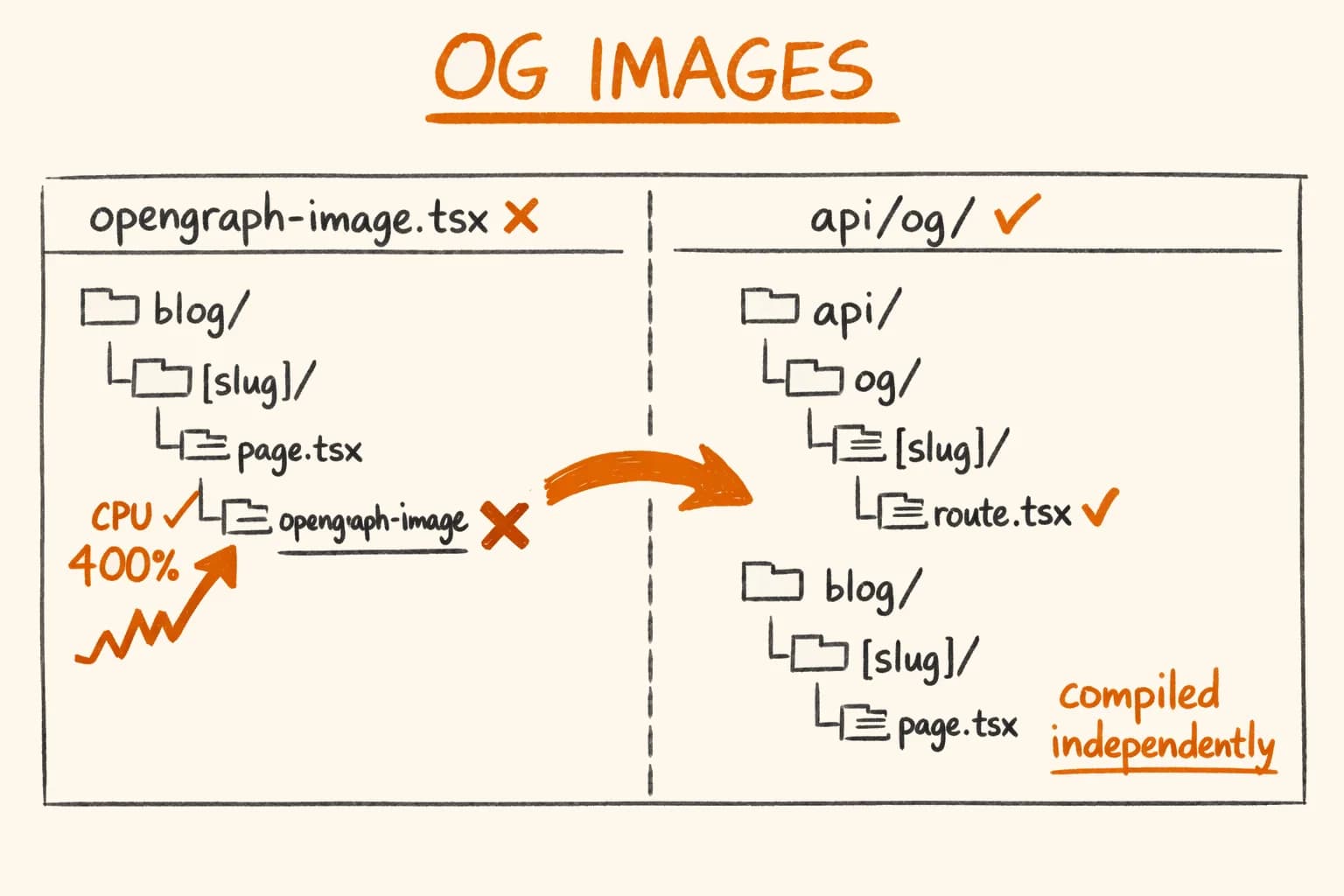
Next.js App Router has a built-in convention for this: opengraph-image.tsx. The documentation makes it sound straightforward – drop a file in any route segment, get automatic og:image meta tags. The convention works fine in production. In development with Turbopack, however, it hangs the dev server at 300–400% CPU on every first page load and never recovers without a restart.
Here is why it happens, what I use instead, and the things Satori does not tell you up front.
How opengraph-image.tsx Works – And Why It Breaks
The file convention is simple. Create opengraph-image.tsx alongside your page.tsx:
app/
  blog/
    [slug]/
      page.tsx
      opengraph-image.tsx   ← ❌ do not put this here with Turbopack
The file exports a default async function returning an ImageResponse from next/og. Next.js registers a route at /blog/[slug]/opengraph-image and adds the meta tag:
<meta property="og:image" content="https://yoursite.com/blog/my-post/opengraph-image" />ImageResponse uses Satori under the hood – a library that renders JSX to PNG. You write JSX with inline styles, Satori paints it into an image.
The problem is Turbopack’s lazy compilation model.
Turbopack (the default bundler in Next.js 15+) does not compile all routes at startup. It compiles each route segment lazily – the first time you navigate to it in development. That means when you open /blog/some-post for the first time, Turbopack compiles everything in app/blog/[slug]/ together, including opengraph-image.tsx.
next/og bundles Satori, which includes a WebAssembly module for PNG rendering. When Turbopack encounters this WASM for the first time, the Node process in your terminal freezes – CPU climbs to 300–400% on macOS Activity Monitor (or htop on Linux), the browser tab spins indefinitely, and the server never recovers. The only fix is to kill the process and restart. And it happens again on the next slug page you visit.
The symptom has a clear pattern:
/bloglisting page – loads instantly, CPU stays at 3–5%/blog/some-post— CPU spikes to 300–400%, browser hangs- After server restart: same spike on the first visit to any other slug page
If you have searched for ‘Next.js Turbopack CPU 100%’ or ‘opengraph-image CPU hang’ and landed here – this is your problem.
The Correct Approach: API Routes
Turbopack compiles API routes and page routes independently. If you move OG image generation to app/api/og/, Turbopack will compile page.tsx on its own when you navigate to /blog/some-post. Satori’s WASM is only compiled when the API route is first hit by an actual HTTP request – which in practice means when a crawler or social preview tool fetches the image, not on every page navigation.
The file structure changes from the broken convention:
app/
  blog/
    [slug]/
      page.tsx
      opengraph-image.tsx   ← compiled with page.tsx, hangs Turbopack
To the correct approach:
app/
  api/
    og/
      blog/
        [slug]/
          route.tsx         ← ✅ compiled independently, Satori runs separately
  blog/
    [slug]/
      page.tsx              ← no opengraph-image.tsx
The generated images are identical – same JSX, same Satori, same PNG output. The only change is the URL path and how Turbopack discovers the code.
The Full Implementation
Here is the complete API route handler for blog post OG images. The design: dark background (#0a0a0f), amber-to-emerald gradient stripe on the left edge, two ambient glow blobs, adaptive title size based on character count, up to four tags as amber chips, and the author section at the bottom.
// app/api/og/blog/[slug]/route.tsx
import { type NextRequest } from "next/server";
import { ImageResponse } from "next/og";
import { readFileSync } from "fs";
import { join } from "path";
import { posts } from "@/.velite";

export const runtime = "nodejs"; // Required for readFileSync

export async function GET(
  _request: NextRequest,
  { params }: { params: Promise<{ slug: string }> }
) {
  const { slug } = await params;
  const post = posts.find((p) => p.slug === slug && !p.draft);

  const title = post?.title ?? "Blog";
  const tags = post?.tags?.slice(0, 4) ?? [];

  // Adaptive font size: shorter titles get larger type
  const titleSize = title.length > 65 ? 42 : title.length > 45 ? 50 : 58;

  // Load author photo from disk — only works with runtime = "nodejs"
  const photoBuffer = readFileSync(join(process.cwd(), "public/images/iurii.png"));
  const photo = `data:image/png;base64,${photoBuffer.toString("base64")}`;

  return new ImageResponse(
    (
      <div
        style={{
          width: "100%",
          height: "100%",
          display: "flex",
          backgroundColor: "#0a0a0f",
          position: "relative",
          overflow: "hidden",
        }}
      >
        {/* Ambient glow top-right — amber */}
        <div
          style={{
            position: "absolute",
            top: -120,
            right: -80,
            width: 500,
            height: 500,
            borderRadius: "50%",
            background: "radial-gradient(circle, rgba(217,119,6,0.12) 0%, transparent 70%)",
          }}
        />
        {/* Ambient glow bottom-left — emerald */}
        <div
          style={{
            position: "absolute",
            bottom: -100,
            left: 60,
            width: 400,
            height: 400,
            borderRadius: "50%",
            background: "radial-gradient(circle, rgba(5,150,105,0.08) 0%, transparent 70%)",
          }}
        />
        {/* Left accent stripe — amber → emerald */}
        <div
          style={{
            position: "absolute",
            left: 0,
            top: 0,
            width: 5,
            height: "100%",
            background: "linear-gradient(to bottom, #d97706, #059669)",
          }}
        />

        {/* Content layout */}
        <div
          style={{
            display: "flex",
            flexDirection: "column",
            justifyContent: "space-between",
            padding: "56px 72px 56px 80px",
            width: "100%",
          }}
        >
          {/* Top: breadcrumb */}
          <div style={{ display: "flex", alignItems: "center", gap: 10 }}>
            <span style={{ fontSize: 17, color: "#6b7280", letterSpacing: "0.03em" }}>
              https://yoursite.com
            </span>
            <span style={{ color: "#374151", fontSize: 17 }}>›</span>
            <span style={{ fontSize: 17, color: "#6b7280" }}>Blog</span>
          </div>

          {/* Middle: title + tags */}
          <div
            style={{
              display: "flex",
              flexDirection: "column",
              gap: 22,
              flex: 1,
              justifyContent: "center",
            }}
          >
            <div
              style={{
                fontSize: titleSize,
                fontWeight: 700,
                color: "#f9fafb",
                lineHeight: 1.2,
                maxWidth: 960,
                letterSpacing: "-0.02em",
              }}
            >
              {title}
            </div>

            {tags.length > 0 && (
              <div style={{ display: "flex", gap: 10 }}>
                {tags.map((tag) => (
                  <div
                    key={tag}
                    style={{
                      fontSize: 15,
                      color: "#d97706",
                      border: "1px solid rgba(217,119,6,0.35)",
                      borderRadius: 20,
                      padding: "4px 14px",
                      backgroundColor: "rgba(217,119,6,0.08)",
                    }}
                  >
                    {tag}
                  </div>
                ))}
              </div>
            )}
          </div>

          {/* Bottom: author */}
          <div style={{ display: "flex", alignItems: "center", gap: 16 }}>
            {/* eslint-disable-next-line @next/next/no-img-element */}
            <img
              src={photo}
              width={52}
              height={52}
              alt=""
              style={{
                borderRadius: "50%",
                border: "2px solid rgba(217,119,6,0.4)",
                objectFit: "cover",
              }}
            />
            <div style={{ display: "flex", flexDirection: "column", gap: 3 }}>
              <span style={{ fontSize: 18, fontWeight: 600, color: "#f9fafb" }}>
                Your Name
              </span>
              <span style={{ fontSize: 15, color: "#6b7280" }}>
                IT Partner for Business · Finland
              </span>
            </div>
          </div>
        </div>
      </div>
    ),
    { width: 1200, height: 630 }
  );
}
A few Satori-specific constraints to be aware of when writing this JSX:
- Every element that contains children must have
display: "flex"set explicitly – block layout does not exist in Satori position: "absolute"works, but you need a parent withposition: "relative"andoverflow: "hidden"to clip it correctlyborderRadius: "50%"works for circles; percentage values on non-square elements may behave differently than in a browser
Gotcha #1: runtime = "nodejs" Is Not Optional
By default, Next.js routes run on the Edge runtime: lightweight, fast, no Node.js APIs. The Edge runtime cannot access the filesystem. If you want to load your author photo from public/images/author.png, you need Node.js.
The readFileSync + base64 pattern is what Satori expects for local images. You cannot use a URL like /images/author.png directly – Satori does not fetch external resources at render time.
If you do not need filesystem access – for example, your image only uses text and inline styles – the Edge runtime works. But the moment you add readFileSync, add export const runtime = "nodejs" above it.
Note that Edge Runtime is also not viable if you load project icons (see Gotcha #3) or any other binary assets from disk.
Gotcha #2: Satori Does Not Support WOFF2
Satori supports TTF and WOFF font formats. WOFF2 – the modern compressed format that every Google Fonts URL defaults to – is not supported.
// This will fail silently or crash the route entirely
const fontResponse = await fetch(
  "https://fonts.gstatic.com/s/inter/v13/UcCO3FwrK3iLTeHuS.woff2"
);
const fontData = await fontResponse.arrayBuffer();

return new ImageResponse(<div>...</div>, {
  fonts: [{ name: "Inter", data: fontData, weight: 400 }],
});
With a WOFF2 URL, the server crashes on the font parsing step. The error message is unhelpful – ‘Empty reply from server’ in some configurations, a silent 500 in others.
The fix is either to use a TTF or WOFF URL, or skip custom fonts entirely. I chose the latter: Satori falls back to Noto Sans, which covers Latin characters cleanly. For OG images, the visual difference is minimal.
If you need a specific typeface, serve TTF from your own domain:
const fontData = await fetch(
  "https://yoursite.com/fonts/Inter-Bold.ttf"
).then((r) => r.arrayBuffer());

return new ImageResponse(<div>...</div>, {
  ...size,
  fonts: [{ name: "Inter", data: fontData, weight: 700, style: "normal" }],
});
Keep the font in public/fonts/ and serve it statically. Avoid Google Fonts CDN – their default URLs return WOFF2.
Gotcha #3: SVG Icons Are Silently Ignored
Satori does not support SVG files in <img> tags. If you load a project icon as a base64 data URI and the file is SVG, Satori will render nothing – no error, no fallback, just an empty space where the icon should be.
The pattern that breaks:
function loadIcon(iconPath: string): string | null {
  try {
    const buffer = readFileSync(join(process.cwd(), "public", iconPath));
    // ❌ Broken for .svg files — Satori ignores SVG image data
    return `data:image/png;base64,${buffer.toString("base64")}`;
  } catch {
    return null;
  }
}
The fix is to rasterize SVG to PNG before passing it to Satori. sharp ships with every Next.js installation:
import sharp from "sharp";

async function loadIcon(iconPath: string): Promise<string | null> {
  try {
    const buffer = readFileSync(join(process.cwd(), "public", iconPath));
    const png = iconPath.endsWith(".svg")
      ? await sharp(buffer)
          .resize(80, 80, { fit: "contain", background: { r: 0, g: 0, b: 0, alpha: 0 } })
          .png()
          .toBuffer()
      : buffer;
    return `data:image/png;base64,${png.toString("base64")}`;
  } catch {
    return null;
  }
}
This handles both PNG and SVG icons transparently. The loadIcon function becomes async, so the call site needs await.
Gotcha #4: Twitter Card Shallow Merge
This one is the least obvious and the most damaging. If you have global metadata in your layout.tsx that includes a static twitter block, and your page.tsx generateMetadata only sets openGraph without an explicit twitter block – Next.js does not automatically connect the two.
The OG image API route will serve the correct dynamic image. The og:image meta tag will point to it. But twitter:image will still reference whatever is in your layout metadata – probably the static og-image.jpeg or nothing. And twitter:title will show your site’s global title, not the article title.
This is what the broken state looks like:
URL="https://yoursite.com/blog/some-post"
curl -s "$URL" | grep -E "twitter:|og:"

# og:image correctly points to the API route
<meta property="og:image" content="https://yoursite.com/api/og/blog/some-post" />
<meta property="og:title" content="Article Title | Site Name" />

# twitter:image is still the static fallback from layout
<meta name="twitter:image" content="/og-image.jpeg" />
<meta name="twitter:title" content="Site Name" />   ← site title, not article title
The fix is to explicitly set the twitter block in every generateMetadata function where you want Twitter cards to reflect the page content:
// app/blog/[slug]/page.tsx
export async function generateMetadata({ params }: Props): Promise<Metadata> {
  const { slug } = await params;
  const post = posts.find((p) => p.slug === slug);
  if (!post) return {};

  return {
    title: post.seoTitle ?? post.title,
    description: post.summary,
    openGraph: {
      title: `${post.title} | ${siteConfig.name}`,
      description: post.summary,
      type: "article",
      publishedTime: post.date,
      authors: [siteConfig.name],
      tags: post.tags,
    },
    // Without this block, Twitter picks up data from layout.tsx instead
    twitter: {
      card: "summary_large_image",
      title: `${post.title} | ${siteConfig.name}`,
      description: post.summary,
      images: [`${siteConfig.url}/api/og/blog/${slug}`],
    },
  };
}
The images URL in the twitter block needs to be absolute. Next.js does not construct this for you automatically – you have to point it at the route yourself using your site’s base URL from config.
After this change, verify with curl:
URL="https://yoursite.com/blog/some-post"
curl -s "$URL" | grep twitter

<meta name="twitter:card" content="summary_large_image" />
<meta name="twitter:title" content="Article Title | Site Name" />
<meta name="twitter:description" content="Article summary..." />
<meta name="twitter:image" content="https://yoursite.com/api/og/blog/some-post" />
You can also paste the URL into Twitter’s Card Validator or LinkedIn’s Post Inspector to confirm the preview renders correctly.
Reusing the Same Design Across Route Types
The projects route at app/api/og/projects/[slug]/route.tsx is nearly identical to the blog version. The only differences are the breadcrumb label (‘Projects’ instead of ‘Blog’) and the data source (projects collection instead of posts). Projects also add an optional icon in the top-right corner – handled by the loadIcon function from Gotcha #3.
Rather than duplicating the JSX, you could extract a shared image generator:
// lib/og/generate-card.tsx
import { ImageResponse } from "next/og";
import type { ReactElement } from "react";

interface CardOptions {
  title: string;
  tags: string[];
  breadcrumb: string;
  photo: string; // base64 data URI
  icon?: string | null; // base64 data URI, optional
}

export function buildCardJsx({ title, tags, breadcrumb, photo, icon }: CardOptions): ReactElement {
  const titleSize = title.length > 65 ? 42 : title.length > 45 ? 50 : 58;

  return (
    <div style={{ /* ... same structure as above ... */ }}>
      {/* breadcrumb, title, tags, icon, author */}
    </div>
  );
}

export function generateCard(options: CardOptions) {
  return new ImageResponse(buildCardJsx(options), { width: 1200, height: 630 });
}
I did not bother with this abstraction because the two files are short and independently readable. But if you add a third route type – say, /tags/[tag] – that is when extracting makes sense.
What This Looks Like in Practice
With the API route in place, each blog post and project page generates a unique 1200×630 PNG on demand:
- Response: HTTP 200, approximately 80–90 KB PNG
- No build-time pre-rendering – images generate on first request and are cached by the CDN
- Each blog post and project page has its own preview image
- Consistent design across all pages: same colours, same typography, same author section
The images are served from the same domain as the rest of the site, which matters for some social platforms that restrict cross-origin OG images.
The opengraph-image.tsx file convention is convenient when it works. But with Turbopack – which is the default since Next.js 15 – it silently kills your dev server on every first page load. The broader production Next.js setup, including metadata and deployment, is covered in my SaaS checklist. Moving generation to app/api/og/ costs you one extra generateMetadata URL, gives you full Node.js APIs, and separates the Satori compilation from your page compilation entirely.
I build production Next.js applications for EU startups and product teams. Projects like vatnode.dev and pikkuna.fi all went through this same setup – correct OG images, proper Twitter cards, full metadata. If you need a senior developer who handles the full stack – from OG metadata to checkout flows – get in touch.
Related reading:
- Technical SEO I Build Into Every Project – the broader SEO foundation this fits into
- How to Build a SaaS with Next.js: Production Checklist – full Next.js App Router setup including metadata, OG, and deployment
- Next.js
opengraph-imagefile convention – official reference - Satori supported CSS properties – what works and what does not inside
ImageResponse - Twitter Card Validator – verify your cards before publishing