You have a statically generated blog on Vercel. You want to show readers how many people have viewed an article. You don’t want to drop Google Analytics on every page for that one number.
This is a deliberately small problem – and the solution should stay small. Here’s what I added to this site: an Upstash Redis counter, a single API route, one client component. Free tier covers the load, no external scripts, no cookie banners, no GDPR archaeology. And a few gotchas that aren’t in the Upstash quickstart.
Why Upstash, Not ioredis
My first instinct was to reach for ioredis – the same client I use for rate limiting in vatnode.dev. For a long-running Node.js server that maintains persistent connections, ioredis is the right choice. If you want a deeper look at sliding window rate limiting with ioredis, I covered it in Redis Rate Limiting for APIs. For Vercel serverless functions, it is not.
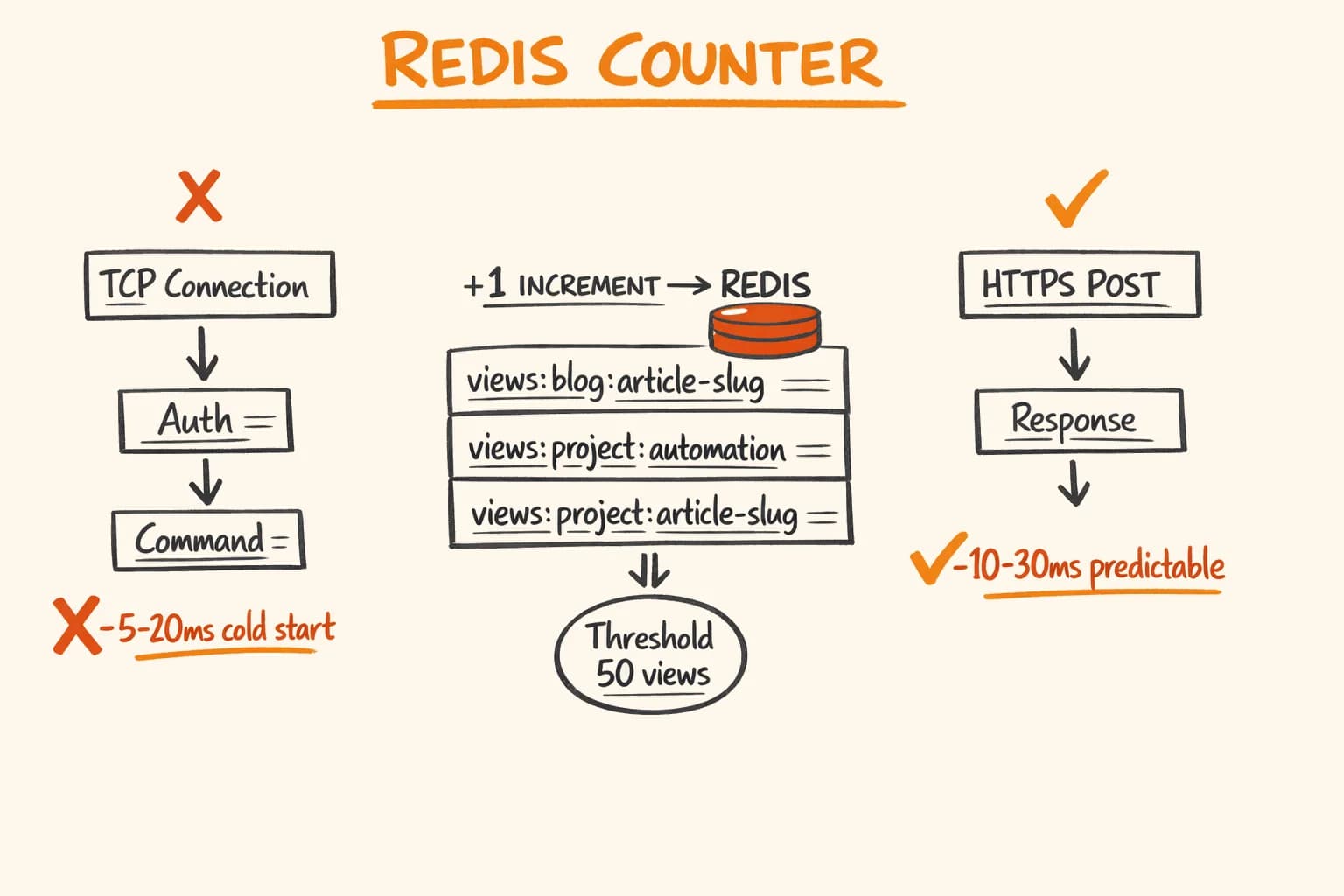
Vercel functions are stateless and short-lived. Each invocation initializes a new Node.js environment. A traditional Redis client opens a TCP connection, negotiates, authenticates, and then executes your command. For a function that increments a counter, the connection overhead easily dominates total execution time – and worse, connection pooling doesn’t work the way you’d expect across isolated function instances.
Upstash solves this with an HTTP REST API. Every command is a plain HTTPS request. No TCP handshake, no persistent connection state, no connection pool to manage. The @upstash/redis client wraps these HTTP calls with a typed interface that mirrors the standard Redis API.
ioredis:  TCP connect → auth → command → response  (~5–20ms cold)
Upstash:  HTTPS POST → response                    (~10–30ms globally)
The latency is not always lower, but it’s predictable and it works correctly in serverless environments. That’s the actual reason to choose it here.
Upstash free tier: 10,000 requests per day, 256MB storage. For a personal blog or small project, you will not hit those limits.
How-to
How to add a view counter to a Next.js blog with Upstash Redis
Create an Upstash Redis database
Sign up at upstash.com, create a Redis database, and copy the REST API URL and token to your Vercel environment variables as KV_REST_API_URL and KV_REST_API_TOKEN. The free tier covers 10,000 requests per day.
Build the API route with Edge Runtime
Create app/api/views/[slug]/route.ts with export const runtime = ‘edge’. Use kv.incr() for atomic POST increments and kv.get() for GET reads. Namespace keys as views:{type}:{slug} to avoid collisions between blog posts and project pages with the same slug.
Build the ViewCounter client component
Create a component that fires a fetch on mount – POST to increment on the post page, GET to read-only on the listing page. Render nothing until the count exceeds 50 to filter out bots and early single-digit counts.
Fix the React Strict Mode double-invoke
Wrap the fetch in an AbortController and return the abort function as the useEffect cleanup. This prevents the double increment that occurs in development when React mounts each component twice.
The API Route
The route lives at app/api/views/[slug]/route.ts. It handles both GET (read current count) and POST (increment and return new count). The type query parameter separates blog posts from project pages – more on why that matters in a moment.
// app/api/views/[slug]/route.ts
export const runtime = "edge";

import { Redis } from "@upstash/redis";
import { type NextRequest } from "next/server";

const kv = new Redis({
  url: process.env.KV_REST_API_URL!,
  token: process.env.KV_REST_API_TOKEN!,
});

type RouteContext = { params: Promise<{ slug: string }> };

function getKey(slug: string, type: string): string {
  return `views:${type}:${slug}`;
}

export async function GET(req: NextRequest, { params }: RouteContext) {
  const { slug } = await params;
  const type = new URL(req.url).searchParams.get("type") ?? "blog";
  const views = (await kv.get<number>(getKey(slug, type))) ?? 0;
  return Response.json({ views });
}

export async function POST(req: NextRequest, { params }: RouteContext) {
  const { slug } = await params;
  const type = new URL(req.url).searchParams.get("type") ?? "blog";
  const views = await kv.incr(getKey(slug, type));
  return Response.json({ views });
}
kv.incr() is atomic. It increments and returns the new value in a single command – no race conditions between read and write, no chance of two concurrent requests both reading 0 and both writing 1.
The params destructuring uses await because Next.js 16 makes route params a Promise. If you’re on Next.js 14 or 15, skip the await.
Environment Variables
In the Upstash console, create a Redis database and copy the REST API URL and token. Add them to your Vercel project settings and .env.local:
KV_REST_API_URL=https://your-db.upstash.io
KV_REST_API_TOKEN=your-token-here
The ViewCounter Component
The component is a Client Component that fires a request on mount. It renders nothing until the count is above 50 – the threshold hides the counter on new posts where showing ‘3 views’ would look odd.
// components/shared/ViewCounter.tsx
"use client";

import { useEffect, useState } from "react";

interface ViewCounterProps {
  slug: string;
  type?: "blog" | "project";
  readonly?: boolean;
}

export function ViewCounter({ slug, type = "blog", readonly = false }: ViewCounterProps) {
  const [views, setViews] = useState<number | null>(null);

  useEffect(() => {
    const controller = new AbortController();

    fetch(`/api/views/${slug}?type=${type}`, {
      method: readonly ? "GET" : "POST",
      signal: controller.signal,
    })
      .then((r) => r.json())
      .then((data: { views: number }) => setViews(data.views))
      .catch(() => {});

    return () => controller.abort();
  }, [slug, type, readonly]);

  if (views === null || views < 50) return null;

  return (
    <span className="text-sm text-[var(--color-text-muted)]">{views.toLocaleString()} views</span>
  );
}
On the individual post page (/blog/[slug]), render without readonly – this increments:
<ViewCounter slug={slug} type="blog" />On the blog listing page, render with readonly – this reads without incrementing:
<ViewCounter slug={post.slug} type="blog" readonly />Gotcha #1: React Strict Mode Double-Invoke
React Strict Mode mounts every component twice in development. Without cleanup, the useEffect fires twice, which means two POST requests – your counter increments by 2 on every page load in development.
The AbortController fixes this. When React unmounts the component during the first (cleanup) pass, it calls the cleanup function, which aborts the in-flight fetch. The second mount fires a fresh request. In development you get 1 increment; in production (no Strict Mode) you also get 1.
Without the AbortController:
- // No cleanup — fires twice in dev
- useEffect(() => {
-   fetch(`/api/views/${slug}?type=${type}`, { method: "POST" })
-     .then(r => r.json())
-     .then(data => setViews(data.views));
- }, [slug, type]);
With the AbortController, the cleanup aborts the first request before it completes, so only the second fires. The .catch(() => {}) silently discards the abort error – that is intentional, not lazy error handling.
Gotcha #2: Slug Namespace Collisions
Blog posts and projects share some slug patterns. If you have a blog post at /blog/automation and a project at /projects/automation, they would share the same Redis key without namespacing.
The type query parameter and the getKey function exist precisely for this:
function getKey(slug: string, type: string): string {
  return `views:${type}:${slug}`;
}

// blog post /blog/automation → views:blog:automation
// project /projects/automation → views:project:automation
This is not hypothetical – you will have slug collisions eventually, especially if your slugs are short or topically similar. Prefix from day one.
Gotcha #3: Serverless Functions Are Not TCP-Friendly
If you try the standard ioredis approach on Vercel:
// This will work, but poorly on Vercel serverless
import Redis from "ioredis";
const redis = new Redis(process.env.REDIS_URL!);
You’ll see connection timeout errors in logs, inconsistent cold start times, and occasional ‘max retries exceeded’ errors when the TCP connection doesn’t reuse across function instances. Upstash’s HTTP client sidesteps all of this.
The tradeoff: HTTP has higher per-request overhead than a warm TCP connection. For a high-throughput rate limiter like the one in vatnode – where a Hono server maintains persistent connections – ioredis is still the better choice. For occasional view counter increments from serverless functions, the HTTP approach wins.
Edge Runtime: Eliminating Cold Starts
Switching from Upstash’s TCP client to HTTP solves the connection problem. There’s still one more issue: Node.js Lambda cold starts.
On Vercel’s default Node.js runtime, serverless function containers freeze between requests. On a low-traffic site, the container is often cold when a visitor hits the page. In practice, I saw a 68.4% cold start rate on this route – meaning more than two-thirds of requests were waking up a frozen container, adding 150–300ms before the function executed a single line.
The fix is one line:
export const runtime = "edge";Edge Runtime runs on V8 isolates – the same model Cloudflare Workers uses. Isolates start in microseconds and stay warm continuously. There’s no container to freeze, no bootstrap overhead between requests. Cold starts effectively drop to zero.
The tradeoff is real: Edge Runtime has no fs, no native Node.js modules, no child_process. For most backend code that matters. For this route it doesn’t – @upstash/redis communicates over HTTP REST, which is exactly what Edge Runtime handles natively. No code changes needed beyond the one export.
The complete route header now looks like this:
export const runtime = "edge";

import { Redis } from "@upstash/redis";
import { type NextRequest } from "next/server";
That single line moves request latency from ‘usually fast, occasionally slow’ to ‘consistently fast.’
The 50-View Threshold
The views < 50 check is a small UX decision: new posts with single-digit view counts feel unpolished. The threshold is arbitrary – adjust to taste. Some builders use 100, some skip the threshold entirely.
The other reason for this threshold: bots. Googlebot, Bingbot, and various crawlers will trigger POST requests as they index your pages. Your early view counts will include a meaningful percentage of non-human traffic. At 50+ views the signal-to-noise ratio is high enough to be worth showing.
What This Does Not Give You
This is where honest accounting matters. A Redis counter measures HTTP requests that reach your API route. It does not:
- Deduplicate visits. Refreshing the page increments the counter. A bot that crawls your post repeatedly increments it.
- Filter bots. There’s no User-Agent check, no IP reputation filter, no Cloudflare challenge.
- Track geography, devices, or referrers. You get a number, not an audience profile.
- Survive someone opening the page 1,000 times. That person inflates your numbers.
For real analytics, you want Plausible, Fathom, or self-hosted Umami. These handle deduplication, bot filtering, and give you the full picture. The view counter I’ve described here is a vanity metric that gives readers social proof – not an analytics tool.
Knowing this, the 50-view threshold becomes even more sensible: below that, the noise-to-signal ratio is too high to mean anything.
Results
| Metric | Value |
|---|---|
| API route cold start (Upstash HTTP) | ~0ms (Edge Runtime isolates) |
| Redis commands per page view | 1 (INCR, atomic) |
| Free tier headroom | 10,000 req/day |
| Additional JS on the page | ~400 bytes (client component) |
| Dependencies added | 1 (@upstash/redis) |
The counter appears on this site after a post passes 50 views. Below that threshold, the component renders nothing, so there’s zero layout shift and no visible element on fresh posts.
If you are building a Next.js site on Vercel and need Redis for anything more than a view counter – rate limiting, caching, queues – the Upstash HTTP approach scales to all of those use cases cleanly. For a production SaaS that uses Redis for both rate limiting and caching, the architecture decisions go further than what a view counter requires. The same @upstash/redis client works for atomic operations, sorted sets, pub/sub.
I’ve used it in production alongside ioredis – each where it fits. If you need a senior developer who can pick the right tool for the architecture rather than the one in the tutorial – get in touch. I’m available for freelance projects and long-term engagements.
Related reading:
- Redis Rate Limiting for APIs: Sliding Window Without the Pain – when ioredis is the right choice and why
- How to Build a SaaS with Next.js: Production Checklist – the broader Next.js setup this fits into
- Upstash Redis documentation – REST API and client setup
@upstash/redison npm – the HTTP client used here- Vatnode VAT validation SaaS – production system where Redis rate limiting runs alongside view tracking