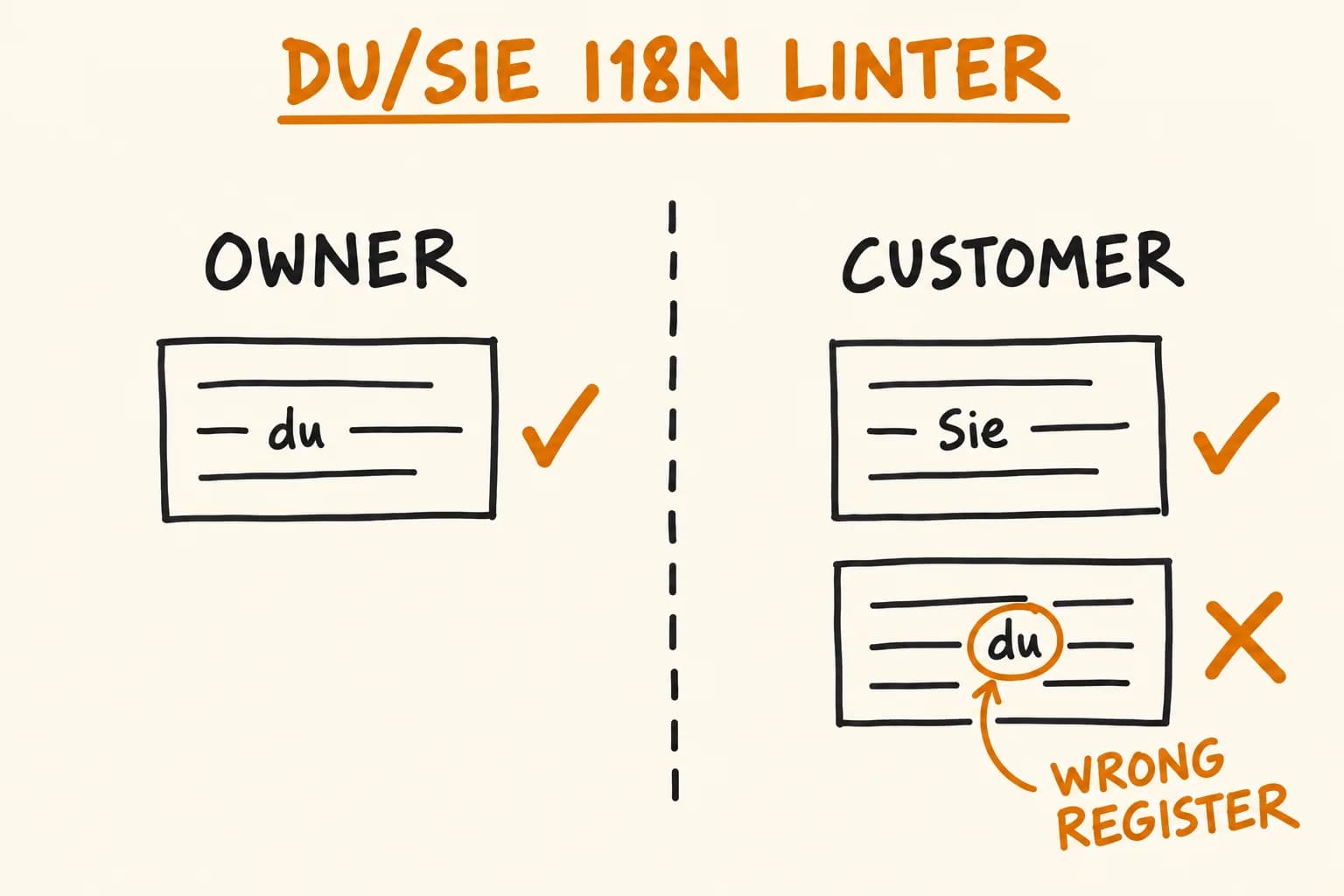
German has two ways to say ‘you.’ A sentence addressed with du is informal – the tone you’d use with a colleague or a friend. The same sentence addressed with Sie is formal – the tone you’d use with a stranger, a customer, an institution. Linguists call this a T–V distinction, and German, French, Hungarian, Polish and Romanian all have one. English doesn’t, which is why an English-speaking team can ship the wrong one without noticing.
The mistake this article is about isn’t picking the wrong register for a language. It’s picking the wrong register for an audience, inside one language, inside one product. KRI, the booking SaaS I designed and built for beauty businesses, has this shape: the German dashboard, written for the paying salon owner, addresses them as du throughout. The German booking pages and confirmation emails, written for that salon’s own clients – strangers booking an appointment online – address them as Sie. Both are correct German; mixing them inside the same screen is the bug. An i18n linter that only checks ‘is this valid German’ can’t catch that, because every sentence on both sides is valid German. It has to know who is being addressed, not just what language.
What the i18n Linter Actually Checks
KRI’s translations are plain JSON, one file per namespace per locale, loaded through next-intl. A locale linter – a single Python 3.9+ script with no dependencies beyond the standard library – runs three checks against that JSON: key order, cross-locale drift, and a glossary check for terminology and address register. It runs with the package’s regular lint command, and the format step applies the key-ordering fix automatically. Exit code 0 when clean, 1 when anything needs a human decision.
It reads which locale is the reference (en) and which namespace is English-only (legal, which is never translated, not even in part) by parsing them out of the codegen script’s own source rather than hardcoding them twice – so the two scripts can’t quietly drift apart.
Key order keeps every locale’s JSON keys in the same order as en, recursively, so a diff between two locale files is readable instead of scrambled by insertion order. Keys that a locale has but en lacks are sorted last and reported separately by the drift check. An --order alpha mode exists but isn’t the default – alphabetising would scramble the grouping the files were authored in (nav, dashboard, bookings, booking details, new booking…) for no real benefit. --write is the only path that touches disk, and it only rewrites key order – it never adds, removes or edits a translated string.
Drift reports missing and extra keys against en, plus missing namespace files and stray copies of the English-only namespace. It never deletes a key: dynamic calls such as t(`businessTypes.${type}.hint`) make literal usage searches unreliable. This is key parity, not the source-text staleness check described in Next.js i18n with 30 Languages.
A separate codegen step excludes locales with missing namespace files from the supported-locale list. It does not establish key completeness inside those files; that is the drift check’s job.
The glossary check – terminology and address register – needed a model of who’s being spoken to. That’s the rest of this article.
Register Is a Property of the Audience, Not the Language
The instinct is to think of ‘formal German’ or ‘informal German’ as a property of the language file. It isn’t, in a product that talks to two different people – and German (like Hungarian, French, Polish and Romanian) marks that difference grammatically whether the product wants to or not.
So the linter maps namespaces onto audiences before it decides which register to expect:
AUDIENCE = {
    "dashboard": "owner",
    "landing": "owner",
    "booking": "customer",
    "public": "customer",
    "emails": {
        "signIn": "owner",
        "emailChange": "owner",
        "*": "customer",
    },
    "services": None,
    "legal": None,
}

def audience_of(namespace, key_path):
    rule = AUDIENCE.get(namespace)
    if isinstance(rule, dict):
        return rule.get(key_path.split(".")[0], rule.get("*"))
    return rule
This is a trimmed view – the real map has a few more entries – but the shape holds: most namespaces speak to one fixed audience each. emails talks to both people in the same file, so it’s split by its top-level key: sign-in and email-change go to the owner (account-security mail; nobody but the account holder reads it); every other group in this view falls through "*" to the customer. services and legal return None – no addressed prose, no register to check.
The Register Check: Scan for the Wrong Marker
Each language’s expectations live in its own glossary file: an addressForm (which register the owner gets, which register the customer gets), regex addressMarkers for each register, a list of terms, and a list of keyExceptions the check skips entirely (empty in every locale but German, which has exactly one – covered further down). For every string, the check resolves the audience, looks up what it’s supposed to get, and searches – not for the right marker, but for the wrong one:
aud = audience_of(ns, path)
expected = address.get(aud) if isinstance(address, dict) else None
if aud and expected in ("formal", "informal"):
    wrong = "informal" if expected == "formal" else "formal"
    for pattern in markers.get(wrong, []):
        if re.search(pattern, value):
            print(f"  REGIS  {code}/{full}")
            print(f"         {wrong} marker /{pattern}/ in {aud}-facing copy, which is {expected} here")
            print(f"         {value}")
            findings += 1
            break
Scanning for the wrong marker rather than requiring the right one matters: a sentence can be perfectly correct German without ‘Sie’ or ‘du’ in it at all – an imperative, a noun phrase, a UI label. The check only has something to say when it finds evidence of the other register bleeding in – a narrower claim than ‘this text is definitely formal.’
The German glossary’s markers look like this, adapted from the real file:
{
  "addressForm": { "owner": "informal", "customer": "formal" },
  "addressMarkers": {
    "formal": ["\\bSie\\b", "\\bIhnen\\b", "\\bIhre[nrms]?\\b"],
    "informal": ["\\b[Dd]u\\b", "\\b[Dd]ein[enrms]?\\b", "\\b[Dd]ir\\b"]
  },
  "terms": [
    {
      "concept": "clear a selection",
      "use": "abwählen",
      "note": "not 'entfernen' — that reads as deleting the record",
      "source": "verified in a native review pass"
    }
  ],
  "keyExceptions": ["dashboard.onboarding.accountSectionDesc"],
  "notes": ["Dashboard is du-throughout; booking, public and confirmation email are Sie-throughout"]
}
The markers are case-sensitive as written – \bSie\b won’t match ‘sie’ (the ordinary lowercase pronoun) – because German capitalises formal ‘Sie’ and not the word it would otherwise collide with. Real KRI copy shows the split. Owner-facing, sign-in email: ‘Melde dich über die Schaltfläche unten an.’ / ‘Falls du diese Anmeldung nicht angefordert hast, kannst du diese E-Mail ignorieren.’ Customer-facing, from the Sie-throughout booking flow and confirmation email: ‘Bei wem möchten Sie buchen?’ / Ihre Buchung bei {salonName} ist bestätigt.
Terminology: Documented Choices and Enforced Rules
terms in a glossary file can carry two different things. A term with only a use and a note – like abwählen above – is a documented convention with nothing to auto-enforce: no avoid pattern means the check skips it. It’s there so a translator or reviewer knows the house choice; it doesn’t fail a lint run.
A term with an avoid pattern is different – the check actually scans for it, case-insensitively:
for term in terms:
    avoid = term.get("avoid") or []
    if not avoid:
        continue  # documented-only rule, not auto-enforced
    haystack = strip_exceptions(value, term.get("exceptions", []))
    for pattern in avoid:
        if re.search(pattern, haystack, flags=re.IGNORECASE):
            print(f"  TERM   {code}/{full}")
            print(f"         matched /{pattern}/ — use \"{term.get('use')}\" for '{term.get('concept')}'")
            print(f"         {value}")
            findings += 1
            break
In the reviewed glossary set, the Hungarian terminology rule has an avoid pattern. KRI calls the salon’s client a ‘guest’ – vendég – never the generic ‘customer,’ ügyfél. The pattern ügyf[eé]l covers the é→e shift in inflected forms – ügyfelek (clients), ügyfelet (client, accusative) – not just the bare dictionary form. But ‘ügyfélszolgálat’ – customer support – is a fixed compound that happens to contain that substring, unrelated to the term rule; a naive regex would flag it regardless. exceptions blanks the excepted substring out before avoid runs:
def strip_exceptions(text, exceptions):
    for exc in exceptions:
        text = re.sub(exc, " ", text, flags=re.IGNORECASE)
    return text
A Missing Glossary Is a Gap, Not a Failure
A missing glossary produces a warning without changing the exit code. It means terminology and register have not been checked, rather than that the translations are wrong. All 32 locales had glossary files at review time; removing one in a scratch copy produces this message:
  GLOSS  no glossary for: vi
         -> terminology and register for these are UNVERIFIED.
            ... An absent file is an honest gap;
            a guessed one is worse than none.
A plausible-looking glossary is not evidence of a native review. Missing coverage should remain visible rather than being filled with guessed rules just to make the check look complete.
Real Output, From an Injected Set of Defects
This is real linter output, run against a scratch copy of the locale files with a handful of defects deliberately injected to show all three checks firing in one pass. When I ran it against KRI’s real locales for this post, it exited 0 with nothing to report. The findings are shown as printed; the opening locale-info line, the drift and glossary tallies, and the final summary are trimmed:
== key order (following en) ==
  ORDER  fi/booking.json — key order differs from en
  1 file(s) need reordering — re-run with --write

== cross-locale drift ==
  DRIFT  de/dashboard: EXTRA    onboarding.accountSectionDesc2
         -> here, not in en. Stale leftover, or add it to en?
            NOT proof the key is unused — dynamic t(`x.${v}`) lookups hide real usage.
  DRIFT  fi/booking: EXTRA    legacyTitle
         -> here, not in en. Stale leftover, or add it to en?
            NOT proof the key is unused — dynamic t(`x.${v}`) lookups hide real usage.

== glossary: terminology and address register ==
  REGIS  de/booking.errors.generic
         informal marker /\b[Dd]u\b/ in customer-facing copy, which is formal here
         Etwas ist schiefgelaufen. Bitte versuch es erneut, du schaffst das.
  REGIS  de/dashboard.onboarding.accountSectionDesc2
         formal marker /\bSie\b/ in owner-facing copy, which is informal here
         Bitte prüfen Sie Ihre Angaben.
  TERM   hu/booking.steps.service
         matched /ügyf[eé]l/ — use "vendég" for 'client'
         Az ügyfél adatai
Coverage at the Time of Review
Having a glossary file and having an enforced register rule aren’t the same thing; conflating them would overstate what’s checked.
| Coverage | What it means | Locales |
|---|---|---|
| Register enforced | A form is declared for that audience and the opposite register has markers to scan for | de, hu, fr (both audiences); it, pl, ro (both audiences); es (owner only) – 7 of 32 |
| Form recorded, not checked | addressForm names a register, but no markers were entered for the opposite one, so nothing is scanned | fi (owner informal), ru (owner formal), and most of the rest – 20 of 32 |
| No form declared | Neither audience has a form declared – for different reasons per locale | en, is, pt, sq, vi – 5 of 32 |
A missing declaration can have different causes: English has no equivalent pronoun distinction, while some locales have no verified policy recorded. Likewise, recording an address form without opposite-register markers does not enforce it. The table describes executable coverage, not translation quality or the completeness of human review.
Where the Heuristic Breaks
Regex markers are a heuristic on top of real grammar, and grammar has exceptions the regex can’t see. The clearest one in KRI’s own German glossary: an owner-facing dashboard string reads roughly ‘Your private contact details for this account. Sie werden nicht auf der Salon-Website angezeigt.’ – ‘Sie’ there means ‘they,’ referring back to the contact details, not formal ‘you.’ \bSie\b can’t tell a third-person plural pronoun from formal address; both look identical to a regex. That string is in the German glossary’s keyExceptions, which the check skips outright. Remove the exception and the linter flags the line as a false formal marker in du-throughout copy – which is what happens when you test it.
The same limitation runs the other way, and no exception list catches it: German has informal imperatives that don’t use ‘du’ – ‘Bitte versuch es erneut’ (‘please try again’) is informal but has no pronoun for \b[Dd]u\b to match. Written in the wrong register, that sentence would pass silently. No regex-based check substitutes for a native reader’s judgement, and this one doesn’t try to.
When You Don’t Need This
A product with one audience can still benefit from register checks; it simply does not need an audience map. Key parity is useful as soon as a second locale exists, and terminology checks can help even in languages without a T–V distinction. Add audience-specific rules when the product addresses different people differently, and only for language patterns someone has verified. A small check with known blind spots is more useful than a broad coverage claim the script cannot support.
A product that switches tone mid-screen without meaning to has a bug, even when every sentence in it is grammatically correct. Get in touch if that’s a gap worth closing in your own product build.
Further reading:
- kri.rocks – Booking Website and Online Scheduling SaaS for Beauty Businesses – the project this linter ships in and its 32-language rollout
- Next.js i18n with 30 Languages: Production Setup Guide – the next-intl setup this linter assumes: routing, TypeScript typing, hreflang, and staleness-flagging when English source text changes
- A Green Test Can Still Miss the Race: Testing Concurrency in PostgreSQL – another KRI-drawn piece on making a check prove what it claims, this time for billing concurrency instead of translation parity