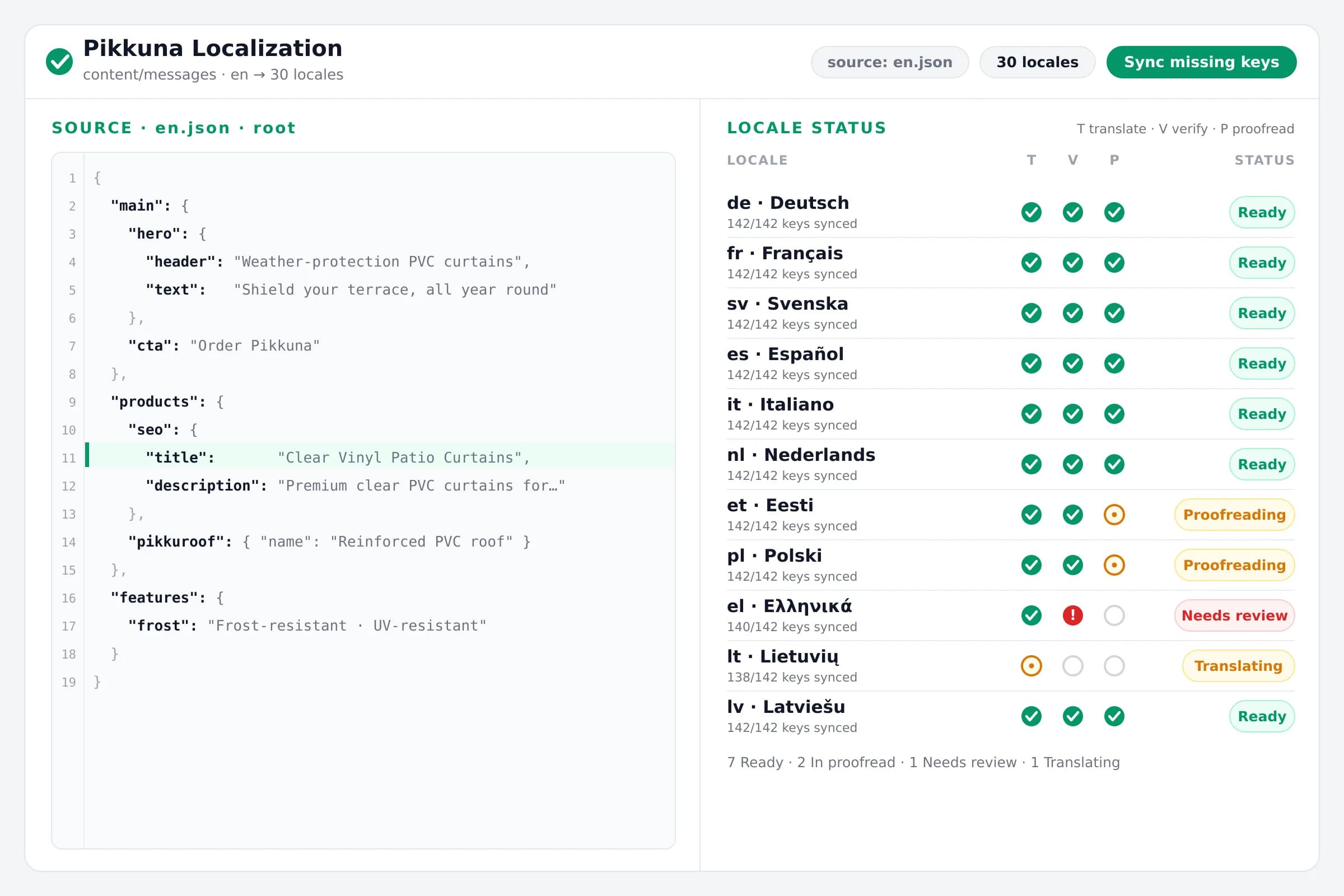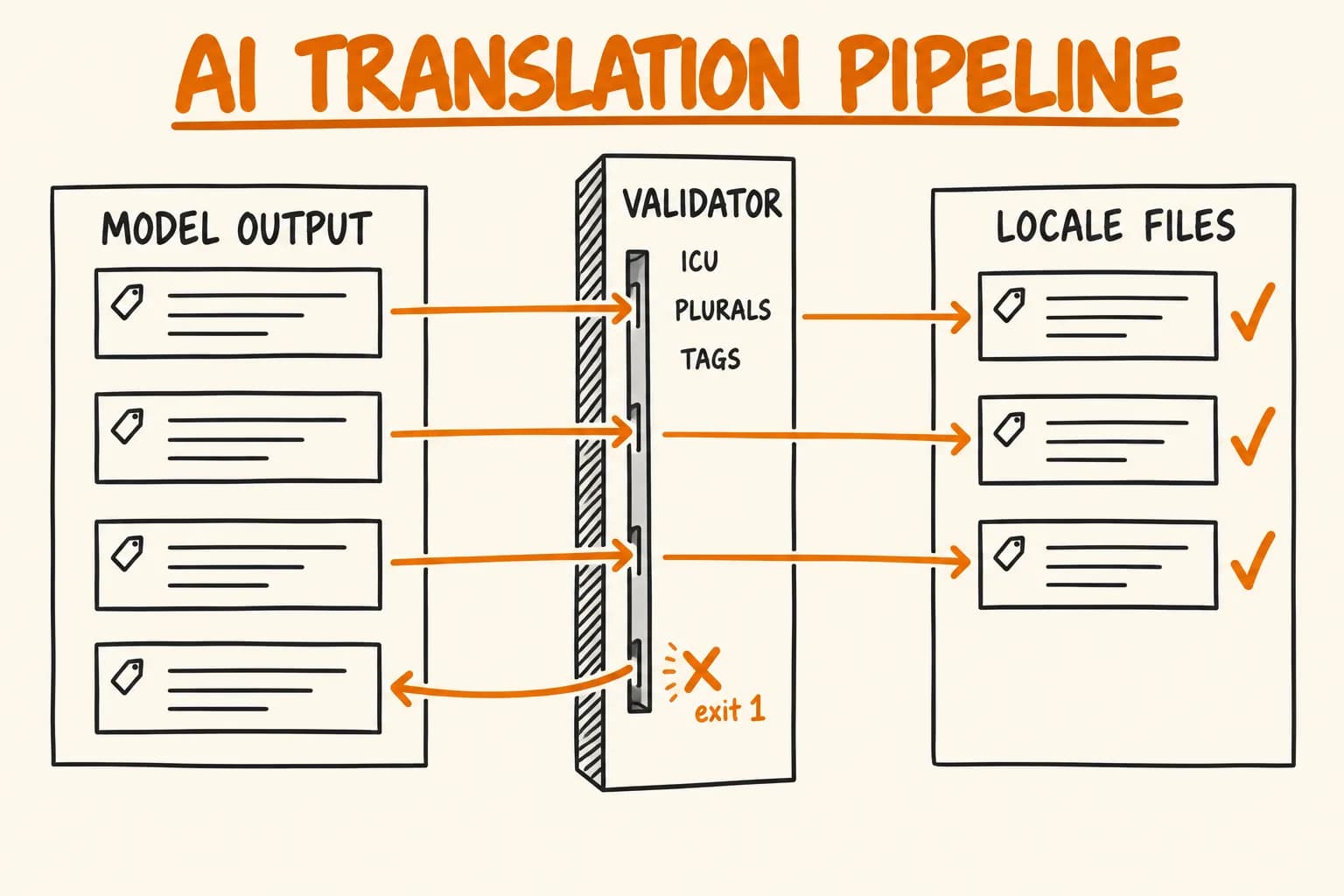
An AI translation pipeline needs checks that can say ‘no’ more than it needs a better prompt. In the script that fills the 27 target languages of pi-pi.ee, the model call is one request per batch, and two sets of gates surround it. At write time: a diff of missing keys, a check on whether the reply was cut off, an ICU and plural validator that must pass before a string is written, and exit code 1 with a list of what was left out. At commit time: i18n:check and glossary:check, which run as part of npm run lint.
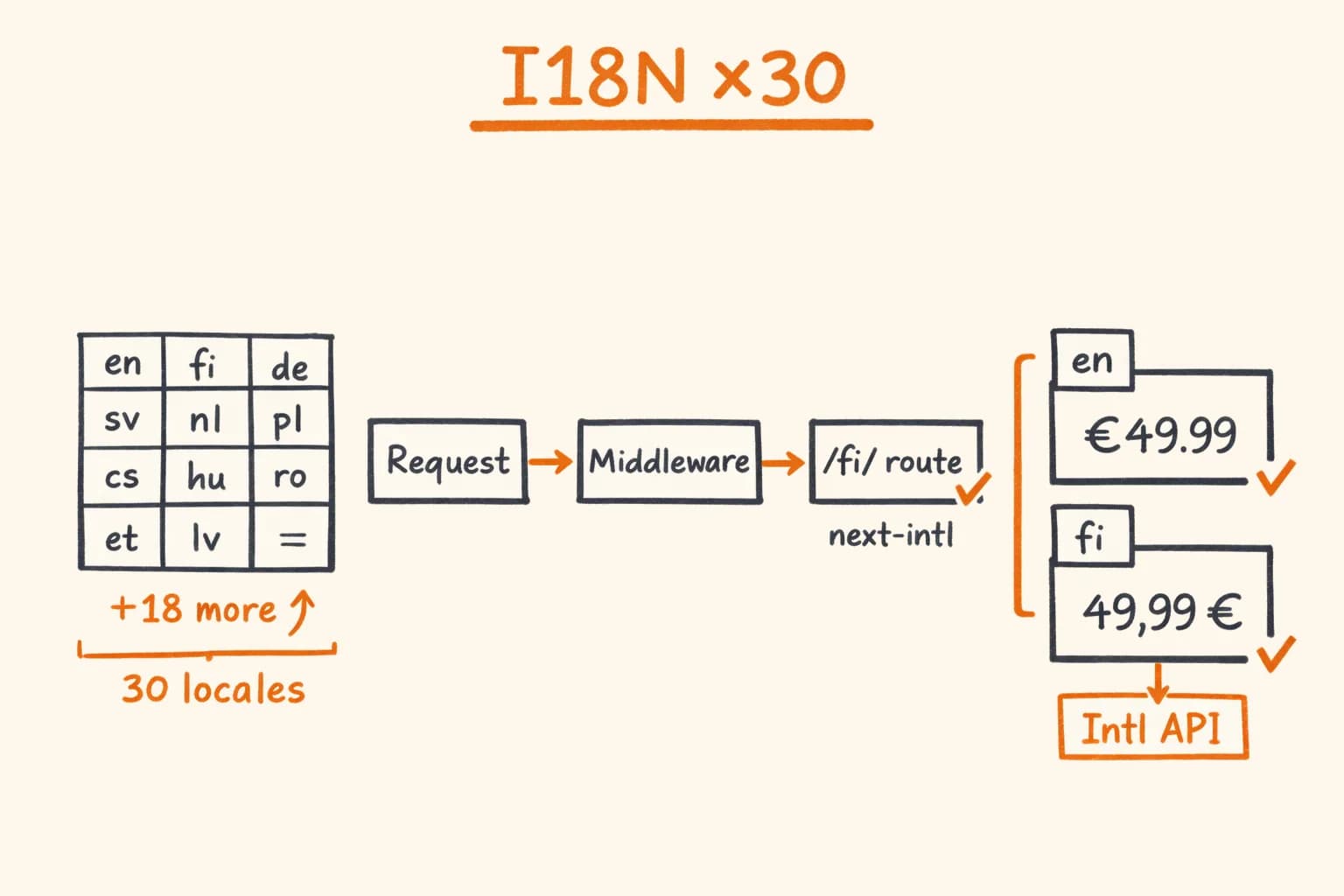
Below is that code as it stands, the real defects behind some of the gates, and a section on what the gates still do not catch. Routing, hreflang and formatting are in Next.js i18n with 30 Languages; I will not repeat them.
One good prompt is not a pipeline
The shop has a Russian source file and 27 generated locales. The first version of any such script sends strings to a model and saves the reply. It works on the first run and fails later, quietly:
- A valid-looking string with a broken shape. A placeholder renamed, a tag dropped, an ICU plural missing a branch the target language needs.
- Batches that disagree. Each batch decides again what to call the product, and one locale ends up with several words for it.
- A cut-off reply. A long answer hits the output limit and the JSON is truncated.
- Overwritten work. A script that retranslates everything also replaces the text a person fixed last week.
A prompt is a request, and these are hard to ask a model to detect in its own output. Code that runs after the call and is allowed to refuse is a better place for them.
Diff, do not retranslate
translate.py never translates a whole file. It computes the keys that exist in ru.json and not in the target, and sends only those:
# Simplified from get_missing_keys() in scripts/translate.py
for key in source:
    if key not in target:
        missing.append((current_path, source[key]))
    elif isinstance(source[key], dict) and isinstance(target[key], dict):
        missing.extend(get_missing_keys(source[key], target[key], current_path))
An existing translated string is never retranslated. That is the property that lets a person edit a locale file by hand and have it survive the next run. Keys that exist in a locale file but not in the source are removed on every run, except the dotted paths listed in scripts/locale-overrides.json; hand-written, locale-specific content has to be registered there or the next run deletes it.
The same diff powers --dry-run: it prints missing, obsolete and invalid keys per locale, with no API call, no writes and no API key. It also validates the strings already in the files, so it checks the current state as well as previewing the next run.
The cost of diffing is a rule people have to follow. translate.py only fills missing keys, so an edit to an existing Russian string leaves the other locales stale until the documented procedure is followed: delete that key from every other locale and rerun. That is a procedure, not an enforced check, and it comes back in the last section.
Validate before you write
Every string the model returns goes through a validator before it is placed in a file. The validator is scripts/i18n-check.ts, the same code that npm run i18n:check runs over the whole catalogue at commit time, called by the Python script in --validate mode:
# Simplified from translate_batch() in scripts/translate.py
invalid = {f["key"]: f["error"] for f in validate_translations(candidates)}
for candidate in candidates:
    key = candidate["key"]
    if key in invalid:
        failures.append(f"{key}: {invalid[key]}")
    else:
        all_translated[key] = candidate["target"]
Using one implementation for both means the write-time check and the commit-time check cannot drift apart: there is one ICU parser and one source of plural data.
For each source and target pair the validator runs these checks:
// Simplified from validate() in scripts/i18n-check.ts
const want = shapeOf(parse(source));
const got = shapeOf(parse(target)); // a parse error is returned as a failure
if (sorted(want.args) !== sorted(got.args)) errors.push(`arguments differ from source`);
if (sorted(want.tags) !== sorted(got.tags)) errors.push(`tags differ from source`);
return [...errors, ...pluralErrors(locale, got)];
The target must parse as ICU. It must use the same {arguments} and the same <tags> as the source. And every plural must contain the required CLDR categories of the target language, which come from Intl.PluralRules: other always, and for example one, few and many for Russian. In French, Italian, Spanish and Portuguese many is treated as optional. A model copying the source structure can get this wrong. One exception: strings containing raw HTML tags, such as FAQ answers, skip this ICU check; more on that below.
A failing string is not written. The other strings in the batch that passed are written, the file is saved, and at the end the run prints the list of keys that were left out and exits with code 1. Because those keys are still missing, the next run picks them up through the same diff. Nothing marks a failure as ‘done’.
The validator also feeds the prompt. Before a request, the script asks it for the target locale’s plural categories with sample numbers and writes them into the system prompt. The model is told the rule that will be enforced afterwards. That should help the first pass; the validator is what stops a miss from being written.
Truncation loses the whole batch
Batches are cut at 50 strings or about 10,000 characters. The character limit exists because the reply is capped at the model’s output limit: if it is reached mid-object you do not get 40 good strings and 10 missing ones, you get a broken JSON object and lose the whole batch. A long HTML answer should not share a call with 49 other strings.
The script checks finish_reason on every response:
# Simplified from translate_batch()
if response.choices[0].finish_reason == "length":
    failures.extend(f"{key}: API response truncated at the output limit" for key in batch)
    continue
A truncated reply fails the batch with its key list; it is not parsed ‘as far as it goes’. An empty reply, an unparseable one and a key missing from a valid reply are each reported separately. The call is gpt-4o at temperature 0.3. That makes output steadier, not reproducible, which is another reason the gates sit after the call. The cost side of production model calls is a separate topic.
A glossary that is injected and checked in two directions
Batching creates the glossary problem. The shop sells two products: waterless urinals and waterless outdoor sinks. Each batch re-decides what to call them in the target language. Over a few runs, one locale ends up with several words, and some of them mean something else. The defects I documented in review:
| Locale | The model produced | What it actually means |
|---|---|---|
et | uriin | urine |
lv | urīns | urine |
hr | vodokotlić | toilet cistern |
pl | zlew | kitchen sink |
uk | писуар | misspelling of пісуар |
A person found these by reading the output in review; the pipeline did not catch them. Afterwards I turned each one into a check.
scripts/glossary.json holds one entry per locale: the approved term for each product, the qualifier that term needs, forbidden terms with a plain statement of what each one really is, the script, the way to address the reader, and the title separator. It records established usage, counted in the files; it does not invent a terminology policy.
The glossary is used in two places. At write time, translate.py renders the locale’s entry into the system prompt, last, so it overrides looser hints above it. It does not check the glossary on the returned strings. That happens at commit time: glossary:check scans every message file, as part of npm run lint. Two kinds of check run there.
The negative check is the obvious one: a forbidden stem, or text in the wrong alphabet, fails. A stem also matches up to four inflection letters, so zlew catches zlewy but not an unrelated word that merely starts the same way.
The negative check has a hole, and I fell into it. A forbidden list only knows the words someone already listed. On 20 September 2026 it was green while six locales carried the kitchen-sink word on the sink product’s H1: fregadero (es), sudoper (hr), drez (sk), mosogató (hu), gootsteen (nl) and lavello (it). Nobody had listed them. I found them by dumping that one key across all 28 locales and reading the column.
So the check now also runs in the opposite direction, on what I call identity surfaces: strings that should name the product, matched by key path, so no language parsing is needed.
// Simplified from scripts/glossary.ts
const IDENTITY_SURFACES = [
  /^(sinks|urinals)\.name$/,
  /^(sinks|urinals)\.seo\.title$/,
  /^(sinks|urinals)\.hero\.header$/,
  /^(sinks|urinals)\.products\.[^.]+\.header$/,
  // ...
];

if (slot && !mentionsTerm(text, entry.terms[slot], false)) {
  console.error(`Tier-1 surface does not use an approved ${slot} term`);
  failures++;
}
On those paths the check fails unless the string contains an approved term for the slot (matched by stem, or by compound head). Two more rules are narrower than they sound. A sink noun needs its qualifier (‘garden’, ‘outdoor’ and so on) only where the page does not already set the category: the check passes automatically for anything under sinks.*, for .name labels, and for a string that also contains the urinal noun. In practice that leaves strings outside the sink subtree, such as the homepage catalogue header. And for seo.title the check flags a dash or pipe that differs from the locale’s recorded separator; it does not require a separator to be present, and the SEO prompt itself asks for none. The key path says which product slot a string belongs to, which keeps false positives low; a rule that fires on legitimate copy gets ignored.
The keyword spec per locale
Strings that drive search results are not translated like button labels. Keys matching patterns such as .seo., .header, the homepage hero and FAQ entries get a different prompt, with the locale’s keyword spec: a file per locale with Tier 1 terms from Keyword Planner volumes, negative lists and disambiguation rules. The loader raises if a spec has no ‘Tier 1’ section:
# Simplified from load_locale_seo_spec()
if "Tier 1" not in spec:
    raise ValueError(f"{path.name}: no Tier 1 section found — the spec format changed")
Same idea, small scale: if someone reformats the spec and the parser silently finds nothing, every SEO key is translated without keywords and no error. A locale with no spec file is allowed, but the run prints a warning.
The review pass is separate, and it is not verification
All of the above checks shape and terminology. None of it can tell whether a sentence sounds like a person wrote it.
That is a separate pass that I run; translate.py does not call it. It uses two Claude Code agent roles defined in the repository, localization-reviewer and proofreader. The reviewer compares the translation with the source and checks buyer terminology; the proofreader does the final language pass. A loop limit stops them bouncing a text back and forth: it goes back once, and then the reviewer’s linguistic verdict is final or the disagreement comes to me. The project procedure also asks for a manual spot-check of a few major languages after a run. The output of the agents is a model’s judgement, not automated verification.
The validators do not prove fluency or tone. They remove mistakes that should never need a reader’s attention, so the attention goes to what only a reader can find. A reviewing agent is a second opinion, not a guarantee.
What this does not catch
- Wrong meaning in the right shape. A string with intact placeholders, tags and plural branches passes validation even if it says the wrong thing.
- Fluency and tone. Nothing in the scripts measures them. That is the review pass, with the limits described above.
- Raw HTML bodies.
i18n-check.tsskips the ICU, placeholder and tag checks for strings that contain HTML tags, such as FAQ answers, because they are rendered as HTML and not as ICU. Those get key parity only. - Bad words outside the identity surfaces. Positive checks apply to the key paths in
IDENTITY_SURFACES. Elsewhere the only automated guard is the forbidden list, which knows only what someone has added. - A wrong word that became the norm. The glossary records established usage. If a mistake is already the dominant form in a locale, it gets pinned. A reader still has to catch that.
- Prompt-only rules. Title length (50–60 characters) and description length (150–158) are instructions in the SEO prompt. In the scripts I read, no check enforces them.
- Stale translations after a source edit.
translate.pyonly fills missing keys. An edited Russian string leaves the other locales stale until the delete-and-rerun procedure is followed, and I found no check in these scripts that detects it. - Source quality. The pipeline translates what
ru.jsonsays.
That limits what I claim. The write-time gates stop strings that are broken in shape from being written; the commit-time checks flag known-wrong and missing product terms. Neither makes a translation good.
Build it, or buy a TMS
A translation management system offers review workflows, translation memory and a place for translators, which this script lacks. I did not evaluate one for this shop, so this is not an argument against them. The reason to write the gates yourself is narrower: they are written in the shop’s own terms (key paths, product slots, the words that mean the wrong thing) and the commit-time ones run with the rest of the project’s lint. For a few hundred strings in two languages, a script like this is more than you need.
Takeaways
- A prompt asks; a validator after the call can say no, and it should run before the write.
- Keep write-time gates (shape, truncation) apart from commit-time checks (terminology) and know which is which.
- Translate only the diff, and protect what people wrote.
- Check
finish_reason, and size batches so one truncation cannot take everything. - A forbidden list catches words you already know. Pair it with positive checks on the surfaces that must say the right thing.
- Say what the checks do not prove, and keep a person for fluency.
Further reading:
- Next.js i18n with 30 Languages: Production Setup Guide – routing, hreflang and formatting for multilingual sites
- Du for the Owner, Sie for the Client: An i18n Linter That Checks Register Per Audience – a separate check for how a locale addresses its reader
- How to Reduce OpenAI API Costs in Production (2026 Guide) – the cost side of production model calls