30 languages. 32 countries. One developer. The brief for Pikkuna sounded reasonable until I realised that ‘add multilingual support’ is not a feature – it is a permanent architectural decision that touches routing, SEO, database schema, content workflow, and every date or price displayed anywhere in the UI.
This article is what I wish existed before I started. Not the official next-intl docs – those are good but skip the parts that cost you days. I mean the decisions, the tradeoffs, and the specific traps that only appear in production.
Why next-intl Wins with App Router
Before picking a library, I considered three options:
next-i18next was the standard for years, but it was built for the Pages Router. With App Router it requires awkward workarounds to get translations into Server Components and the maintenance posture has shifted toward legacy support.
Rolling your own is tempting if you only need two or three languages – load a JSON file, interpolate strings, done. At ten languages it breaks down. At thirty it is unmaintainable.
next-intl 4 was built from the ground up for App Router. Translations work natively in Server Components, Client Components, Server Actions, and API routes. The TypeScript integration gives you autocomplete and compile-time errors for missing keys. It handles plurals, ordinals, rich text, and number/date formatting through the standard Intl API.
That last point matters more than it sounds. When you discover that Finnish dates look like 26.2.2025 and German prices need a comma for the decimal separator, you want that handled by the platform – not by hand-rolled string manipulation in fifty places.
For Pikkuna and for pi-pi.ee (28 languages, 32 EU markets), next-intl was the right call. The full Pikkuna stack is documented in the pikkuna e-commerce platform project card.
next-intl App Router Setup: Routing and Locale Prefixes
The foundational decision is URL structure. You have two real options: subdomain routing (fi.example.com) or prefix routing (example.com/fi/). Subdomain routing is architecturally cleaner but requires DNS management per locale and complicates cookie sharing for auth. Prefix routing is simpler to operate and works out of the box with Next.js.
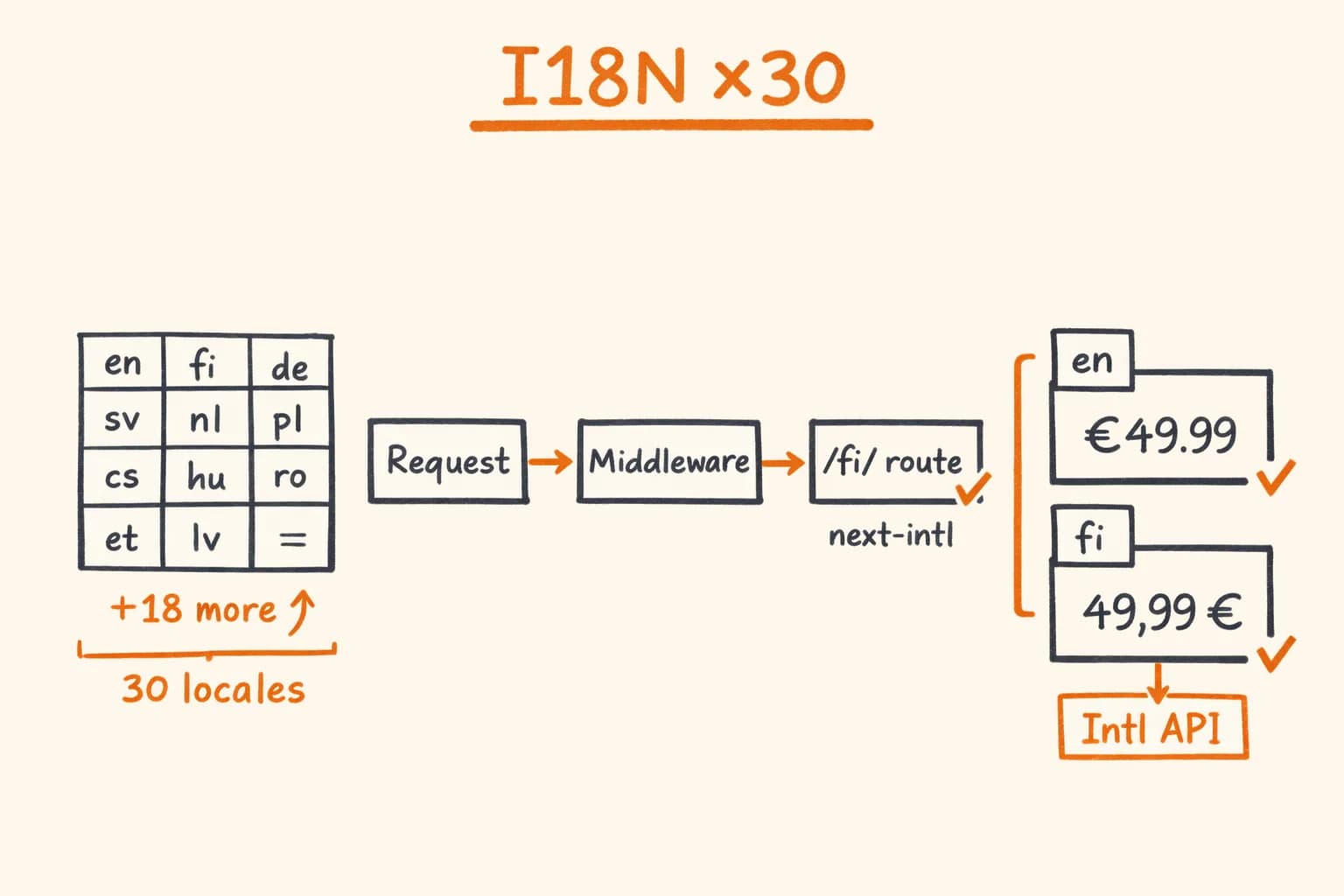
I use prefix routing for everything: /en/, /fi/, /de/, /fr/, and so on. The default locale (en) still gets a prefix – this is important for hreflang correctness, which I cover below.
A complete next-intl App Router setup is three files working together: a routing.ts that lists your locales, the proxy.ts (middleware.ts on Next.js 15 and below) that detects and rewrites the locale, and the i18n/request.ts that loads the right messages per request. Wire these three before you write a single translated component – getting them right up front saves a painful refactor at locale ten.
Middleware for Locale Detection
// middleware.ts
import createMiddleware from "next-intl/middleware";
import { routing } from "./i18n/routing";

export default createMiddleware(routing);

export const config = {
  // Match all pathnames except static assets and API routes
  matcher: ["/((?!api|_next/static|_next/image|favicon.ico|icons|images).*)"],
};
// i18n/routing.ts
import { defineRouting } from "next-intl/routing";
export const routing = defineRouting({
locales: [
"en",
"fi",
"de",
"fr",
"sv",
"nl",
"pl",
"cs",
"sk",
"hu",
"ro",
"bg",
"hr",
"sl",
"et",
"lv",
"lt",
"da",
"nb",
"is",
"pt",
"es",
"it",
"el",
"tr",
"uk",
"ru",
"zh",
"ja",
"ko",
],
defaultLocale: "en",
// Always use a prefix, even for the default locale.
// Required for correct hreflang — see SEO section.
localePrefix: "always",
});File Structure for Translations
messages/
  en/
    common.json
    product.json
    checkout.json
    email.json
  fi/
    common.json
    ...
  de/
    ...
Splitting by namespace prevents loading all 30 languages times all keys on every page. Each page imports only what it needs.
// messages/en/checkout.json
{
  "title": "Checkout",
  "summary": {
    "subtotal": "Subtotal",
    "shipping": "Shipping",
    "vat": "VAT ({rate}%)",
    "total": "Total"
  },
  "cta": {
    "pay": "Pay {amount}",
    "processing": "Processing..."
  },
  "errors": {
    "cardDeclined": "Your card was declined. Please try a different payment method.",
    "vatInvalid": "The VAT number you entered could not be verified."
  }
}
TypeScript Type Safety
This is where next-intl 4 earns its place. You define your message types once and get compile-time errors everywhere translations are missing or keys are mistyped.
// i18n/request.ts
import { getRequestConfig } from "next-intl/server";
import { routing } from "./routing";

export default getRequestConfig(async ({ requestLocale }) => {
  let locale = await requestLocale;

  if (!locale || !routing.locales.includes(locale as (typeof routing.locales)[number])) {
    locale = routing.defaultLocale;
  }

  return {
    locale,
    messages: {
      ...(await import(`../messages/${locale}/common.json`)).default,
    },
  };
});
// types/i18n.d.ts
import en from "../messages/en/common.json";
type Messages = typeof en;
declare global {
interface IntlMessages extends Messages {}
}Now in any Server Component:
import { getTranslations } from "next-intl/server";

export default async function CheckoutPage() {
  // TypeScript knows every key that exists — typos are compile errors
  const t = await getTranslations("checkout");

  return <button>{t("cta.pay", { amount: "€49.00" })}</button>;
}
And in Client Components:
"use client";

import { useTranslations } from "next-intl";

export function CheckoutButton({ amount }: { amount: string }) {
  const t = useTranslations("checkout");
  return <button>{t("cta.pay", { amount })}</button>;
}
If you add a key to the English file and forget to add it to Finnish, the TypeScript compiler will catch it. This saves hours of manual QA across 30 locales.
next-intl hreflang and Per-Locale Metadata at Scale
hreflang tells search engines which version of a page to show for which language and region. next-intl does not generate these tags for you – you build them from your routing config in generateMetadata, which is where most 30-locale setups go wrong. Two rules that catch most mistakes:
- Every locale must link to every other locale, including itself. If you have 30 locales, every page has 30 hreflang tags plus one
x-default. - The
x-defaultshould point to the same URL as your default locale (en). Do not point it to a language selection page – that pattern is outdated.
// app/[locale]/products/[slug]/page.tsx
import { routing } from "@/i18n/routing";
import type { Metadata } from "next";

interface Props {
  params: Promise<{ locale: string; slug: string }>;
}

export async function generateMetadata({ params }: Props): Promise<Metadata> {
  const { locale, slug } = await params;
  const product = await getProduct(slug, locale);

  const languages: Record<string, string> = {
    "x-default": `https://pikkuna.fi/en/products/${slug}`,
  };

  for (const loc of routing.locales) {
    languages[loc] = `https://pikkuna.fi/${loc}/products/${slug}`;
  }

  return {
    title: `${product.name} | Pikkuna`,
    description: product.description.slice(0, 160),
    alternates: {
      canonical: `https://pikkuna.fi/${locale}/products/${slug}`,
      languages,
    },
    openGraph: {
      title: product.name,
      description: product.description,
      // OG expects en_US format, not en-US
      locale: locale.replace("-", "_"),
      images: [{ url: product.imageUrl, width: 1200, height: 630 }],
    },
  };
}
For sitemaps, I generate one per locale to keep file size manageable:
// app/[locale]/sitemap.ts
import type { MetadataRoute } from "next";

export default async function sitemap({ id }: { id: number }): Promise<MetadataRoute.Sitemap> {
  const locales = ["en", "fi", "de" /* ... */];
  const locale = locales[id];
  const products = await getAllProducts(locale);

  return products.map((product) => ({
    url: `https://pikkuna.fi/${locale}/products/${product.slug}`,
    lastModified: product.updatedAt,
    changeFrequency: "weekly",
    priority: 0.8,
  }));
}

export function generateSitemaps() {
  return ["en", "fi", "de" /* ... */].map((_, index) => ({ id: index }));
}
This generates /en/sitemap.xml, /fi/sitemap.xml, and so on – each submitted separately to Google Search Console for that market.
The Problems Nobody Documents
Numbers and Currencies
Intl.NumberFormat is the correct tool. Do not format prices with string concatenation.
// lib/format.ts
export function formatCurrency(amount: number, currency: string, locale: string): string {
  return new Intl.NumberFormat(locale, {
    style: "currency",
    currency,
    minimumFractionDigits: 2,
    maximumFractionDigits: 2,
  }).format(amount);
}

formatCurrency(49.99, "EUR", "en"); // €49.99
formatCurrency(49.99, "EUR", "fi"); // 49,99 €  (space + trailing symbol)
formatCurrency(49.99, "EUR", "de"); // 49,99 €
formatCurrency(49.99, "EUR", "fr"); // 49,99 €  (different grouping rules)
Finnish puts the currency symbol after the amount with a non-breaking space. German uses commas as decimal separators. These are not edge cases – they are requirements for any EU market. Intl.NumberFormat handles all of them correctly given the right locale string.
Date Formatting
export function formatDate(
  date: Date,
  locale: string,
  options?: Intl.DateTimeFormatOptions
): string {
  return new Intl.DateTimeFormat(locale, {
    day: "2-digit",
    month: "2-digit",
    year: "numeric",
    ...options,
  }).format(date);
}

formatDate(new Date("2025-11-12"), "en"); // 11/12/2025
formatDate(new Date("2025-11-12"), "fi"); // 12.11.2025
formatDate(new Date("2025-11-12"), "de"); // 12.11.2025
formatDate(new Date("2025-11-12"), "sv"); // 2025-11-12
If you hardcode a date format anywhere in your codebase, you have a bug waiting for its first Finnish user.
The fi vs fi-FI Trap
next-intl uses BCP 47 locale tags. For Finnish, the correct code in your routing config is fi – not fi-FI. Keep them consistent: use short codes (fi, de, fr) in routing and pass them directly to Intl APIs. Mixing fi-FI in routing with fi in formatters produces inconsistent behaviour for edge cases like language negotiation headers.
Storing Translations for Dynamic Content
Static strings in JSON files are the easy part. Product names, descriptions, and SEO content come from a database. You need a translation table.
// db/schema.ts (Drizzle ORM)
import { pgTable, text, timestamp, uuid, primaryKey } from "drizzle-orm/pg-core";

export const products = pgTable("products", {
  id: uuid("id").primaryKey().defaultRandom(),
  sku: text("sku").notNull().unique(),
  createdAt: timestamp("created_at").notNull().defaultNow(),
});

export const productTranslations = pgTable(
  "product_translations",
  {
    productId: uuid("product_id")
      .notNull()
      .references(() => products.id, { onDelete: "cascade" }),
    locale: text("locale").notNull(),
    name: text("name").notNull(),
    description: text("description").notNull(),
    slug: text("slug").notNull(), // locale-specific URL slug
  },
  (t) => ({
    pk: primaryKey({ columns: [t.productId, t.locale] }),
  })
);
Query it with English fallback – never show a blank page because a translation is missing:
// lib/products.ts
export async function getProduct(slug: string, locale: string) {
  const result = await db
    .select()
    .from(productTranslations)
    .innerJoin(products, eq(products.id, productTranslations.productId))
    .where(and(eq(productTranslations.slug, slug), eq(productTranslations.locale, locale)))
    .limit(1);

  if (result.length > 0) return result[0];

  // Fallback to English — same logic next-intl uses for message files
  return db
    .select()
    .from(productTranslations)
    .innerJoin(products, eq(products.id, productTranslations.productId))
    .where(and(eq(productTranslations.slug, slug), eq(productTranslations.locale, "en")))
    .limit(1)
    .then((r) => r[0] ?? null);
}
Translation Workflow
For Pikkuna I bootstrapped all 30 languages from English using the DeepL API. This is the right approach for an initial launch – do not wait for human translators to test the product in a new market.
But machine translation is only a starting point:
- UI strings (button labels, navigation, error messages): machine translation is fine, a native speaker does a quick review
- Product descriptions: machine translation + human editing, because copy affects conversion
- Legal text (privacy policy, terms, return policy): always human translation – you are legally responsible for what it says
When English content changes, a script flags the corresponding keys in all other locale files as stale. Translators update only the flagged keys. Translation costs stay proportional to the amount of content that actually changed.
Adding Estonian to pi-pi.ee – which was already at 27 languages – took about two hours end to end: one hour of DeepL processing, one hour of manual review for checkout and legal strings.
Before You Start
A few things I would tell myself on day one:
Decide on localePrefix: "always" early. Changing this later means updating every internal link, every canonical URL, and every hreflang tag in the database.
Do not skip the TypeScript type augmentation. The ten minutes it takes to wire up IntlMessages pays back on every key you add for the rest of the project.
Use Intl.NumberFormat for every number. Not just prices – quantities, percentages, distances. The formatting rules vary in ways that are not obvious until a Finnish user files a bug about 1,614 displaying as 1.614 (which in German means one point six one four, not one thousand six hundred fourteen).
VAT numbers are a separate problem. If you are building a B2B checkout with VAT number validation, the full architecture – VIES reliability, Redis caching, reverse charge logic – is covered in the EU VAT validation guide. For the broader e-commerce development picture – payments, automation, multi-currency – that guide is a good companion.
If you are launching a product in Europe and need more than one or two languages, you will hit every problem I described above. The Next.js proxy.ts migration guide covers locale routing at the proxy layer – a related concern for any multilingual App Router project. I have built this architecture across multiple production systems for EU markets ranging from 3 to 32 countries.
If you need someone who can own the full implementation – from the Drizzle schema to the sitemap generation to the translator workflow – get in touch. I am available for freelance projects and long-term engagements.
Related project: Pikkuna E-commerce Platform – case study on the multilingual storefront this article is based on: 30 languages, 32 countries, full tech stack breakdown.