The vatnode.dev API runs on a €6/month VPS. Not a €50/month managed service, not a Kubernetes cluster – a single Vultr instance in Amsterdam with 1 vCPU, 1 GB RAM, and a deployment setup I can explain completely in one article.
I want to be clear about why I made this choice, because ‘just use Vercel’ is the advice you’ll get almost everywhere, and for the Next.js frontend of vatnode that advice is correct. But the API itself is a Hono application running on Node.js with a BullMQ worker process. It needs persistent TCP connections, long-running background jobs, and Redis. Serverless doesn’t fit that model.
This is the complete infrastructure setup – Caddy, Docker Compose, zero-downtime deploys – and the lessons from running it in production.
How-to
How to self-host a Node.js API with Caddy and Docker on a VPS
Configure Docker Compose
Define three services: the API bound to 127.0.0.1 (not 0.0.0.0), the BullMQ worker using the same image with a different entrypoint, and Redis with appendonly persistence and a named volume. Add health checks to each service.
Set up Caddy as reverse proxy
Write a Caddyfile that proxies the domain to localhost:3001. Caddy issues and renews Let’s Encrypt certificates automatically – no certbot, no cron job. Add security headers and request body size limits.
Write a zero-downtime deploy script
Pull the new image, run docker compose up with --no-deps and --no-recreate for the API and worker services, then poll the health endpoint for up to 60 seconds. Roll back automatically if the health check fails.
Build the CI/CD pipeline with GitHub Actions
On push to main, build a Docker image tagged with the commit SHA, push to GitHub Container Registry, and SSH into the VPS to run the deploy script. Use a dedicated ED25519 deploy key with minimal permissions.
Write a multi-stage Dockerfile
Use a builder stage for compilation and a separate production stage that installs only production dependencies, copies built output, and runs as a non-root user. Keeps the final image around 180 MB.
Add minimal monitoring
Set up UptimeRobot on the /health endpoint for uptime alerts. Add a daily cron job that checks disk usage and sends a Telegram alert above 80%. Configure Redis maxmemory with allkeys-lru eviction.
Why Not a Managed Platform
Vercel is genuinely good for what it does: serverless functions and static assets, deployed in seconds. I use it for the Next.js frontend. But the vatnode API has requirements that don’t fit the serverless model:
Background workers. The BullMQ worker process that handles webhook processing and scheduled VAT monitoring jobs needs to run continuously. Vercel functions cold-start on each request and terminate after execution. You can work around this with external job queues, but then you’re paying for a separate worker service anyway.
WebSocket connections. The rate limiting layer keeps Redis connections warm. Serverless functions re-establish the connection on each invocation – acceptable for low traffic, a latency problem at scale.
Predictable cost. At the traffic vatnode sees, a €6/month VPS with fixed cost makes more sense than per-invocation pricing that’s hard to forecast during growth.
The tradeoff: I’m responsible for the infrastructure. Patching, backups, monitoring – that’s on me. For a production SaaS I’m running myself, that’s acceptable. For a client project where infrastructure ownership matters, I’d weigh this differently.
The Stack
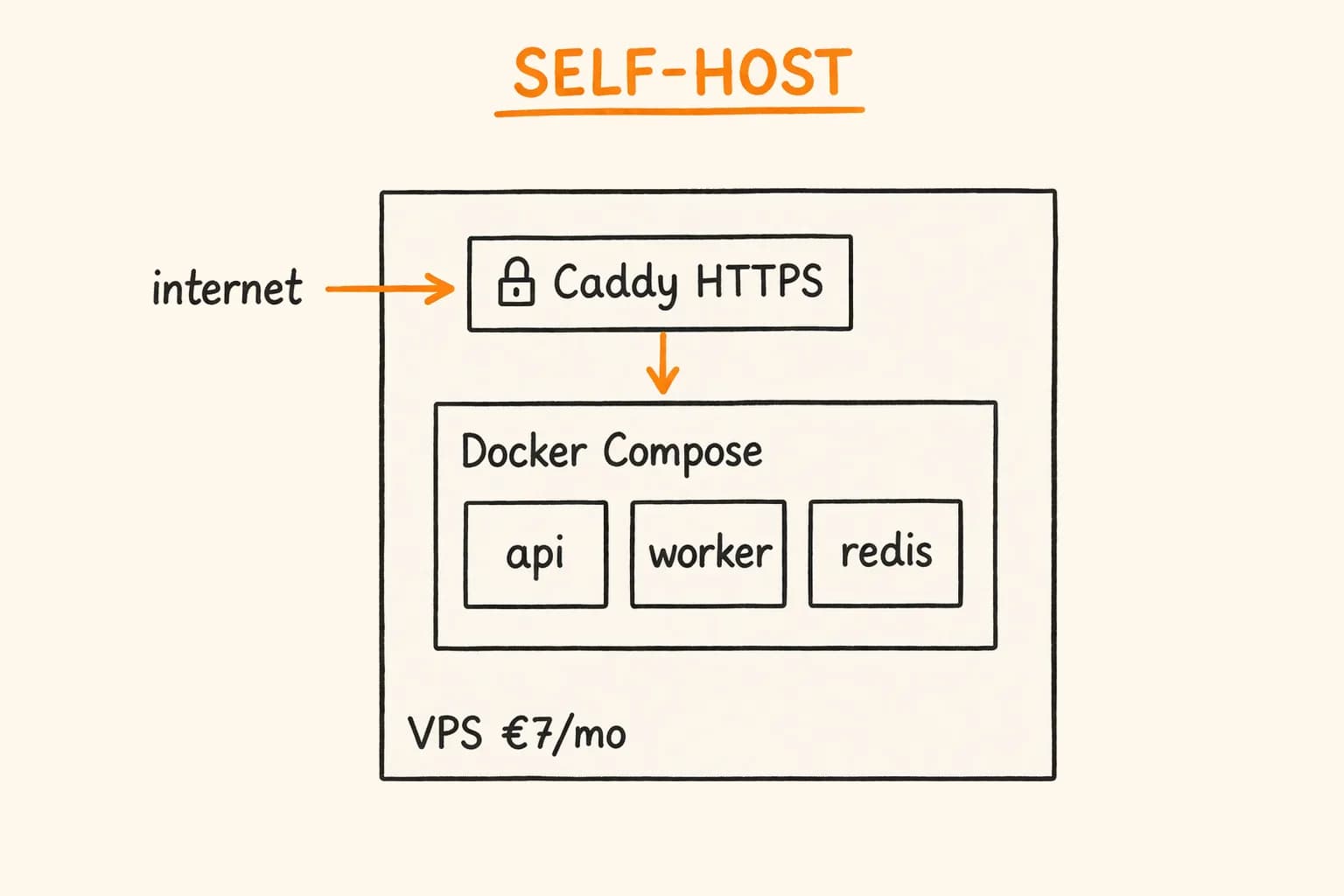
Vultr VPS (Amsterdam, €6/month)
├── Ubuntu 24.04 LTS
├── Docker + Docker Compose
├── Caddy (reverse proxy + automatic TLS)
└── App containers:
    ├── hono-api (Node.js 22, Hono)
    ├── worker (BullMQ worker process)
    └── redis (Redis 7.2, named volume)
The Next.js frontend runs on Vercel (free tier, Frankfurt region). DNS points vatnode.dev to Vercel and api.vatnode.dev to the VPS.
Docker Compose Configuration
# docker-compose.yml
services:
  api:
    image: ghcr.io/vatnode/api:${IMAGE_TAG:-latest}
    restart: unless-stopped
    environment:
      - NODE_ENV=production
      - DATABASE_URL=${DATABASE_URL}
      - REDIS_URL=redis://redis:6379
      - STRIPE_SECRET_KEY=${STRIPE_SECRET_KEY}
      - STRIPE_WEBHOOK_SECRET=${STRIPE_WEBHOOK_SECRET}
    ports:
      - "127.0.0.1:3001:3001" # Bind to localhost only — Caddy proxies externally
    depends_on:
      redis:
        condition: service_healthy
    healthcheck:
      test: ["CMD", "wget", "-qO-", "http://localhost:3001/health"]
      interval: 30s
      timeout: 10s
      retries: 3
      start_period: 15s

  worker:
    image: ghcr.io/vatnode/api:${IMAGE_TAG:-latest}
    restart: unless-stopped
    command: ["node", "dist/worker.js"] # Different entrypoint, same image
    environment:
      - NODE_ENV=production
      - DATABASE_URL=${DATABASE_URL}
      - REDIS_URL=redis://redis:6379
    depends_on:
      redis:
        condition: service_healthy

  redis:
    image: redis:7.2-alpine
    restart: unless-stopped
    volumes:
      - redis_data:/data
    command: redis-server --appendonly yes --maxmemory 256mb --maxmemory-policy allkeys-lru
    healthcheck:
      test: ["CMD", "redis-cli", "ping"]
      interval: 10s
      timeout: 5s
      retries: 5

volumes:
  redis_data:
    driver: local
Three things worth noting:
The API binds to 127.0.0.1:3001, not 0.0.0.0:3001. This means the port is not accessible from the internet – only from the same machine. Caddy, running on the host, proxies requests to it. Without this, anyone who knows your IP can hit your API directly, bypassing Caddy’s rate limiting and TLS handling.
The worker uses the same Docker image as the API but a different command. This avoids maintaining two separate Dockerfiles for what is essentially the same codebase. The dist/worker.js entrypoint starts only the BullMQ worker process, no HTTP server.
Redis has appendonly yes and a named volume. appendonly yes means Redis writes every command to an append-only file – on restart, the data survives. Without this, all rate limit state, job queues, and cached VIES responses vanish every time the container restarts. The named volume persists the data directory outside the container lifecycle.
Caddy Configuration
Caddy is the reverse proxy and TLS terminator. It handles HTTPS certificate issuance and renewal automatically via Let’s Encrypt – no certbot, no cron job for renewal, no certificate expiry surprises.
# /etc/caddy/Caddyfile

api.vatnode.dev {
    reverse_proxy localhost:3001 {
        health_uri /health
        health_interval 30s
        health_timeout 10s
        health_status 200
    }

    # Security headers
    header {
        Strict-Transport-Security "max-age=31536000; includeSubDomains; preload"
        X-Content-Type-Options "nosniff"
        X-Frame-Options "DENY"
        -Server
    }

    # Request size limit — prevent large body abuse
    request_body {
        max_size 1MB
    }

    log {
        output file /var/log/caddy/api-access.log {
            roll_size 100MB
            roll_keep 5
        }
        format json
    }
}
Caddy’s automatic HTTPS is what makes it genuinely better than nginx for this use case. With nginx, I’d need certbot, a renewal cron job, and nginx reload logic. With Caddy, I write api.vatnode.dev { and it handles everything. The first time a request comes in, Caddy issues a Let’s Encrypt certificate, stores it, and handles renewal before expiry. Nothing to configure, nothing to monitor.
Zero-Downtime Deploy Script
The key constraint: the API handles live payment webhooks. If I take it down during a deploy, Stripe will retry – but a 30-second gap in availability still means delayed order processing. The goal is deploys with no visible downtime.
#!/bin/bash
# deploy.sh
set -euo pipefail

IMAGE_TAG="${1:-latest}"
COMPOSE_FILE="/srv/vatnode/docker-compose.yml"
ENV_FILE="/srv/vatnode/.env"

echo "Deploying tag: ${IMAGE_TAG}"

# Pull new image
docker pull \
  "ghcr.io/vatnode/api:${IMAGE_TAG}"

cd /srv/vatnode

# Update the API service — Docker Compose handles rolling replacement
# --no-deps: don't recreate redis
# --scale: keep running while new container starts
docker compose --env-file "${ENV_FILE}" \
  up -d --no-deps --no-recreate \
  --pull never \
  api worker

# Wait for API health check to pass (max 60 seconds)
echo "Waiting for health check..."
for i in $(seq 1 12); do
  if curl -sf http://localhost:3001/health \
       > /dev/null 2>&1; then
    echo "API healthy after $((i * 5))s"
    break
  fi
  if [ "$i" -eq 12 ]; then
    echo "ERROR: API failed to become healthy after 60s"
    # Roll back
    docker compose --env-file "${ENV_FILE}" up -d --no-deps --no-recreate api worker
    exit 1
  fi
  sleep 5
done

# Remove old images to prevent disk fill
docker image prune -f --filter "until=24h"

echo "Deploy complete"
The --no-recreate flag tells Docker Compose to only update containers whose image or configuration has changed. Redis is unaffected. The API and worker containers are recreated with the new image.
This is not a true zero-downtime rolling deploy in the Kubernetes sense – there’s a brief window (~2-3 seconds) when the old container is stopping and the new one hasn’t passed its health check yet. Caddy buffers requests during that window rather than immediately returning 502. For the traffic vatnode handles, this is acceptable. If I needed strict zero-downtime, I’d run two API container replicas and use Docker Compose’s --scale api=2 during the transition.
CI/CD Pipeline
Pushes to main trigger the GitHub Actions workflow:
# .github/workflows/deploy.yml
name: Deploy

on:
  push:
    branches: [main]

jobs:
  build-and-deploy:
    runs-on: ubuntu-latest
    steps:
      - uses: actions/checkout@v4

      - name: Build Docker image
        run: |
          docker build -t ghcr.io/vatnode/api:${{ github.sha }} .
          docker tag ghcr.io/vatnode/api:${{ github.sha }} ghcr.io/vatnode/api:latest

      - name: Push to GHCR
        run: |
          echo "${{ secrets.GITHUB_TOKEN }}" | docker login ghcr.io -u ${{ github.actor }} --password-stdin
          docker push ghcr.io/vatnode/api:${{ github.sha }}
          docker push ghcr.io/vatnode/api:latest

      - name: Deploy to VPS
        run: |
          ssh -i ~/.ssh/deploy_key -o StrictHostKeyChecking=no \
            deploy@${{ secrets.VPS_HOST }} \
            "bash /srv/vatnode/deploy.sh ${{ github.sha }}"
        env:
          SSH_KNOWN_HOSTS: ${{ secrets.VPS_SSH_KNOWN_HOSTS }}
The deploy user has minimal permissions: can run deploy.sh, can execute Docker commands, cannot sudo. The deploy_key is an ED25519 key pair generated specifically for CI – not my personal SSH key.
Dockerfile
The Dockerfile uses multi-stage builds to keep the production image small:
# Stage 1: Build
FROM node:22-alpine AS builder
WORKDIR /app
COPY package*.json ./
RUN npm ci --include=dev
COPY . .
RUN npm run build

# Stage 2: Production
FROM node:22-alpine AS production
RUN addgroup -S appgroup && adduser -S appuser -G appgroup
WORKDIR /app

COPY package*.json ./
RUN npm ci --only=production && npm cache clean --force

COPY --from=builder /app/dist ./dist

USER appuser

EXPOSE 3001
CMD ["node", "dist/index.js"]
The non-root user (appuser) is important. If the Node.js process is somehow compromised, it runs without root privileges – it can’t modify system files or install software. Small thing, but it’s the kind of defence-in-depth that matters in production.
The final image is about 180MB – the alpine base plus node_modules and compiled JavaScript. Not tiny, but reasonable for a Node.js API.
Monitoring and Alerts
I keep monitoring minimal on a personal project, but three things are non-negotiable:
Uptime monitoring via UptimeRobot – free tier, checks https://api.vatnode.dev/health every 5 minutes. Sends a Telegram alert if it’s down.
Disk usage alert – Docker image accumulation is a real risk. A cron job runs df -h / daily and sends a Telegram alert if usage exceeds 80%:
# /etc/cron.daily/disk-alert
#!/bin/bash
USAGE=$(df / \
  | tail -1 \
  | awk '{print $5}' \
  | sed 's/%//')
if [ "$USAGE" -gt 80 ]; then
  curl -s "https://api.telegram.org/bot${BOT_TOKEN}/sendMessage" \
    -d "chat_id=${CHAT_ID}" \
    -d "text=VPS disk at ${USAGE}% — clean up Docker images"
fi
Redis memory – Redis is configured with maxmemory 256mb and allkeys-lru eviction. If memory fills, it evicts the least recently used keys. For rate limiting state, this is acceptable – a rate limited key that gets evicted just resets the counter. The vatnode codebase has a fallback path for this case anyway.
Actual Costs
| Component | Cost |
|---|---|
| Vultr VPS (1 vCPU, 1 GB, Amsterdam) | €5.50/month |
| Domain (vatnode.dev) | ~€15/year |
| Vercel (Next.js frontend) | €0 (free tier) |
| Uptime monitoring (UptimeRobot) | €0 (free tier) |
| Total | ~€7/month |
Compare this to a managed option: Railway starts at $5/month per service, but I’d need separate services for the API, worker, and Redis – that’s $15–25/month before any usage charges. Render’s free tier doesn’t support background workers persistently. Fly.io is a reasonable alternative at similar cost, but requires learning their deployment model.
For a bootstrapped SaaS, €7/month infrastructure is meaningful. When vatnode grows to where managed infrastructure makes sense, I’ll migrate – but I’ll do it because the business justifies it, not because it’s the default assumption.
If you’re building a Node.js API or background worker service and wondering whether you need managed infrastructure from day one – you probably don’t. For the health check implementation that makes this setup reliable under Docker and Kubernetes, see production health check endpoints. The background jobs article covers the BullMQ worker process that runs alongside the API in this same setup. The setup described here took about a day to put together and has run without intervention since.
If you need a senior developer who can design the full production stack – API, infrastructure, deployment pipeline, and monitoring – get in touch. I’m available for freelance projects and long-term engagements.
Related projects: vatnode.dev VAT Validation API – the production system this infrastructure runs.
Further reading: