Your order confirmation email is sometimes delayed. Your nightly report occasionally runs twice. Your integration with the third-party API times out and nobody notices until a customer complains three days later.
These are background job problems. And the solution is almost always ‘you need a proper job queue’ – but that phrase hides a decision with real infrastructure consequences. Redis-backed or Postgres-backed? A cron schedule or event-driven workers? Retries with backoff or fire-and-forget?
I have dealt with this across several production systems: on vatnode.dev, where BullMQ workers handle subscription logic triggered by Stripe webhooks, and on pikkuna.fi, where the full order pipeline – CRM update, shipment creation, invoice generation, email – runs through an async worker chain. Here is how I make that decision.
Three Levels of Background Work
Before comparing tools, it helps to be precise about what ‘background job’ actually means in your case.
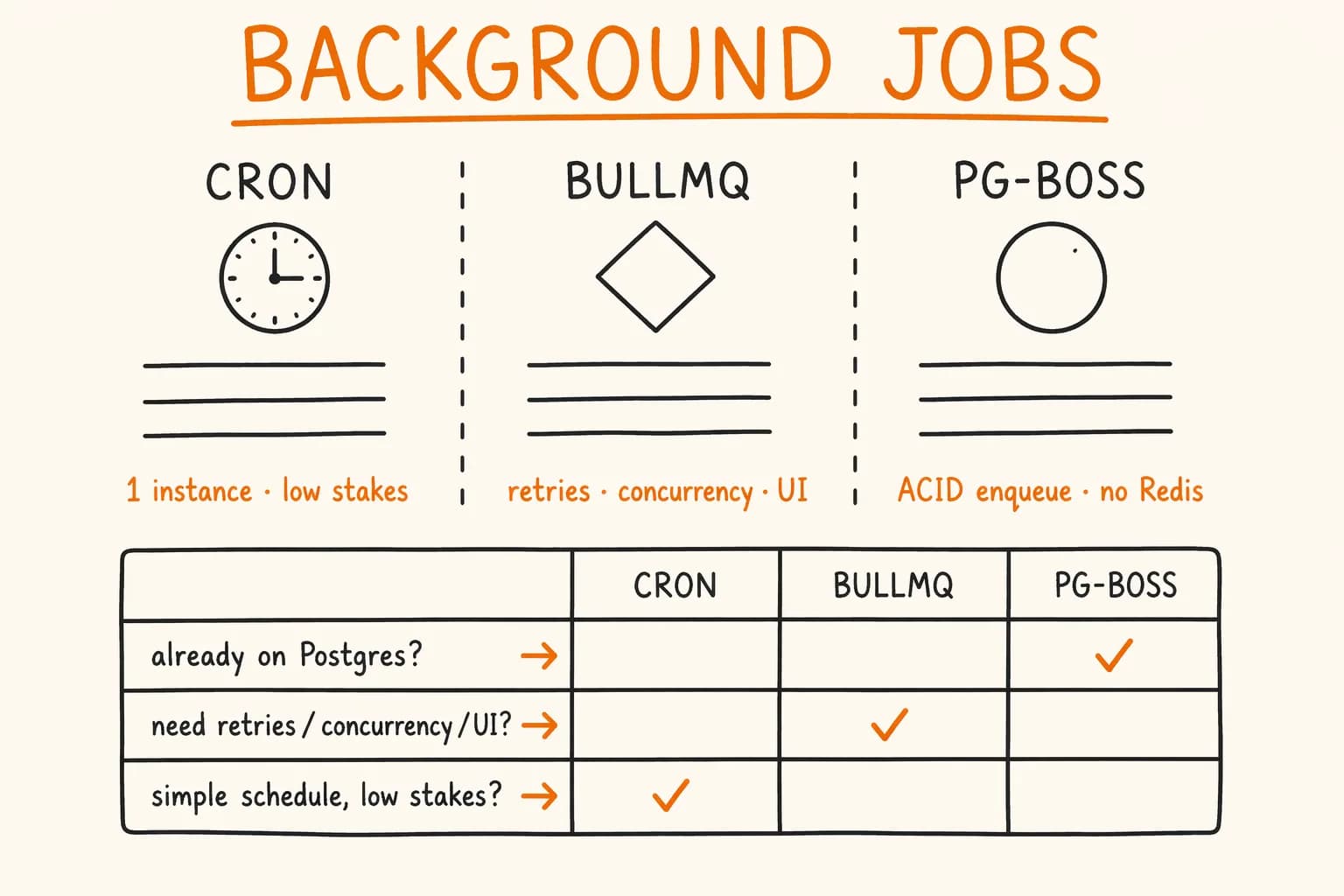
Level 1: Scheduled tasks, single process, low stakes. You need to send a weekly digest email, refresh a cache at 6 AM, or clean up expired sessions every hour. The work is triggered by time, not events. If it fails, it will run again in an hour. You are running one app instance.
This is what node-cron or an OS-level cron is for. Bringing in Redis and a queue worker for this is over-engineering.
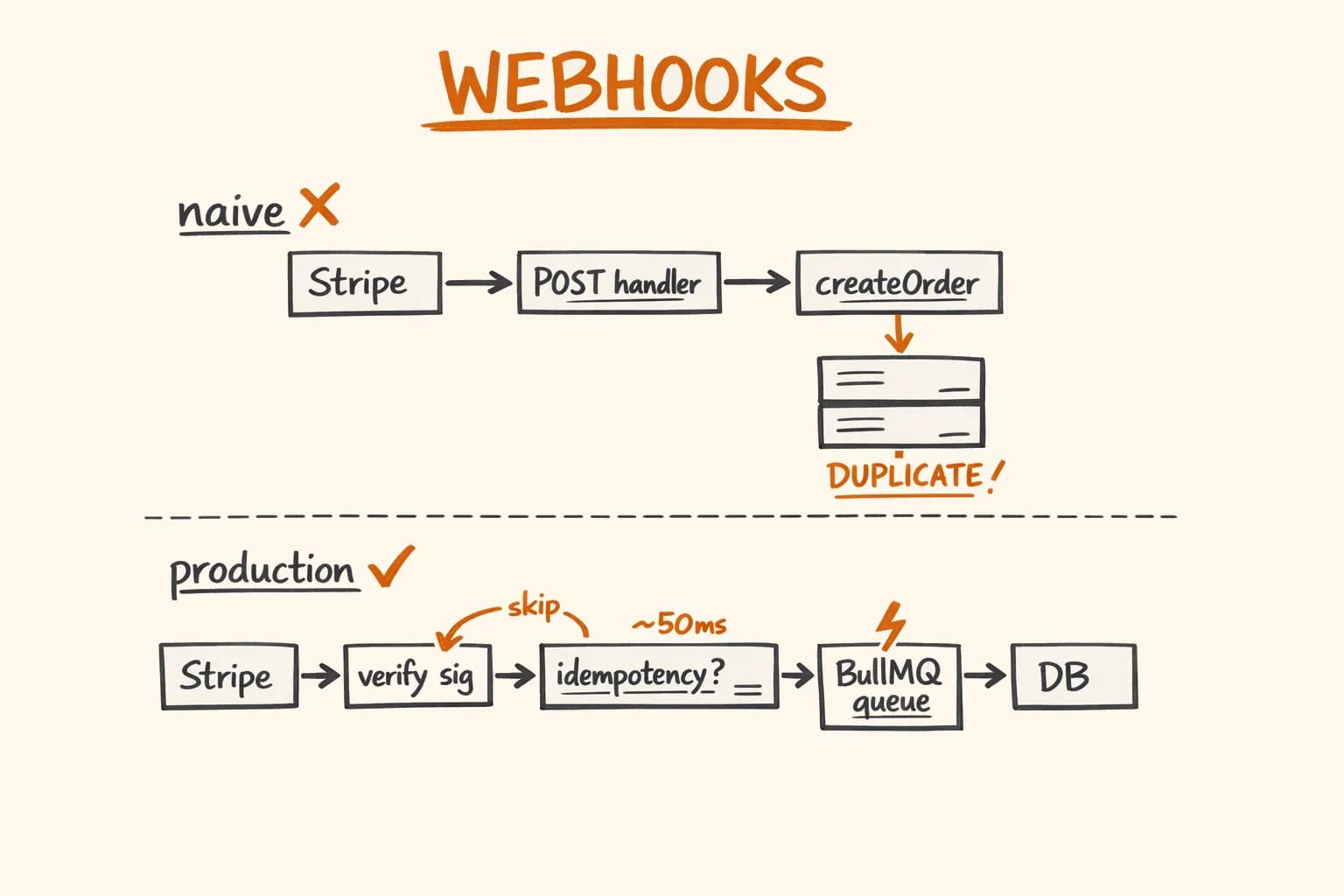
Level 2: Event-driven work that needs retries, deduplication, or concurrency control. A Stripe webhook fires, you need to create an order, update a CRM, and send a confirmation email. Any of these steps can fail. You might be running multiple app instances. You need to guarantee delivery and avoid duplicates.
This is what a job queue is for. Either BullMQ or pg-boss applies here.
Level 3: High-throughput processing pipelines. You are ingesting events at thousands per minute, running parallel transformations, or building complex job dependency graphs (fan-out, fan-in, rate-limited sub-queues). Sub-second job pickup latency matters.
This is where BullMQ (Redis-backed) becomes the right tool over Postgres alternatives.
Most applications are Level 1 or Level 2. I will focus there.
Simple Cron: When It Is Actually Fine
node-cron and similar packages are underrated for genuinely simple use cases. The implementation is minimal:
// lib/scheduler.ts
import cron from "node-cron";
import { db } from "@/lib/db";
import { sessions } from "@/lib/db/schema";
import { lt } from "drizzle-orm";

export function startScheduler(): void {
  // Run every day at 3 AM
  cron.schedule("0 3 * * *", async () => {
    try {
      const deleted = await db
        .delete(sessions)
        .where(lt(sessions.expiresAt, new Date()))
        .returning({ id: sessions.id });

      console.log(`Cleaned up ${deleted.length} expired sessions`);
    } catch (err) {
      console.error("Session cleanup failed:", err);
    }
  });
}
Call startScheduler() from your app entrypoint and you are done.
These are the reasons to move to a queue:
- No distribution. If you deploy two instances, both run the cron – your cleanup job runs twice. For idempotent cleanup that’s harmless; for an email send, it isn’t.
- No retries. If the database is temporarily unavailable, the job throws and nothing re-runs it until the next scheduled interval.
- No visibility. You cannot see which jobs ran, which failed, or how long they took.
These are not reasons to avoid cron – they are the checklist for deciding whether cron is sufficient. If none of these matter for your use case, keep it simple.
BullMQ: The Redis-Backed Standard
BullMQ is the most widely used job queue in the Node.js ecosystem. It uses Redis as its backing store and provides retries with configurable backoff, job prioritization, concurrency control, delayed jobs, repeating jobs, job dependencies, and a solid UI via Bull Board.
Here is the basic setup. A queue for enqueueing, a worker for processing:
// lib/queues/order-queue.ts
import { Queue, Worker, Job } from "bullmq";
import { redis } from "@/lib/redis"; // ioredis instance

interface OrderJobData {
  orderId: string;
  customerId: string;
}

// The queue — used by your API/webhook handlers to enqueue work
export const orderQueue = new Queue<OrderJobData>("order-processing", {
  connection: redis,
  defaultJobOptions: {
    attempts: 4,
    backoff: {
      type: "exponential",
      delay: 3000, // 3s, 6s, 12s, 24s
    },
    removeOnComplete: { count: 500 },
    removeOnFail: false, // Keep failed jobs for inspection
  },
});

// The worker — runs in a separate process or alongside your app
export const orderWorker = new Worker<OrderJobData>(
  "order-processing",
  async (job: Job<OrderJobData>) => {
    const { orderId, customerId } = job.data;

    await job.updateProgress(10);
    await syncOrderToCrm(orderId);

    await job.updateProgress(40);
    await createShipment(orderId);

    await job.updateProgress(70);
    await generateInvoice(orderId, customerId);

    await job.updateProgress(90);
    await sendConfirmationEmail(customerId, orderId);

    await job.updateProgress(100);
    return { processed: true };
  },
  {
    connection: redis,
    concurrency: 3, // Process up to 3 orders simultaneously
  }
);

orderWorker.on("failed", (job, err) => {
  console.error(`Order job ${job?.id} failed after all retries:`, err);
  // Alert your team — Telegram, Slack, PagerDuty, whatever you use
});
Enqueueing from a Stripe webhook handler is a single line:
await orderQueue.add(
  "process-order",
  { orderId, customerId },
  { jobId: `order-${orderId}` } // Deduplicate by orderId in the active window
);
The jobId is how BullMQ handles deduplication within active jobs – if a job with that ID is already waiting or active, the new enqueue is silently ignored. This is useful for webhook retries, but note it does not cover completed jobs. For that you still need a database-level idempotency check.
What BullMQ does well:
- Job prioritization (numeric priority field on each job)
- Delayed jobs – schedule a follow-up email 3 days after sign-up
- Repeating jobs with cron expressions – a proper replacement for
node-cronthat works across multiple instances - Job dependencies with
FlowProducer– fan-out, fan-in, pipelines - Rich UI with Bull Board
- Large community, mature documentation
What to watch out for:
Redis is a separate infrastructure component to manage. If Redis goes down, job processing stops – jobs in the queue are still there, but no new ones are picked up and none are processed until Redis recovers. For most applications this is acceptable; for a payment pipeline it means you need Redis HA (Redis Sentinel or Cluster, or a managed service like Upstash).
The other thing: BullMQ workers are long-running processes. In a Next.js deployment, you need a separate worker process. On vatnode, the Turborepo monorepo has a dedicated apps/worker package that runs alongside the Next.js app in the same container.
pg-boss: Postgres as Your Queue
pg-boss takes a different approach: it uses Postgres as the queue backing store, maintaining a pgboss schema with job tables, state transitions, and indexes. No Redis required.
The key insight: if you already use Postgres, you can enqueue a job in the same database transaction as your business logic. This gives you ACID guarantees that Redis cannot match.
Consider this scenario: you receive a payment confirmation and need to (1) update the order status and (2) enqueue a job to send a confirmation email. With Redis-backed queues:
// Without transactional enqueue — there's a window where the DB write succeeds
// but the queue enqueue fails, and the email never gets sent
await db.update(orders).set({ status: "paid" }).where(eq(orders.id, orderId));
await orderQueue.add("send-confirmation", { orderId }); // This can fail independently
With pg-boss, both operations happen in the same Postgres transaction:
// lib/queues/pg-boss-queue.ts
import PgBoss from "pg-boss";

const boss = new PgBoss(process.env.DATABASE_URL!);
await boss.start();

// In your payment handler — inside a transaction
await db.transaction(async (tx) => {
  await tx.update(orders).set({ status: "paid" }).where(eq(orders.id, orderId));

  // Enqueue using the same Postgres connection — atomic with the DB write.
  // Pass the raw pg client from the active transaction, not the ORM wrapper
  // (e.g. tx.client with node-postgres, or the equivalent your adapter exposes).
  await boss.sendOnce(
    "send-confirmation",
    { orderId },
    { key: `confirmation-${orderId}` }, // Deduplication key
    tx.client // raw pg client from the active transaction
  );
});
If the transaction rolls back, the job is also rolled back. The email cannot be sent for an order that does not exist in the database. This is the killer feature of Postgres-backed queues.
Setting up a worker in pg-boss:
await boss.work<{ orderId: string }>(
  "send-confirmation",
  { teamSize: 2, teamConcurrency: 2 },
  async (job) => {
    const { orderId } = job.data;
    await sendConfirmationEmail(orderId);
  }
);
What pg-boss does well:
- Transactional job enqueue – the main reason to choose it
- No additional infrastructure if you already have Postgres
- At-least-once delivery with configurable retry policy
- Job deduplication with
sendOnceand a key - Scheduled and recurring jobs with cron syntax
- Reasonable throughput for most web applications
What to watch out for:
Postgres is not Redis. Job pickup latency is in the tens of milliseconds, not sub-millisecond. For typical web application workloads – order processing, webhook handling, scheduled emails – pg-boss handles volume comfortably; for sustained high-throughput pipelines, BullMQ is the safer choice. The UI tooling is sparse compared to BullMQ. If your team needs dashboards and visibility, you will need to build something yourself or query the pgboss tables directly.
Also: pg-boss adds tables to your Postgres instance. The schema is well-isolated (its own schema), but it is another thing in your database. Migrations and schema management become part of your normal deployment process.
Dead Letter Queues, Retries, and Deduplication
These three features separate a reliable job queue from a fragile one.
Retries with backoff – both BullMQ and pg-boss support exponential backoff. The key thing to configure is the maximum number of attempts and the delay policy:
// BullMQ
{ attempts: 5, backoff: { type: "exponential", delay: 2000 } }
// Attempt delays: 2s, 4s, 8s, 16s, 32s

// pg-boss
boss.send("my-job", data, { retryLimit: 4, retryDelay: 2, retryBackoff: true });
// retryDelay is in seconds; retryBackoff enables exponential scaling
Do not set retries to unlimited. A job that fails 50 times is either broken or pointing at a broken dependency – you want it to stop and alert you.
Dead letter queues – in BullMQ, jobs that exhaust all retries move to the failed state. They stay there (if removeOnFail: false) and you can inspect them via Bull Board or query Redis directly. In pg-boss, failed jobs stay in the job table with a failed state and a output column containing the error.
In both cases: set up an alert on failed jobs. In production I use a worker.on('failed') listener that sends a Telegram message with the job ID and error. Five minutes of debugging a failed job is much better than discovering it three days later when a customer complains.
Deduplication – BullMQ uses jobId for deduplication within active/waiting jobs. pg-boss uses sendOnce with a user-defined key. The important distinction: BullMQ’s jobId deduplication expires once the job completes. pg-boss’s sendOnce key deduplicates within a configurable retention window. For most webhook-driven workflows, database-level idempotency on top of queue-level deduplication is the right approach regardless of which queue you use.
Monitoring: What Actually Matters
Queue depth, failed job count, and job processing duration are the three numbers that tell you whether your background processing is healthy.
// BullMQ — get queue metrics
const counts = await orderQueue.getJobCounts("waiting", "active", "completed", "failed", "delayed");

// { waiting: 0, active: 2, completed: 1847, failed: 3, delayed: 0 }
For pg-boss:
-- Check queue state directly in Postgres
SELECT name, state, count(*)
FROM pgboss.job
WHERE createdon > NOW() - INTERVAL '24 hours'
GROUP BY name, state
ORDER BY name, state;
The metric that surprises people most is job age – how long a job sits in the waiting state before a worker picks it up. If this grows, you either have too few workers or your workers are blocked on slow downstream calls. Increase concurrency in your worker config or add more worker instances.
I track these metrics with a simple Prometheus exporter that scrapes BullMQ counts every 30 seconds and pushes them to Grafana. The setup is a hundred lines of code and has caught two incidents before they became customer-visible problems.
Serverless Alternatives
If you are on Vercel or another serverless platform, long-running worker processes are not an option. Two tools worth knowing:
Vercel Cron – HTTP endpoints called on a schedule. Simple, integrated, works with the App Router. Fine for Level 1 scheduled tasks. Not suitable for event-driven work or complex retry logic.
Inngest – event-driven background functions with retries, delays, and step functions. Designed for serverless. The DX is excellent; the trade-off is a third-party dependency and pricing that scales with invocations.
I do not use either in my current production stack because I run Node.js on VPS infrastructure with Docker, where long-running workers are straightforward. But if your deployment target is serverless and you need more than basic cron, Inngest is the most production-ready option I have evaluated.
The Decision Matrix
| Situation | Recommendation |
|---|---|
| Single instance, scheduled tasks, low stakes | node-cron or OS cron |
| Multi-instance, scheduled tasks | BullMQ repeatable jobs (replaces cron) |
| Event-driven work, already using Postgres, want ACID enqueue | pg-boss |
| Event-driven work, already using Redis, need rich UI | BullMQ |
| High throughput (thousands of jobs/minute) | BullMQ |
| Serverless deployment | Inngest or Vercel Cron |
| Complex job graphs (fan-out, dependencies) | BullMQ FlowProducer |
The pg-boss vs BullMQ decision usually comes down to whether you already have Redis in your stack. If you do – BullMQ is the obvious choice. If you do not, and your throughput is under a few hundred jobs per minute, pg-boss lets you skip a Redis dependency entirely without meaningful trade-offs for typical web application workloads.
On vatnode, I chose BullMQ because Redis was already there for rate limiting and caching. Adding BullMQ cost zero new infrastructure. On a greenfield project without Redis, I would evaluate pg-boss seriously.
What This Looks Like in Production
On vatnode, BullMQ workers handle subscription lifecycle jobs triggered by Stripe webhooks – plan activations, usage resets, cancellation workflows. Worker concurrency is set to 5, which is enough to handle burst traffic during billing cycles without saturating the Postgres connection pool. Failed jobs go to the failed state and trigger a Telegram alert; I have had fewer than 10 permanent failures in the past six months, all due to temporary Stripe API unavailability.
On pikkuna.fi, the order processing chain runs through a BullMQ worker that calls Zoho CRM, PostNord, Netvisor, and Mailgun in sequence – a pattern I also apply to any API integration work where third-party calls need retry logic and visibility. The full chain – from Stripe webhook to sent confirmation email – completes in under 2 minutes. Before this architecture, intermittent failures in one integration would silently break the rest of the chain with no visibility. Now each step is retried independently and failed steps appear in the monitoring dashboard.
Frequently Asked Questions
- BullMQ vs pg-boss – which should I choose?
- The decision usually comes down to your existing stack. If you already have Redis for rate limiting or caching, BullMQ is the obvious choice – zero new infrastructure, rich UI via Bull Board, high throughput. If you have Postgres but no Redis, pg-boss lets you skip a Redis dependency entirely with reasonable throughput for typical web application workloads. The killer feature of pg-boss is transactional job enqueue: the job and your DB write happen atomically.
- How does BullMQ handle failed jobs?
- Failed jobs move to the ‘failed’ state after exhausting all retry attempts. If you set removeOnFail: false, they stay in Redis and can be inspected via Bull Board or queried directly. Set up a worker.on(‘failed’) listener that alerts your team – Telegram, Slack, or PagerDuty. A job that fails 50 times is either broken or pointing at a broken dependency: cap your retry attempts and alert rather than looping indefinitely.
- Can I use BullMQ or pg-boss on Vercel?
- No – both require long-running worker processes, which serverless functions do not support. On Vercel, use Vercel Cron for simple scheduled tasks or Inngest for event-driven background work with retries and step functions. Inngest is the most production-ready serverless queue option I have evaluated.
- How do I prevent duplicate jobs from Stripe webhook retries?
- In BullMQ, set a deterministic jobId (e.g. ‘order-’ + orderId) – if a job with that ID is already waiting or active, the new enqueue is ignored. In pg-boss, use sendOnce() with a deduplication key. Both approaches cover active-window deduplication. For completed jobs, add a database-level idempotency check: query for an existing processed record before doing any work.
- How do I run BullMQ workers alongside a Next.js app?
- In a standalone Next.js deployment, workers need a separate process. In my vatnode.dev Turborepo monorepo, there is a dedicated apps/worker package that runs in the same Docker container alongside the Next.js app. The worker process starts independently and shares the Redis connection. For simple setups, you can also start workers from a separate entry point file invoked with node.
If you are building a SaaS or e-commerce platform and running into the limits of synchronous request handling or simple cron jobs, you will hit exactly these decisions. I have implemented BullMQ-based pipelines across several production systems and can help you design an architecture that matches your actual throughput and reliability requirements.
Background jobs are not about moving work out of the request. They are about making failure visible and recoverable.
If you need a senior developer who can own background job infrastructure end-to-end – get in touch. I am available for freelance projects and long-term engagements.
Related:
- Stripe Webhooks Done Right: Production Architecture – how BullMQ fits into the webhook processing pipeline
- Vatnode VAT Validation SaaS – BullMQ workers in production
- Pikkuna E-commerce Platform – async order processing chain
External documentation: