Open your server logs right now. I’ll wait.
If your site has been running for more than a week, you almost certainly have hundreds – probably thousands – of requests to paths like /.env, /.git/config, /wp-admin/, /xmlrpc.php, and /phpmyadmin/. Your app is almost certainly not WordPress. The bots don’t care. They scan every IP on the internet looking for anything exposed.
These requests don’t break your app. But they pollute your logs, burn bandwidth, and add noise that makes real problems harder to spot. On a small VPS, a persistent scanner can also spike CPU enough to matter.
Cloudflare’s WAF solves this cleanly – and works on the free plan, with one operator constraint that took me longer than I’d like to admit to figure out.
What the Bots Are Looking For
Each path these scanners request corresponds to something specific they hope to exploit:
| Path | Target |
|---|---|
/.env | Environment file – API keys, database passwords, secrets |
/.git/config | Git repository – sometimes contains credentials, always reveals codebase structure |
/.aws/credentials | AWS credentials file – direct cloud access |
/actuator/ | Spring Boot management endpoints – often unauthenticated |
/wp-admin/ | WordPress admin panel – brute-force login target |
/wp-login.php | WordPress login – credential stuffing |
/xmlrpc.php | WordPress XML-RPC – amplification attacks, credential testing |
/phpmyadmin/ | Database management UI – direct database access |
/laravel/ | Laravel framework paths – debug mode exposure |
/backend/ | Generic admin paths – admin panel probing |
/config.php | Configuration files – credentials |
/server-status | Apache server status – internal metrics exposure |
None of this is targeted at you specifically. It’s automated, opportunistic, and constant. The scanner tries every IP it finds. Your site being a Next.js app with none of these paths is irrelevant – the bot doesn’t know that until it gets a response.
The Cloudflare WAF Rule
Cloudflare lets you write custom WAF rules using its Ruleset Language – a boolean expression that evaluates against request properties. When the expression matches, you choose an action: block, challenge, log, etc.
Here’s the rule that covers the most common scanner paths:
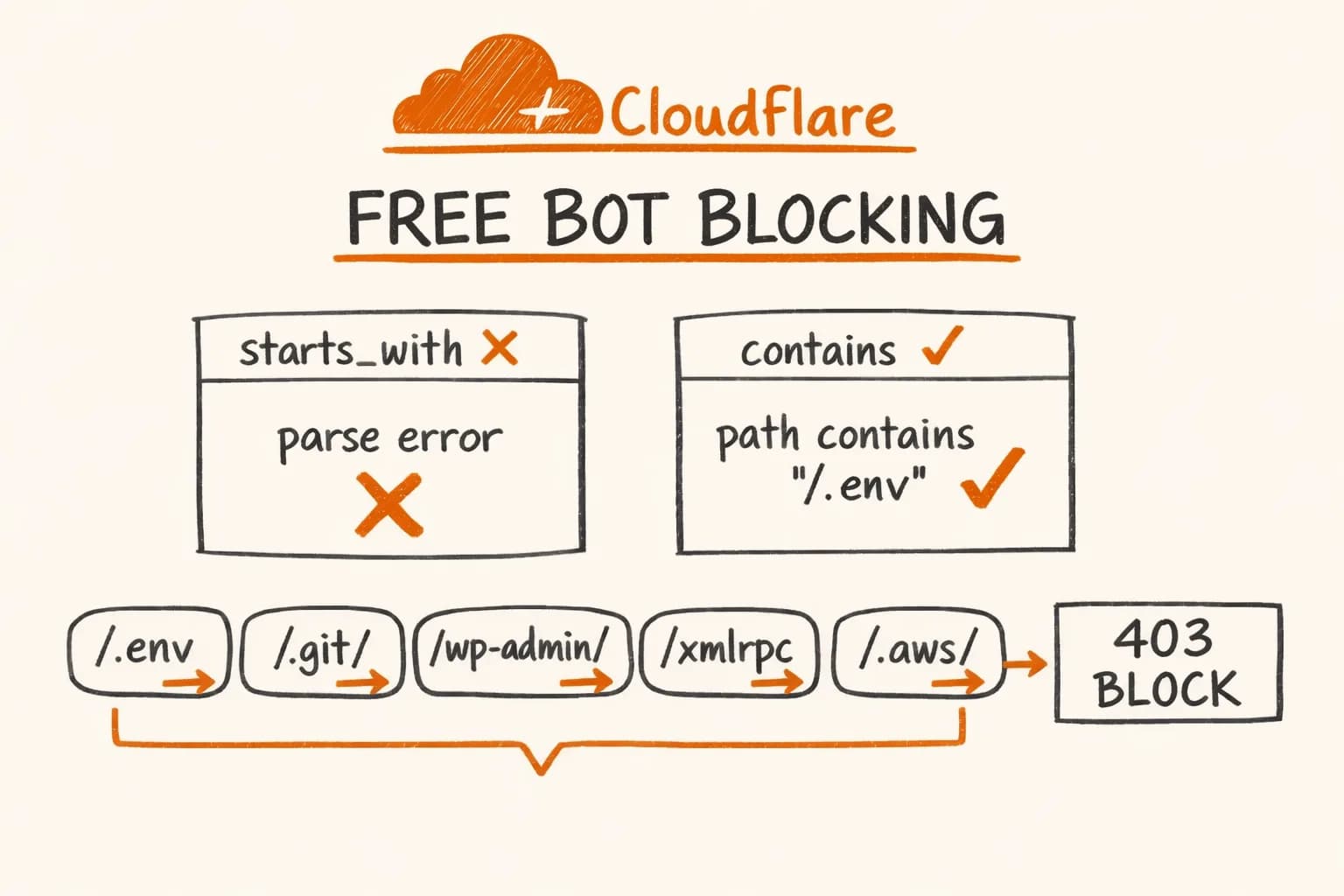
(http.request.uri.path contains "/.env") or (http.request.uri.path contains "/.git/") or (http.request.uri.path contains "/.aws/") or (http.request.uri.path contains "/actuator/") or (http.request.uri.path contains "/wp-admin/") or (http.request.uri.path contains "/wp-login") or (http.request.uri.path contains "/xmlrpc") or (http.request.uri.path contains "/phpmyadmin/") or (http.request.uri.path contains "/laravel/") or (http.request.uri.path contains "/backend/") or (http.request.uri.path eq "/config.php") or (http.request.uri.path eq "/server-status")
Action: Block.
Notice I’m using contains for most paths and eq for two of them. That’s deliberate – and it connects directly to the free plan limitation below.
The Operator Gotcha: Why starts_with Breaks on the Free Plan
This is the part nobody documents clearly. When I first wrote this rule, I used starts_with – it’s the semantically correct operator for ‘path begins with /wp-admin/’. It immediately threw a parse error in the Cloudflare dashboard.
Here’s what’s available on each plan tier:
| Operator | Free | Pro | Business | Notes |
|---|---|---|---|---|
eq | Yes | Yes | Yes | Exact match |
contains | Yes | Yes | Yes | Substring match |
starts_with | No | No | No | Parse error – not supported in custom rules |
ends_with | No | No | No | Same |
matches | No | No | Yes | Regex – requires Business or WAF Advanced |
starts_with is not a plan limitation in the sense of ‘you need to upgrade’ – it simply doesn’t exist as a supported operator in WAF custom rules. The Cloudflare docs mention it in the context of other products (Transform Rules, Page Rules), but in the custom WAF ruleset, your options are eq, ne, contains, in, lt, le, gt, ge, and a few type-specific ones.
contains works fine as a substitute because scanner bots always use the full path anyway – /.env is always /.env, not /.environment or anything else. The substring match catches everything starts_with would have caught, plus any path that has the string anywhere, which is actually more thorough.
The two exceptions – /config.php and /server-status – use eq because these are exact paths. Using contains for /config.php would block any path that has ‘config.php’ in it, which could catch legitimate admin tools if you have /admin/config.php as an internal path. If your app doesn’t have anything like that, contains works equally well.
Deploying via the Dashboard
This is the simpler option. Takes about two minutes.
- Log into the Cloudflare dashboard and select your zone
- Go to Security → WAF → Custom rules
- Click Create rule
- Give it a name (‘Block scanner bots’ works fine)
- Switch the expression editor to Edit expression (text mode) and paste the rule above as a single line
- Set action to Block
- Save and deploy
The rule is active immediately. No propagation delay.
Deploying via API
If you manage infrastructure as code or want to script this, the Cloudflare API works cleanly. You’ll need two things:
- Zone ID – found on the right sidebar of your zone’s Overview page in the dashboard
- API Token – create one at dash.cloudflare.com/profile/api-tokens with
Zone:Editpermission scoped to your specific zone
curl -X PUT \
  "https://api.cloudflare.com/client/v4/zones/$CF_ZONE_ID/rulesets/phases/http_request_firewall_custom/entrypoint" \
  -H "Authorization: Bearer $CF_AUTH_TOKEN" \
  -H "Content-Type: application/json" \
  -d '{
    "rules": [
      {
        "description": "Block bots",
        "expression": "(http.request.uri.path contains \"/.env\") or (http.request.uri.path contains \"/.git/\") or (http.request.uri.path contains \"/.aws/\") or (http.request.uri.path contains \"/actuator/\") or (http.request.uri.path contains \"/wp-admin/\") or (http.request.uri.path contains \"/wp-login\") or (http.request.uri.path contains \"/xmlrpc\") or (http.request.uri.path contains \"/phpmyadmin/\") or (http.request.uri.path contains \"/laravel/\") or (http.request.uri.path contains \"/backend/\") or (http.request.uri.path eq \"/config.php\") or (http.request.uri.path eq \"/server-status\")",
        "action": "block"
      }
    ]
  }'
This uses the PUT method on the phase entrypoint – which replaces the entire custom ruleset. If you already have other custom WAF rules, add them to the rules array rather than making a separate API call, or you’ll overwrite them.
If you want to check what rules are currently set before writing:
curl "https://api.cloudflare.com/client/v4/zones/$CF_ZONE_ID/rulesets/phases/http_request_firewall_custom/entrypoint" \
  -H "Authorization: Bearer $CF_AUTH_TOKEN" | jq '.result.rules'
A successful PUT returns HTTP 200 with the created ruleset. A 400 usually means a malformed expression – double-check the escaping in the JSON string.
Verifying It Works
After deploying, the easiest check is to curl one of the blocked paths from your terminal:
curl -I https://yourdomain.com/.env
# HTTP/2 403
Cloudflare returns 403 for blocked requests. You should also see the blocked request show up in Security → Events in the dashboard, with the custom rule listed as the match reason.
Give it 24 hours and then check Security → Events. On any public-facing site, you’ll see the rule firing repeatedly – not because someone is targeting you, but because the scanners are continuous and indiscriminate.
What This Does Not Cover
A few things worth being explicit about:
It doesn’t replace proper secrets management. If /.env is actually accessible on your server because you committed it or deployed it to the wrong directory, this rule masks the symptom. Fix the root cause – .env should never be web-accessible regardless of WAF rules.
It doesn’t protect against sophisticated attacks. A targeted attacker can easily rotate IPs, use different paths, or probe your application logic directly. This rule is noise reduction, not a security perimeter.
It doesn’t cover API abuse or DDoS. For that you need rate limiting at the application layer – sliding window counters in Redis, or Cloudflare’s rate limiting rules (also available on the free plan, separately from WAF). I cover the Redis implementation in detail in the Redis rate limiting article.
The /backend/ and /laravel/ paths might be too broad depending on your app. If you have a legitimate /backend/ route in your Next.js app, remove that clause. Review each path against your actual route structure before deploying.
Extending the Rule
The free plan allows up to 5 custom WAF rules, with expressions up to a certain length. The rule above is well within both limits. If you want to add more paths – for example, probes specific to PHP frameworks, Java servlet containers, or cloud metadata endpoints – you can extend the same expression with additional or clauses.
Common additions I consider for projects with more exposure:
or (http.request.uri.path contains "/.ssh/")
or (http.request.uri.path contains "/etc/passwd")
or (http.request.uri.path contains "/proc/self/")
or (http.request.uri.path contains "/.DS_Store")
or (http.request.uri.path contains "/wp-content/")
or (http.request.uri.path eq "/.htaccess")
The .DS_Store one is worth including – macOS creates these files automatically and developers sometimes commit them, leaking directory structure. Scanner bots know this.
This is a 10-minute setup with permanent noise reduction. I add it to every project I deploy behind Cloudflare – it costs nothing on the free plan and makes the Security Events log actually useful instead of 95% bot scanner noise. For the full self-hosting stack with Caddy and Docker, these WAF rules are one layer of a broader infrastructure setup.
If you’re building a SaaS or e-commerce platform for the EU market and want the full infrastructure layer handled properly – security, rate limiting, observability, deployment – get in touch. I’m available for freelance projects and long-term engagements.
Further reading:
- GitHub Gist – ready-to-use script and expression – copy the expression or run
block-bots.shdirectly - Cloudflare WAF Custom Rules documentation – official reference for the ruleset language
- Cloudflare Ruleset Language field reference – all available fields including
http.request.uri.path - Cloudflare Rate Limiting Rules – complementary to WAF, also available on the free plan