Order confirmation emails with PDF invoices attached sound simple. They’re not.
The naive approach – generate a PDF in your Stripe webhook handler, attach it to an email, send it – runs straight into a wall of practical problems. Vercel serverless functions have a 4.5 MB request body limit, so large PDFs fail. PDF generation using Puppeteer requires Chromium, which doesn’t fit in a serverless function’s execution environment. And generating a PDF synchronously inside a webhook handler adds 1-3 seconds to your response time, increasing the risk of Stripe timing out and retrying.
I’ve solved this across two production projects: pi-pi.ee uses @react-pdf/renderer for server-rendered invoices sent via Resend, and pikkuna.fi uses Vercel Blob as temporary PDF storage before attaching to a Mailgun email. This article covers the architecture that makes both approaches work reliably.
The Problem with PDF Emails in Serverless
Let me be specific about what breaks:
Puppeteer in Vercel functions requires @sparticuz/chromium – a 60+ MB dependency that pushes you against Vercel’s 250 MB function size limit and adds 1-3 seconds of cold start time. It works, but it’s fragile. Any Chromium update can break the binary.
@react-pdf/renderer is the better serverless option: it generates PDFs via PDFKit (pure JavaScript, no native binaries), the bundle is ~2 MB, and generation time for a simple invoice is under 200ms. The tradeoff is that CSS support is limited – you’re writing StyleSheet.create() objects, not Tailwind classes.
Email size limits. Resend’s attachment limit is 40 MB per email. This is rarely the bottleneck, but worth knowing. If you’re attaching multiple documents, add them up.
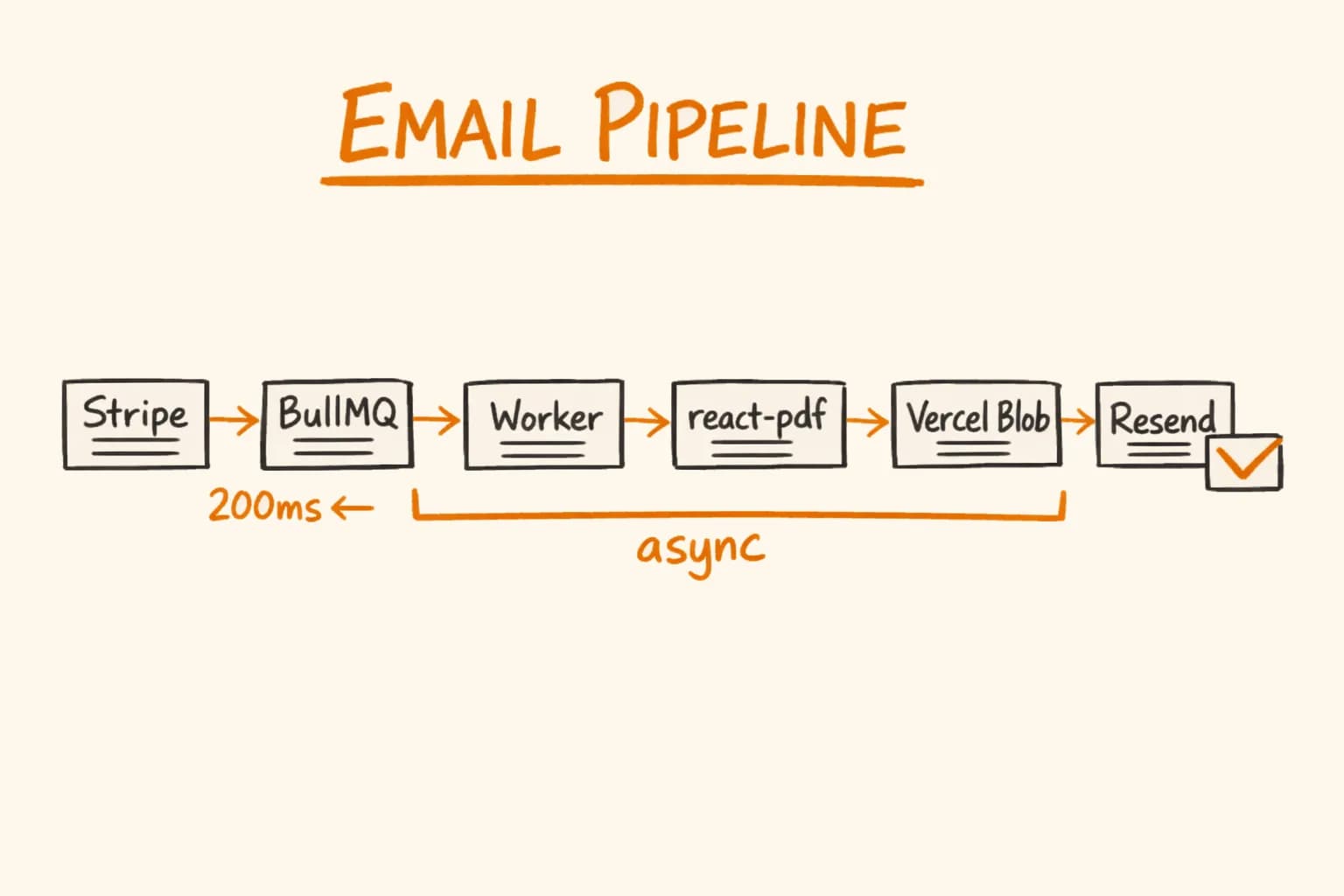
Blocking the webhook handler. This is the real problem. If PDF generation takes 500ms and email sending takes another 300ms, your webhook handler responds in 800ms. Stripe’s timeout is 30 seconds, so technically fine – but you’re blocking unnecessarily. The right architecture: return 200 from the webhook immediately, do the work asynchronously in a queue.
Architecture Overview
Stripe webhook (payment_intent.succeeded)
  └── Webhook handler (returns 200 in <50ms)
        └── BullMQ job enqueued
              └── Worker process
                    ├── 1. Fetch order from Stripe
                    ├── 2. Generate PDF (react-pdf)
                    ├── 3. Upload PDF to Vercel Blob (temporary)
                    ├── 4. Send email via Resend with attachment URL
                    └── 5. Delete PDF from Blob after confirmed send
How-to
How to send transactional emails with PDF invoices in Next.js
Generate the PDF invoice with react-pdf
Use @react-pdf/renderer with StyleSheet.create() to build an invoice template. Call renderToBuffer() to get a Buffer directly – no file system required. Register fonts before the first render to avoid fallback font on cold starts.
Upload large PDFs to Vercel Blob
For PDFs over 500 KB, upload to Vercel Blob with a timestamped filename for an unpredictable URL. Store the blob URL to pass to Resend as a path attachment instead of a base64-encoded buffer in the payload.
Build the React Email template
Use React Email components – Html, Body, Container, Section, Text – with inline style objects. The render() function produces email-client-safe HTML. Never use Tailwind or external stylesheets; email clients strip them.
Send the email via Resend with attachment
Call resend.emails.send() with the rendered HTML and an attachment entry that uses either content (base64 buffer) or path (Blob URL) depending on PDF size. Throw on Resend errors so the BullMQ worker retries automatically.
Clean up the Blob after confirmed send
Immediately after Resend accepts the email, call del() to remove the temporary PDF from Blob storage. Log but don’t throw on cleanup failure – the email was already sent successfully.
The Vercel Blob step deserves explanation. Resend accepts attachments in two ways: as a base64-encoded buffer in the email payload, or as a URL it fetches itself. For small PDFs (under 1 MB), the buffer approach is fine. For larger PDFs, uploading to Blob first and passing a URL avoids the risk of hitting payload size limits in the BullMQ job payload or the email API request.
PDF Generation with react-pdf
@react-pdf/renderer renders React component trees to PDF using PDFKit under the hood. The API is similar to React Native’s style system – View, Text, Image, absolute positioning via StyleSheet.create().
Here’s a production invoice template from pi-pi.ee:
// lib/pdf/invoice-template.tsx
import {
  Document,
  Page,
  Text,
  View,
  StyleSheet,
  Font,
  renderToBuffer,
} from "@react-pdf/renderer";

Font.register({
  family: "Roboto",
  fonts: [
    {
      src: "https://fonts.gstatic.com/s/roboto/v30/KFOmCnqEu92Fr1Me5WZLCzYlKw.ttf",
      fontWeight: 400,
    },
    {
      src: "https://fonts.gstatic.com/s/roboto/v30/KFOlCnqEu92Fr1MmWUlfBBc9.ttf",
      fontWeight: 700,
    },
  ],
});

const styles = StyleSheet.create({
  page: {
    fontFamily: "Roboto",
    fontSize: 10,
    padding: 40,
    color: "#111827",
  },
  header: {
    flexDirection: "row",
    justifyContent: "space-between",
    marginBottom: 32,
  },
  invoiceTitle: {
    fontSize: 24,
    fontWeight: 700,
    color: "#1e40af",
  },
  table: {
    marginTop: 16,
    borderWidth: 1,
    borderColor: "#e5e7eb",
  },
  tableRow: {
    flexDirection: "row",
    borderBottomWidth: 1,
    borderBottomColor: "#e5e7eb",
    minHeight: 32,
    alignItems: "center",
    paddingHorizontal: 12,
  },
  tableHeader: {
    backgroundColor: "#f3f4f6",
    fontWeight: 700,
  },
  col: {
    flex: 1,
  },
  colAmount: {
    width: 100,
    textAlign: "right",
  },
  vatNote: {
    marginTop: 24,
    fontSize: 9,
    color: "#6b7280",
    borderTopWidth: 1,
    borderTopColor: "#e5e7eb",
    paddingTop: 12,
  },
});

export interface InvoiceData {
  invoiceNumber: string;
  date: string;
  customerName: string;
  customerEmail: string;
  customerAddress: string;
  vatNumber?: string;
  isReverseCharge: boolean;
  items: Array<{
    name: string;
    quantity: number;
    unitPrice: number;
    total: number;
  }>;
  subtotal: number;
  vatRate: number;
  vatAmount: number;
  total: number;
  currency: string;
}

function InvoiceTemplate({ invoice }: { invoice: InvoiceData }) {
  return (
    <Document>
      <Page size="A4" style={styles.page}>
        {/* Header */}
        <View style={styles.header}>
          <View>
            <Text style={styles.invoiceTitle}>INVOICE</Text>
            <Text style={{ color: "#6b7280", marginTop: 4 }}>
              #{invoice.invoiceNumber}
            </Text>
          </View>
          <View style={{ alignItems: "flex-end" }}>
            <Text style={{ fontWeight: 700 }}>Your Company OÜ</Text>
            <Text>Tartu mnt 1, Tallinn 10111</Text>
            <Text>Estonia, EE123456789</Text>
          </View>
        </View>

        {/* Bill to */}
        <View style={{ marginBottom: 24 }}>
          <Text style={{ fontWeight: 700, marginBottom: 4 }}>Bill to:</Text>
          <Text>{invoice.customerName}</Text>
          <Text>{invoice.customerAddress}</Text>
          {invoice.vatNumber && <Text>VAT: {invoice.vatNumber}</Text>}
        </View>

        {/* Line items table */}
        <View style={styles.table}>
          <View style={[styles.tableRow, styles.tableHeader]}>
            <Text style={styles.col}>Description</Text>
            <Text style={{ width: 60, textAlign: "right" }}>Qty</Text>
            <Text style={styles.colAmount}>Unit Price</Text>
            <Text style={styles.colAmount}>Total</Text>
          </View>
          {invoice.items.map((item, i) => (
            <View key={i} style={styles.tableRow}>
              <Text style={styles.col}>{item.name}</Text>
              <Text style={{ width: 60, textAlign: "right" }}>{item.quantity}</Text>
              <Text style={styles.colAmount}>
                {formatCurrency(item.unitPrice, invoice.currency)}
              </Text>
              <Text style={styles.colAmount}>
                {formatCurrency(item.total, invoice.currency)}
              </Text>
            </View>
          ))}
        </View>

        {/* Totals */}
        <View style={{ alignItems: "flex-end", marginTop: 12 }}>
          <Text>Subtotal: {formatCurrency(invoice.subtotal, invoice.currency)}</Text>
          {invoice.isReverseCharge ? (
            <Text style={{ color: "#6b7280" }}>VAT: Reverse charge</Text>
          ) : (
            <Text>
              VAT ({Math.round(invoice.vatRate * 100)}%): {formatCurrency(invoice.vatAmount, invoice.currency)}
            </Text>
          )}
          <Text style={{ fontWeight: 700, fontSize: 12, marginTop: 8 }}>
            Total: {formatCurrency(invoice.total, invoice.currency)}
          </Text>
        </View>

        {/* VAT note */}
        {invoice.isReverseCharge && (
          <Text style={styles.vatNote}>
            VAT reverse charge per Article 196 of Directive 2006/112/EC. The customer is liable
            for the payment of VAT.
          </Text>
        )}

        <Text style={{ ...styles.vatNote, textAlign: "center" }}>
          Invoice date: {invoice.date}
        </Text>
      </Page>
    </Document>
  );
}

export async function generateInvoicePdf(invoice: InvoiceData): Promise<Buffer> {
  return await renderToBuffer(<InvoiceTemplate invoice={invoice} />);
}

function formatCurrency(amount: number, currency: string): string {
  return new Intl.NumberFormat("en-EU", {
    style: "currency",
    currency,
    minimumFractionDigits: 2,
  }).format(amount / 100); // Stripe stores amounts in cents
}
renderToBuffer() is the key function – it returns a Buffer directly, no file system required. This is what makes react-pdf work in serverless environments.
Uploading to Vercel Blob
For PDFs that exceed a few hundred KB, I upload to Vercel Blob before sending – this avoids passing a large buffer through the BullMQ job payload and keeps the email API request small.
// lib/pdf/upload-invoice.ts
import { put, del } from "@vercel/blob";

export async function uploadInvoiceTemporarily(
  pdfBuffer: Buffer,
  invoiceNumber: string
): Promise<{ url: string; blobUrl: string }> {
  const filename = `invoices/tmp-${invoiceNumber}-${Date.now()}.pdf`;

  const blob = await put(filename, pdfBuffer, {
    access: "public",
    contentType: "application/pdf",
    // Vercel Blob doesn't natively support TTL expiry on upload,
    // so we track the URL and delete it after the email is sent
  });

  return { url: blob.url, blobUrl: blob.url };
}

export async function deleteInvoiceBlob(blobUrl: string): Promise<void> {
  try {
    await del(blobUrl);
  } catch (err) {
    // Non-critical — log but don't fail the job
    console.warn("Failed to delete invoice blob:", blobUrl, err);
  }
}
The blob is public for the brief window between upload and email send (seconds to minutes). I name it with a timestamp to prevent predictable URLs and to make cleanup easy. In the worker, I delete it immediately after Resend confirms the email was accepted.
React Email Templates
React Email takes a different approach from react-pdf – it renders React components to HTML email markup using inline styles similar to styled-components:
// emails/order-confirmation.tsx
import {
  Body,
  Container,
  Head,
  Heading,
  Hr,
  Html,
  Img,
  Link,
  Preview,
  Row,
  Section,
  Text,
} from "@react-email/components";

interface OrderConfirmationProps {
  customerName: string;
  orderNumber: string;
  items: Array<{ name: string; quantity: number; total: string }>;
  orderTotal: string;
  trackingUrl?: string;
}

export function OrderConfirmationEmail({
  customerName,
  orderNumber,
  items,
  orderTotal,
  trackingUrl,
}: OrderConfirmationProps) {
  return (
    <Html>
      <Head />
      <Preview>Your order #{orderNumber} is confirmed</Preview>
      <Body style={main}>
        <Container style={container}>
          <Heading style={h1}>Order Confirmed</Heading>

          <Text style={paragraph}>Hi {customerName},</Text>
          <Text style={paragraph}>
            Thank you for your order. Your invoice is attached to this email.
          </Text>

          <Section style={orderBox}>
            <Heading as="h2" style={h2}>
              Order #{orderNumber}
            </Heading>
            {items.map((item) => (
              <Row key={item.name}>
                <Text style={itemText}>
                  {item.name} × {item.quantity} — {item.total}
                </Text>
              </Row>
            ))}
            <Hr style={divider} />
            <Text style={totalText}>Total: {orderTotal}</Text>
          </Section>

          {trackingUrl && (
            <Section>
              <Link href={trackingUrl} style={button}>
                Track Your Shipment
              </Link>
            </Section>
          )}

          <Hr style={divider} />
          <Text style={footer}>
            Questions? Reply to this email or visit our support page.
          </Text>
        </Container>
      </Body>
    </Html>
  );
}

// Inline styles — email clients don't support stylesheets
const main = { backgroundColor: "#f9fafb", fontFamily: "Arial, sans-serif" };
const container = {
  backgroundColor: "#ffffff",
  margin: "0 auto",
  padding: "20px 0 48px",
  maxWidth: "580px",
};
const h1 = { fontSize: "24px", fontWeight: "bold", color: "#111827" };
const h2 = { fontSize: "18px", fontWeight: "bold", color: "#374151" };
const paragraph = { fontSize: "14px", lineHeight: "22px", color: "#374151" };
const orderBox = {
  backgroundColor: "#f3f4f6",
  borderRadius: "8px",
  padding: "20px",
  margin: "24px 0",
};
const itemText = { fontSize: "13px", color: "#374151", margin: "4px 0" };
const totalText = { fontSize: "16px", fontWeight: "bold", color: "#111827" };
const button = {
  backgroundColor: "#1e40af",
  borderRadius: "6px",
  color: "#ffffff",
  fontSize: "14px",
  padding: "12px 24px",
  textDecoration: "none",
  display: "inline-block",
};
const divider = { borderColor: "#e5e7eb", margin: "24px 0" };
const footer = { fontSize: "12px", color: "#9ca3af" };
Sending with Resend and PDF Attachment
// lib/email/send-order-confirmation.ts
import { Resend } from "resend";
import { render } from "@react-email/render";
import { OrderConfirmationEmail } from "@/emails/order-confirmation";
import { generateInvoicePdf } from "@/lib/pdf/invoice-template";
import { uploadInvoiceTemporarily, deleteInvoiceBlob } from "@/lib/pdf/upload-invoice";

const resend = new Resend(process.env.RESEND_API_KEY!);

export interface OrderEmailData {
  customerName: string;
  customerEmail: string;
  orderNumber: string;
  invoiceNumber: string;
  items: Array<{ name: string; quantity: number; unitPrice: number; total: number }>;
  total: number;
  currency: string;
  trackingUrl?: string;
  invoiceData: Parameters<typeof generateInvoicePdf>[0];
}

export async function sendOrderConfirmationWithInvoice(
  data: OrderEmailData
): Promise<void> {
  // 1. Generate PDF
  const pdfBuffer = await generateInvoicePdf(data.invoiceData);

  // 2. Upload to Blob (using buffer directly for small invoices, URL for large)
  const useBlobUpload = pdfBuffer.length > 500_000; // 500 KB threshold
  let blobUrl: string | undefined;
  let attachmentContent: string | undefined;

  if (useBlobUpload) {
    const { url } = await uploadInvoiceTemporarily(pdfBuffer, data.invoiceNumber);
    blobUrl = url;
  } else {
    attachmentContent = pdfBuffer.toString("base64");
  }

  // 3. Render email HTML
  const emailHtml = await render(
    <OrderConfirmationEmail
      customerName={data.customerName}
      orderNumber={data.orderNumber}
      items={data.items.map((item) => ({
        name: item.name,
        quantity: item.quantity,
        total: formatCurrency(item.total, data.currency),
      }))}
      orderTotal={formatCurrency(data.total, data.currency)}
      trackingUrl={data.trackingUrl}
    />
  );

  // 4. Send email
  const { data: emailResult, error } = await resend.emails.send({
    from: "Orders <[email protected]>",
    to: data.customerEmail,
    subject: `Order Confirmation #${data.orderNumber}`,
    html: emailHtml,
    attachments: [
      {
        filename: `invoice-${data.invoiceNumber}.pdf`,
        // Resend accepts either content (base64) or path (URL)
        ...(attachmentContent
          ? { content: attachmentContent }
          : { path: blobUrl }),
      },
    ],
  });

  if (error) {
    throw new Error(`Resend error: ${error.message}`);
  }

  // 5. Clean up Blob after successful send
  if (blobUrl) {
    await deleteInvoiceBlob(blobUrl);
  }
}

function formatCurrency(amountCents: number, currency: string): string {
  return new Intl.NumberFormat("en-EU", {
    style: "currency",
    currency,
  }).format(amountCents / 100);
}
Stripe Webhook Integration
The webhook handler itself stays thin – it just enqueues the job:
// app/api/webhooks/stripe/route.ts
import Stripe from "stripe";
import { orderEmailQueue } from "@/lib/queues/order-email";

const stripe = new Stripe(process.env.STRIPE_SECRET_KEY!);

export async function POST(request: Request): Promise<Response> {
  const rawBody = await request.arrayBuffer();
  const signature = request.headers.get("stripe-signature");

  if (!signature) {
    return new Response("Missing signature", { status: 400 });
  }

  let event: Stripe.Event;
  try {
    event = stripe.webhooks.constructEvent(
      Buffer.from(rawBody),
      signature,
      process.env.STRIPE_WEBHOOK_SECRET!
    );
  } catch {
    return new Response("Invalid signature", { status: 400 });
  }

  if (event.type === "payment_intent.succeeded") {
    const pi = event.data.object as Stripe.PaymentIntent;
    await orderEmailQueue.add(
      "send-order-confirmation",
      { paymentIntentId: pi.id, eventId: event.id },
      {
        jobId: event.id, // Idempotency: BullMQ deduplicates by jobId
        attempts: 3,
        backoff: { type: "exponential", delay: 10_000 },
        removeOnComplete: { count: 100 },
        removeOnFail: false,
      }
    );
  }

  return new Response("OK", { status: 200 });
}
Testing Email Templates
React Email provides a dev server that lets you preview templates in a browser with hot reload:
npx email dev --dir emails --port 3030This is the workflow I use: open localhost:3030, edit the template component, the preview updates instantly. No sending test emails to yourself, no opening Gmail to check how it renders.
For integration tests, Resend has a test API key that accepts requests but doesn’t actually send emails – responses include the same data as live sends, so your CI can verify the send logic without sending real emails.
Gotchas
Font loading in react-pdf is asynchronous. Font.register() is called synchronously, but the actual font fetch is deferred. If you call renderToBuffer() immediately after registering fonts, the first few renders may use the fallback font. The fix is to wait: call Font.load() (which returns a Promise) before the first render, or accept that the first render in a cold function might use the default font.
React Email renders full HTML structure. The rendered output includes <!DOCTYPE html>, <html>, <head> – Resend expects this, but don’t wrap it in another HTML structure. Pass the output of render() directly to the html field.
Vercel Blob put() requires BLOB_READ_WRITE_TOKEN in environment. This token is generated in the Vercel dashboard and is different from your deployment token. Easy to forget during local development.
@react-pdf/renderer does not support SVG <image> tags with external URLs in serverless. If your invoice template includes a logo, embed it as a base64 data URL. External URL fetches from inside renderToBuffer() can time out unpredictably in serverless environments.
If you’re building an e-commerce platform or SaaS that needs reliable transactional emails with PDF documents – order confirmations, invoices, receipts – get in touch. I’ve built this across production systems including pi-pi.ee and pikkuna.fi. This email pipeline is one piece of a larger e-commerce automation stack – see how the full order automation pipeline fits together, including PDF generation choices for server-side invoices. I’m available for automation workflows and freelance projects long-term engagements.
Further reading: