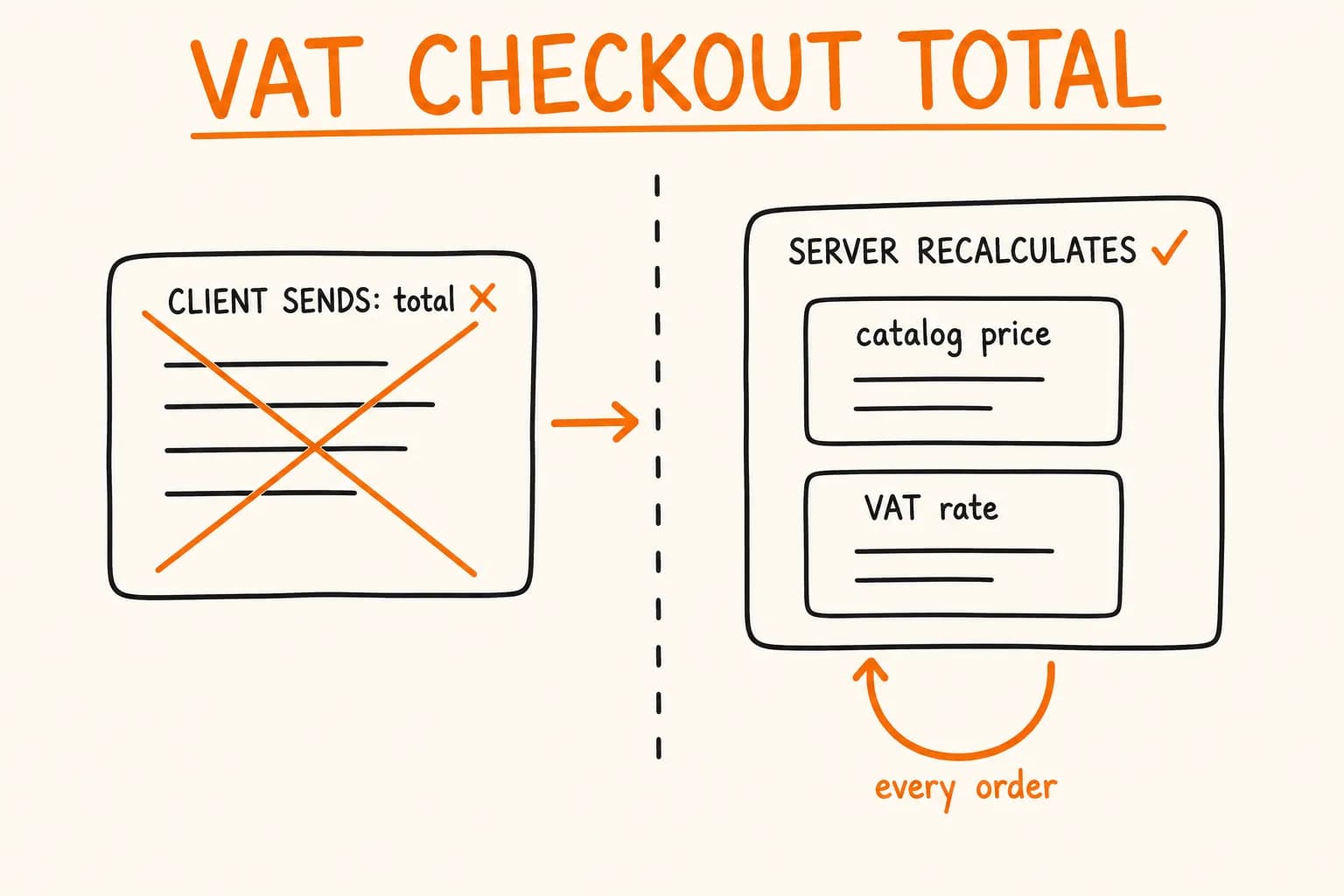
A checkout page shows a subtotal, a VAT line, a total. Somewhere in the request that submits the order, a server-side checkout total calculation has to confirm those numbers are correct before charging a card. The wrong answer to ‘where does that decision happen’ is a well-known exploit category: if the server trusts a total the client sent along with the order, changing that total is a browser dev-tools exercise, not a hack.
The right answer is simple: the server recomputes the total from its own product data, every time, on every order, rather than accepting a total the client already computed. What needs unpacking is what that requires once the storefront sells in multiple markets, multiple currencies, and multiple VAT regimes. ‘Recalculate server-side’ quietly picks up two more decisions once currency and tax enter the picture, and getting either one wrong looks fine until it doesn’t.
This is drawn from a B2B e-commerce platform I built, selling waterless urinal systems across 32 European countries – the pi-pi.ee project card covers the wider VAT and payments architecture. A companion piece, Caching VAT and FX Rates at Build Time, Not on the Request Path – call it the caching article – covers a different question from the same codebase: how the VAT table and FX rates get into the app without a live API call on checkout. This article is about what happens once they’re there – the trust model at the moment someone actually pays.
What ‘Trust the Client’s Total’ Actually Lets Someone Do
Start with the naive version. It isn’t a strawman – it’s what a checkout looks like before anyone thinks about this specifically. The cart page computes a subtotal, applies a VAT rate, shows a total, and the ‘pay’ button posts that total (or a Stripe amount built from it) straight to the charge call. The server’s job is just to charge whatever number arrived.
That version has an exploit for every input the client controls: edit a product’s unit price in the request payload before it’s used to build the Stripe amount, tamper with a quantity so a discount tier applies that shouldn’t, pass a coupon code the server never re-validates, or simply zero out the VAT line by claiming a country the buyer isn’t shipping to. None of these need sophisticated tooling – a browser’s network tab and a replayed, edited request are enough. And this isn’t a typical UI bug. A manipulated price isn’t a rendering glitch, it’s a customer paying less than the product costs, with the difference coming straight out of the seller’s margin, order after order, until someone notices the numbers don’t reconcile.
The fix is stated in the comment at the top of the actual calculateOrder function on this project:
// src/lib/stripe/calculate-order.ts

/**
 * Calculate order totals server-side.
 * Never trust client-provided amounts - always recalculate from product data.
 */
export function calculateOrder(
  items: CartItem[],
  country: Country,
  isBusiness: boolean,
  viesValidated: boolean,
  shippingCostNet: number
): OrderCalculation {
  const isReverseCharge = isBusiness && viesValidated && country !== SELLER_COUNTRY;
  const vatRate = isReverseCharge ? 0 : getVatRate(country);

  const productCharge = chargeCart(
    items.map((item) => ({
      netCents: Math.round(getItemPrice(item) * 100),
      quantity: item.quantity,
    })),
    vatRate
  );

  const shippingCharge = chargeUnit(Math.round(shippingCostNet * 100), vatRate);

  return {
    subtotal: productCharge.net,
    shippingCost: shippingCharge.net,
    vatRate,
    vatAmount: productCharge.vat + shippingCharge.vat,
    total: productCharge.gross + shippingCharge.gross,
    isReverseCharge,
  };
}
The function takes a cart of { productId, quantity } pairs – not a price and not a total. getItemPrice(item) looks up the unit price from the server’s own product catalogue (products.json) keyed by productId. Whatever price the client displayed on the cart page never enters this function at all, because CartItem doesn’t carry one: only productId, color, quantity, and an isSample flag.
The boundary isn’t ‘trust nothing from the client.’ quantity, country, and isBusiness are exactly that – client-supplied inputs, and there’s no way around taking them from the request. shippingCostNet is client-supplied too, in the same category: the client tells the server which shipping method it wants.
Where shipping differs from the product price is what ‘trusted’ should mean for a value like this. A shipping cost only earns that word once it’s resolved server-side from an ID against a catalogue of valid methods and their real costs – the same discipline getItemPrice gives the product price – rather than accepted as a raw number handed over with the order. A downstream sanity check – a minimum-charge floor, say – isn’t a substitute for that lookup: it catches gross abuse of the combined total, not manipulation of the shipping figure on its own. That’s a narrower scope than the guarantee this article is mostly about, and worth checking for in any checkout where some money fields are resolved from a catalogue and others aren’t.
The specific, non-negotiable part is narrower still: a product’s price is never a client-supplied input. It’s resolved from the catalogue, by ID, every time. Every order – the first one and the ten-thousandth – runs this same function from scratch. There’s no ‘trust the last calculation’ shortcut for the line items that make up the bulk of the total, because the product side of the total is a derived value, not a stored or forwarded one.
That single design decision is what makes everything downstream – the VAT rate, the reverse-charge flag, the currency display – safe to build without re-litigating trust at every layer. Get this one wrong and no amount of correct VAT-rate data fixes it, because the attacker was never going through the VAT lookup in the first place.
Two Different Numbers Wearing the Same Currency Symbol
Once a storefront serves buyers outside the eurozone, it’s tempting to call what it does ‘multi-currency checkout.’ That phrase implies more than this system does, and the gap between the phrase and the reality is where mistakes happen – both in how a buyer reads the price and in how an engineer might over-build the next feature.
What actually happens for a UK or Norwegian buyer here: the storefront shows a price in GBP or NOK next to the EUR price, computed by getApproxLocal from a currency table cached at build time. That’s it. The charge itself – the number Stripe actually moves – is always EUR, for every country, every currency shown on the page. The code that produces the local-currency number says so in a comment that’s doing architectural work, not decoration:
// src/lib/pricing/fx.ts

/**
 * Approximate local-currency reference for non-euro countries.
 *
 * The site prices everything in EUR and Stripe charges in EUR
 * (src/lib/stripe/config.ts). For the non-euro shipping countries we show an
 * APPROXIMATE local amount next to the EUR price ("≈ £25") to remove the
 * mental-conversion friction — always labelled "charged in EUR". Rates are the
 * ECB reference rates cached at build time in src/data/fx-rates.json.
 */
export function getApproxLocal(eurAmount: number, countryCode: string): ApproxLocal | null {
  const currency = COUNTRY_CURRENCY[countryCode];
  if (currency === undefined) return null;
  const rate = FX_RATES[currency];
  if (rate === undefined) return null;
  return { currency, amount: eurAmount * rate };
}
Two things collapse into one mental model easily, and shouldn’t:
- The presentation layer – ‘here’s roughly what €29 is in your currency’ – is a UX courtesy. It removes the mental-arithmetic tax on a UK buyer trying to figure out if €29 is a good price. It’s approximate by design, refreshed on a build cadence, and never appears anywhere near an actual charge amount.
- The settlement layer – the number Stripe actually debits – is always EUR here, regardless of which currency the storefront just showed.
calculateOrderabove never touches a currency other than EUR; there’s no branch in it for ‘this buyer sees GBP.’
Conflating the two is the mistake. ‘Multi-currency checkout’ sounds like real multi-currency settlement: a ledger that carries balances in ten currencies, FX risk sitting on the seller’s book because today’s rate isn’t tomorrow’s, reconciliation against bank statements in multiple currencies, maybe even hedging. None of that exists in this system, and none of it needs to – the actual charge never leaves EUR. What looks like multi-currency support from the customer’s side is a single-currency settlement system with a translation layer bolted onto the storefront. That’s a legitimate, much simpler thing to build. Be precise about which one you’re building before a spec says ‘multi-currency’ and someone starts scoping ledger entries that were never the requirement.
(A separate project I built, Pikkuna, also sells across 32 countries and 13 currencies – a reminder that this isn’t a one-off pattern for a single client. Its checkout isn’t the evidence for the code shown here.)
The Cache Feeds the Calculation, It Doesn’t Replace It
The caching article on this same codebase covers why the VAT table and FX rates are fetched once per build instead of once per request: a live tax-authority or FX call sitting in the checkout path adds latency and a third-party failure mode to the one part of the app where a customer is actively trying to pay. That’s a caching decision, and a good one on its own terms – but it answers a different question. The cache doesn’t do the job the request-time recalculation does.
getVatRate(country) reads from VAT_RATES, a table built once at module load from getAllRates() in the eu-vat-rates-data package – the same package and the same build-time refresh the caching article covers in detail, so it isn’t repeated here.
That lookup is fast and has no network dependency – the caching article’s whole point. But calculateOrder still calls getVatRate(country) fresh, inside the function, on every order. It doesn’t read a VAT amount that was computed once and stored; it reads a rate, then does the multiplication itself, against the product prices it just looked up from its own data, for this specific order. The cache saves the trip to fetch the rate table. It does not – and was never meant to – save the step of applying that rate to this order’s actual line items. Two separate jobs. A fast, cached rate lookup doesn’t mean the total is already computed and just needs forwarding: the recalculation described in the first section runs regardless of how the rate got there.
A VAT Lookup That Refuses to Guess
One more decision. The interesting part isn’t the choice itself – the caching article already covers why getVatRate throws on an unrecognized country instead of defaulting to 0%, and why that’s the opposite failure direction from the FX side of the same file. What matters is where that throw sits. getVatRate doesn’t default to a rate when it doesn’t recognize the country code:
// src/lib/pricing/config.ts
export function getVatRate(countryCode: string): number {
  const rateInfo = VAT_RATES[countryCode];
  if (rateInfo !== undefined) return rateInfo.rate;
  if (countryCode in ZERO_VAT_TERRITORIES) return 0;
  // Fail fast on a fully unknown code rather than silently charging 0% VAT.
  throw new Error(`getVatRate: unknown country code "${countryCode}"`);
}
This function runs inside calculateOrder, on every single order, as part of the same from-scratch recalculation covered in the first section. That placement is the point. A bad or missing rate can’t silently corrupt a stored total, because there’s no stored total for it to corrupt. calculateOrder either produces a fresh, correct total from a rate it just looked up, or it throws before producing a total at all. There’s no intermediate state – no order sitting half-priced in the database with a wrong VAT amount, waiting to be found on a filing – because the VAT amount is never computed once and kept. It’s computed at the moment of the charge, every time, from whatever getVatRate returns right then.
Where This Doesn’t Apply
This is a storefront that settles in one currency and taxes according to a well-defined, slow-changing table of EU standard rates. The two places that stops being true – a system genuinely settling in multiple currencies, and a VAT rate changing mid-cycle faster than a rebuild catches it – are exactly the boundaries the caching article walks through.
Server-side recalculation from trusted data has to be right regardless of any of that. It’s the layer that turns ‘the customer typed something’ into ‘the amount we actually charge,’ and nothing about caching, currency display, or tax-table freshness changes what that layer’s job is.
If your checkout trusts a number that came from the browser anywhere between the cart and the charge – a price, a total, a discount, a tax line – that’s worth finding before a manipulated request finds it first. Get in touch and let’s look at where the trust boundary actually sits. That’s the kind of build I cover on the E-commerce page.
Further reading:
- Caching VAT and FX Rates at Build Time, Not on the Request Path – how the VAT table and FX rates this article reads from get into the app without a runtime API call
- pi-pi.ee – B2B E-commerce for Waterless Urinal Systems – the project this checkout logic is drawn from
- Idempotency Keys: Building Retries That Don’t Double-Charge – the companion trust problem on the payment-retry side of the same kind of checkout