Generating one PDF is easy. Generating one PDF per request, on demand, is also easy – I’ve done it for 31 locales streamed straight out of a route handler. The problem starts when someone asks you to generate five thousand of them at once: a nightly statement run, a year-end report for every customer, a bulk export of invoices.
The obvious code is one line, and it will take your process down:
// This will OOM. Do not ship it.
const pdfs = await Promise.all(customers.map((c) => generateStatement(c)));
This isn’t a PDF-library problem. It’s a memory and throughput problem that happens to involve PDFs. The same mistake sinks image processing, report exports, and any batch that maps an async, memory-heavy operation over a large list. This article is about doing the batch part right – not about which renderer to pick. If you’re still choosing a tool, I wrote a separate Puppeteer vs react-pdf comparison for that decision.
Why Promise.all(map) Runs Out of Memory
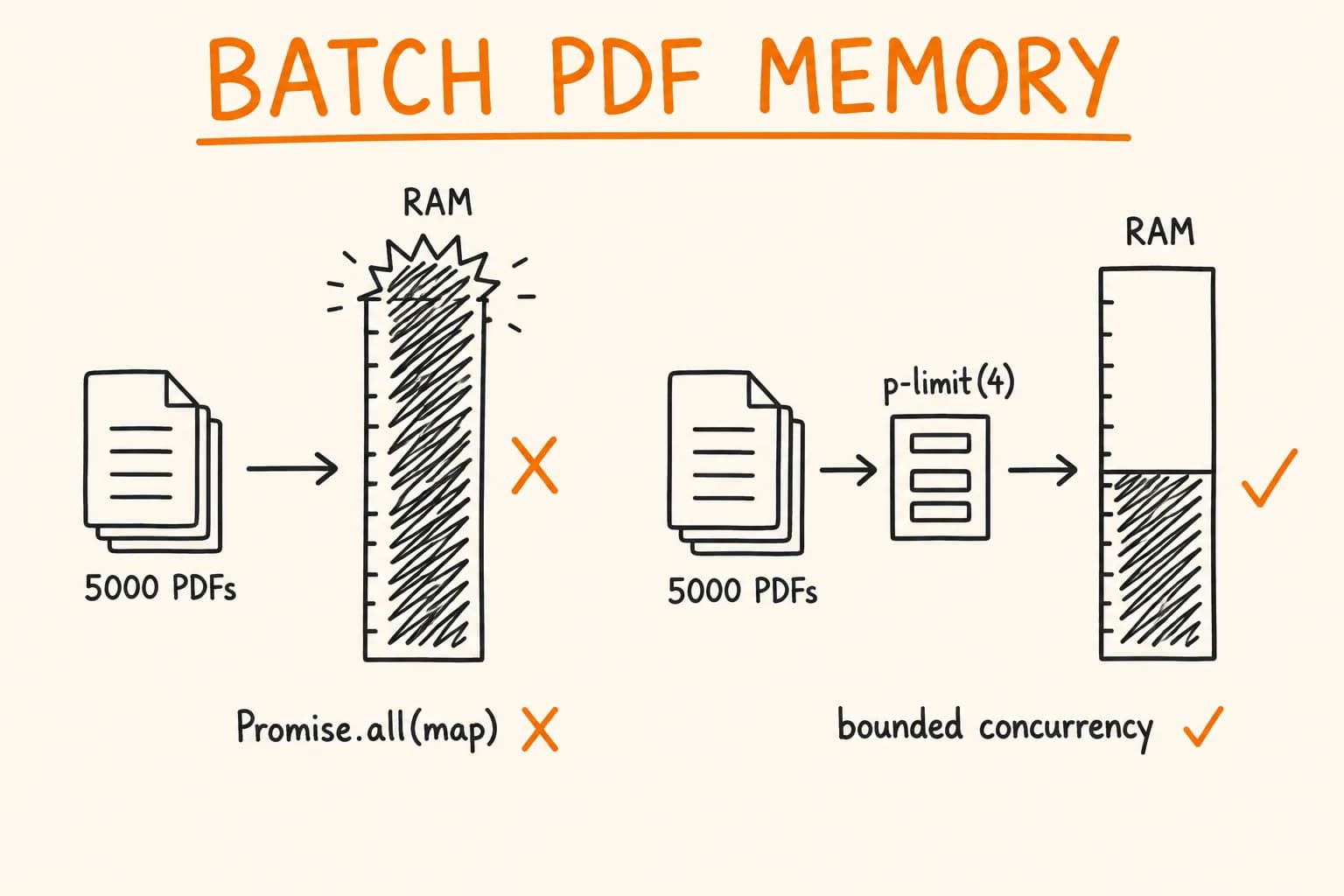
Promise.all does not process items in sequence. It starts every promise in the array immediately, then waits for all of them. customers.map(generateStatement) doesn’t create a queue of 5,000 pending tasks – it creates 5,000 running tasks.
Each running PDF generation holds memory for the duration:
- the source data loaded for that document,
- the layout tree the renderer builds in memory,
- the output buffer accumulating the finished bytes,
- and, if you use a browser engine, an open page in a Chromium process.
A single 4-page A4 document with images and tables is not large. But multiply the peak footprint of one generation by 5,000 concurrent generations and you are asking Node to hold all of it at once. Node’s default heap is capped (around 1.5–2 GB on a 64-bit build unless you raise --max-old-space-size), and a browser engine lives in native memory outside that heap entirely. You hit the ceiling, V8 burns its last cycles on garbage collection, and the process dies with JavaScript heap out of memory – or the OOM killer takes it first.
The failure is worse in a constrained container. This site’s own CV PDF is prebuilt at build time with @react-pdf/renderer specifically to keep the production container under its 1 GiB memory limit – a single document already forced that decision. A naive batch of thousands doesn’t stand a chance in the same environment.
The fix is not ‘add more RAM’. The fix is to never hold more than a handful of documents in flight at once.
Bound the Concurrency
The core idea: process the list with a fixed number of workers, not all at once. Say 4 documents in flight at any moment, regardless of whether the list has 50 or 50,000 entries. Peak memory becomes a function of your concurrency limit, not your input size – which means it’s constant and predictable.
You don’t need a queue server for this. A concurrency limiter is enough. p-limit is the smallest, most boring tool for the job:
import pLimit from "p-limit";

const limit = pLimit(4); // never more than 4 running at once

async function generateAll(customers: Customer[]): Promise<void> {
  await Promise.all(
    customers.map((customer) =>
      limit(async () => {
        const pdf = await generateStatement(customer);
        await writeStatement(customer.id, pdf); // write out, then let it be collected
      })
    )
  );
}
Note what changed and what didn’t. It’s still Promise.all(map) on the outside – but every task is now wrapped in limit(). p-limit only lets 4 of the wrapped functions actually run; the rest are held as cheap closures until a slot frees up. A pending closure costs almost nothing. A running PDF generation costs megabytes. That difference is the whole point.
Equally important: each task writes its result out and returns nothing. If you collect all 5,000 buffers into an array to write later, you’ve just moved the memory problem downstream – the buffers pile up in the array instead. Write to disk, upload to storage, or stream to the response as each document finishes, then let it be garbage-collected before the next one starts.
Picking the number
There’s no universal right value. It depends on the peak footprint of one generation and how much memory you’re allowed to use. Start low – 2 to 4 – and measure. Watch RSS while the batch runs:
setInterval(() => {
  const { rss, heapUsed } = process.memoryUsage();
  console.log({
    rssMB: Math.round(rss / 1024 / 1024),
    heapMB: Math.round(heapUsed / 1024 / 1024),
  });
}, 1000);
If RSS stays flat across the whole run, your concurrency is safe and you can try raising it for throughput. If RSS climbs steadily and never comes back down, you have a leak – something is being retained between documents. Find it before you raise the limit, because a higher limit only makes a leak fail faster.
Release the Renderer Between Documents
Concurrency limiting fixes the ‘too many at once’ problem. There’s a second problem specific to browser-based generation: the engine holds native memory that the JS heap can’t see, and it accumulates if you don’t release it.
With @react-pdf/renderer this is mostly a non-issue – it’s a pure-JS renderer with no external process, so each renderToBuffer call produces a buffer and the layout tree becomes garbage the moment the call returns. Bound the concurrency, write each buffer out, and you’re done.
With Puppeteer it’s different, because a Chromium process sits outside V8. The pattern that works at scale is: one browser, one page per document, close the page every time.
import puppeteer, { Browser } from "puppeteer";
import pLimit from "p-limit";

async function generateBatchPuppeteer(reports: ReportInput[]): Promise<void> {
  const browser: Browser = await puppeteer.launch({
    headless: true,
    args: ["--no-sandbox", "--disable-dev-shm-usage"],
  });

  const limit = pLimit(3); // Chromium pages are heavier — keep this low

  try {
    await Promise.all(
      reports.map((report) =>
        limit(async () => {
          const page = await browser.newPage();
          try {
            await page.setContent(renderHtml(report), {
              waitUntil: "networkidle0",
            });
            const pdf = await page.pdf({ format: "A4", printBackground: true });
            await writeReport(report.id, Buffer.from(pdf));
          } finally {
            await page.close(); // release the page's memory every single time
          }
        })
      )
    );
  } finally {
    await browser.close();
  }
}
Two rules do the heavy lifting here.
Reuse the browser, not the page. Launching Chromium takes a second or two and allocates a lot; doing it per document is both slow and wasteful. But a single page that renders thousands of documents leaks – retained DOM, detached nodes, whatever the last render left behind. So the browser is created once, and a fresh page is opened and closed for each document. Pages are cheap to create; keeping them open is what costs you.
Close the page in finally, unconditionally. If a page.pdf() call throws and you skip page.close(), that page stays open inside Chromium and its memory is never reclaimed. Do that a few hundred times in a batch and the browser process bloats until it’s killed. The finally block isn’t defensive decoration – it’s what keeps the batch alive.
For a very long-running batch, browsers can still creep upward over tens of thousands of documents. A pragmatic mitigation is to recycle the browser periodically – close and relaunch it every N documents – which resets native memory to a clean baseline. Only reach for that if you actually observe the creep; don’t add it speculatively.
Stream, Don’t Accumulate
Even with bounded concurrency, there’s one more place memory hides: the results. If your batch produces a single combined artifact – a ZIP of all PDFs, or a multi-document merge – the naive version builds the whole thing in memory before writing a byte.
The alternative is back-pressure: pull the next item only when the writer is ready for it. Node streams give you this for free. Instead of mapping the whole list, process it as an async iterator and let the destination throttle the pace:
import { pipeline } from "node:stream/promises";
import { Readable } from "node:stream";

async function* pdfChunks(customers: Customer[]) {
  for (const customer of customers) {
    const pdf = await generateStatement(customer);
    yield pdf; // one document at a time; nothing accumulates
    // pdf goes out of scope here and becomes collectable
  }
}

await pipeline(
  Readable.from(pdfChunks(customers)),
  zipArchiveWriter // consumes at its own pace; generator waits
);
The generator produces exactly one document, hands it to the writer, and doesn’t start the next until the writer has taken it. If the writer is slow – a network upload, a disk under load – the generator naturally pauses. That’s back-pressure. Memory stays flat no matter how many customers are in the list, because at any instant there’s one document in flight, not five thousand.
This trades throughput for a hard memory ceiling: a serial generator is slower than 4 parallel workers. In practice you combine the two – bounded concurrency for speed, streaming to the destination for the memory ceiling – but if you have to pick one property to guarantee, ‘the job finishes’ beats ‘the job is fast.’
What This Looks Like in Practice
The shape of a batch job that survives production is consistent regardless of the renderer:
- Concurrency is bounded to a small number, measured against real memory, not guessed.
- Each document is written out and released as it finishes – no array of buffers waiting at the end.
- The renderer instance is reused, its per-document handle is not. One browser, one page per doc, closed in
finally. OnerenderToBuffercall per doc for the pure-JS path. - The final artifact is streamed, so combining thousands of documents doesn’t require holding thousands of documents.
- Memory is observed while it runs. A flat RSS line is the acceptance test. A climbing one is a bug, not a reason to buy RAM.
None of this is exotic. It’s the difference between a batch that finishes quietly at 3 AM and one that OOMs at document 812, leaving half the run missing – which nobody notices until a customer asks where their statement is.
Where This Doesn’t Apply
If you’re generating one document per request, none of this matters – the request lifecycle already bounds your concurrency, and a single generation fits comfortably in memory. Reach for concurrency limits and streaming when the batch size is unbounded or large enough that the peak footprint of ‘all of them at once’ exceeds what you’re allowed to use. For a few dozen documents, Promise.all(map) is fine. The trouble is specifically at scale, and the fix costs a few lines.
I build and operate document pipelines that run unattended – bulk invoice and statement generation, scheduled report exports, on-demand PDFs across 30+ locales – the kind that has to finish inside a fixed memory budget without a human watching. If you have a batch job that falls over at scale, or you’re about to build one and want it to survive the first real run, get in touch. I take on automation and workflow projects and longer engagements.