

Looping SVG animation illustrating a PDF verification pipeline – document stack, cloud processing, and green/red folder sorting.
Recolour a product photo to any colour in the browser. A canvas pass tints one white master per photo, so made-to-order colours need no extra photos.
Key Results
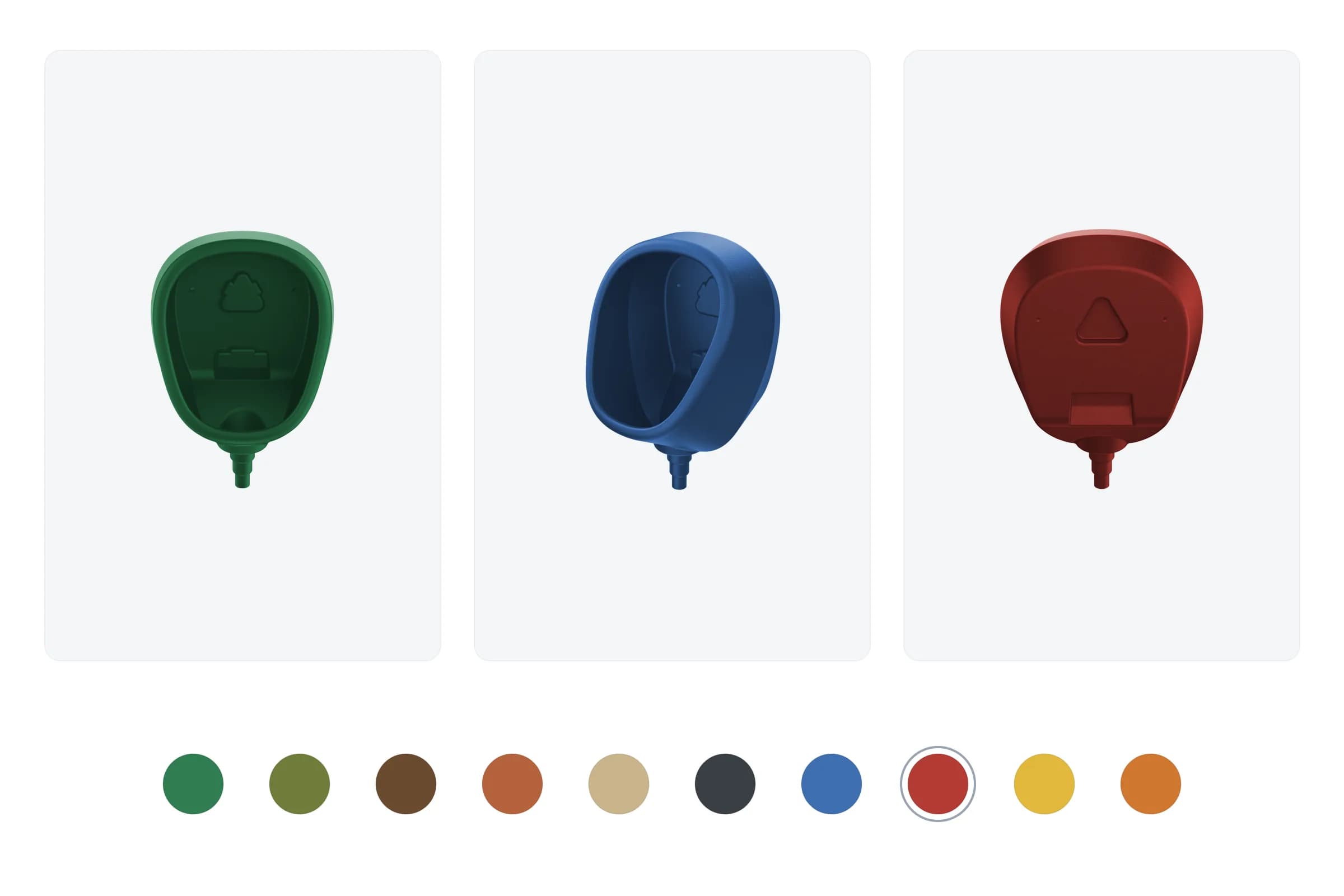
Pi-pi.ee stocks its products in three colours – black, grey, white – and photographs each one. But customers kept asking for colours that aren’t on the shelf: a green to blend into a garden, an anthracite to match a façade, a terracotta for a courtyard. Every one of those is a made-to-order paint job, perfectly doable, but invisible on the website. The buyer had to imagine it.
The obvious fix – photograph the product in every offered colour – doesn’t scale. Ten colours across several product shots is dozens of new image files to shoot, edit, name, store, and re-do the moment the catalogue changes. And it still only covers a fixed list. The real requirement was different: let the visitor see any offered colour on the actual product, right on the page, without the shop producing a single extra photo.
The recolouring happens in the browser. Each product photo has a white master with a transparent background. The picker draws that master onto a canvas, reads its brightness and transparency per pixel, and repaints every pixel in the chosen colour: darker areas of the photo become a darker shade, brighter ones the colour itself, and the brightest spots get a touch of white for a plastic-like sheen. The product’s own lighting is preserved, so a recoloured shot still reads as a photograph rather than a flat silhouette.
The master is white for a reason. The first version used a black master, which has no real highlight-to-shadow range: white and saturated custom colours came out flat and muddy, and dark hues such as brown and red collapsed into one tone. A white master carries the full range of light and shade, so any colour sits on it like coloured plastic.
The visitor picks from a set of named swatches – no raw hex or RGB input, just ‘olive’, ‘terracotta’, ‘anthracite’ – and the preview redraws as soon as a swatch is picked. Because a custom colour is a special order rather than a stock SKU, the chosen colour name is reported back up to the product form and pre-filled into the order request, so what the buyer saw is exactly what the shop receives. Swatch labels run through the same next-intl dictionary as the rest of the catalogue, so the colour names are localised alongside everything else.
This case shows the technique. The live site may differ in detail from what is described here.
This is the exact recolour that runs on the product page – the same transform, live in your browser: the product’s white master is painted with a diffuse tint plus a white specular highlight. Pick a colour and pull the sliders: saturation, shadow depth and highlight are the transform’s real knobs.
| Aspect | Outcome |
|---|---|
| Recolour latency | Client-side canvas redraw on swatch change; the white master is fetched once |
| Image assets | One white master per photo covers every colour |
| Colour range | Any target colour; the UI offers 10 curated, localised presets |
| Shading fidelity | Original shadows and highlights preserved via normalised luminance, plus a white specular |
| Order accuracy | Chosen colour name pre-fills the special-order request |
For the technically curious, here’s how the live preview is built.
The master is drawn once to an offscreen canvas (preview capped at 420 px, up to three images per product), and getImageData hands over the pixels. decompose() turns them into two things: luminance (weighted 0.213 / 0.715 / 0.072), stretched so the 2nd to 99th percentile of the opaque pixels maps to 0..1, and the alpha channel. The percentile stretch means a slightly dull or overexposed master still uses the full shading range.
const l = 0.213 * px[k] + 0.715 * px[k + 1] + 0.072 * px[k + 2];
// ...histogram of opaque pixels -> lo (2nd percentile), hi (99th)
const span = Math.max(hi - lo, 1);
for (let i = 0; i < n; i++) norm[i] = clamp01((lum[i] - lo) / span);
Recolouring is then a loop over those normalised values. Each pixel gets a shading factor, the target colour is multiplied by it, and the brightest pixels get white mixed in as a specular highlight. Alpha is copied through, so the transparent background stays transparent:
const SHADOW_SCALE = 0.5;
const SPEC_START = 0.85;
const SPEC_STRENGTH = 0.5;

for (let i = 0; i < d.norm.length; i++) {
  const n = d.norm[i];
  const j = i * 4;
  const mod = SHADOW_SCALE + (1 - SHADOW_SCALE) * n;
  const spec = clamp01((n - SPEC_START) / (1 - SPEC_START)) * SPEC_STRENGTH;
  const dr = r * mod;
  o[j] = (dr + (1 - dr) * spec) * 255;
  // ...same for g and b
  o[j + 3] = d.alpha[i];
}
The result goes back with putImageData and is redrawn whenever the swatch changes. The catalogue pipeline bakes the stock variants with the same transform: the black and grey variants still come from the black master, and the white variant is the white master tinted to RAL 9016.
The cost is real. The pixel work happens on the visitor’s device and the preview is capped at 420 px, and each numbered photo needs an extra white master file (15 were added) rather than one generic master.
The catalogue only stores the stock photo paths (12-black.webp). The picker derives the white master path from those by convention, and quietly drops any image that has no master (diagrams, mesh close-ups), so the preview only ever shows the shots that can actually be tinted.
function whiteMasters(images: string[]): string[] {
  const out: string[] = [];
  for (const src of images) {
    const m = src.match(/^(.*\/)(\d+)-(?:black|grey|white)\.(?:webp|png)$/);
    if (m !== null) out.push(`${m[1]}${m[2]}-transparent-white.png`);
  }
  return out.slice(0, 3);
}
The visitor chooses from ten named presets – green, olive, brown, terracotta, beige, anthracite, blue, red, yellow, orange – each with a fixed hex value and a next-intl label. The transform itself accepts any target colour; the UI simply offers the curated set.
A custom colour isn’t a stock SKU, so it can’t just be added to the cart – it becomes a special-order request. The picker reports the chosen colour name (already localised) up to the product form, which pre-fills it into the enquiry. There’s no second place for the buyer to re-state the colour, and no gap between the preview and the order:
const [customColorName, setCustomColorName] = useState<string | null>(null);
<CustomColorPicker images={images} onChange={setCustomColorName} />;
// ...the form's colour field is driven by customColorName Available
Need something similar?
I build custom solutions – from APIs to full products. Let’s talk about your project.
Looping SVG animation illustrating a PDF verification pipeline – document stack, cloud processing, and green/red folder sorting.

i18n B2B e-commerce platform for waterless urinal products across 32 European countries with automated VAT handling, PDF invoicing, and CRM integration.
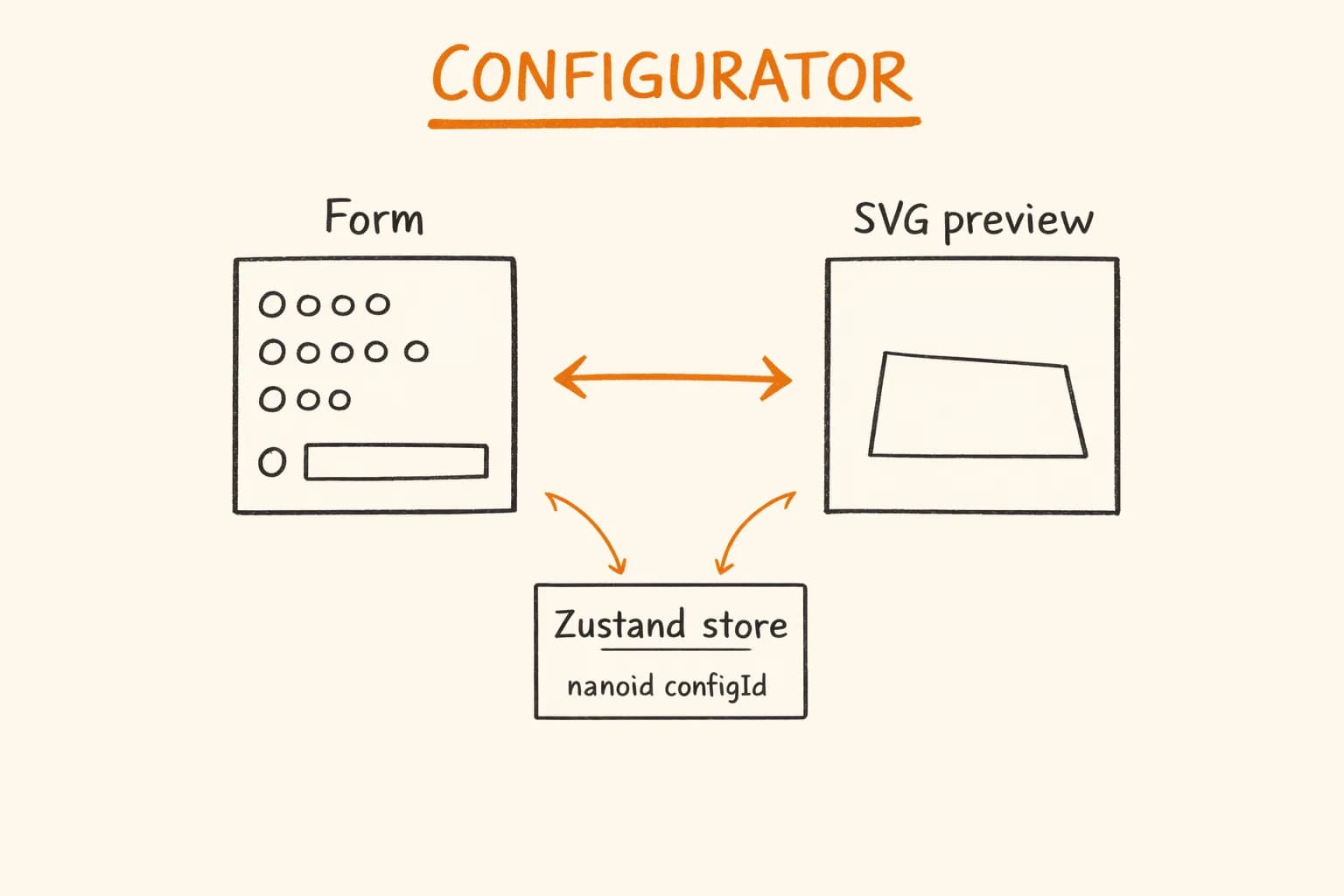
Build a React product configurator with Zustand, DaisyUI, Motion animations and a live SVG preview – architecture, pricing logic, and performance patterns.
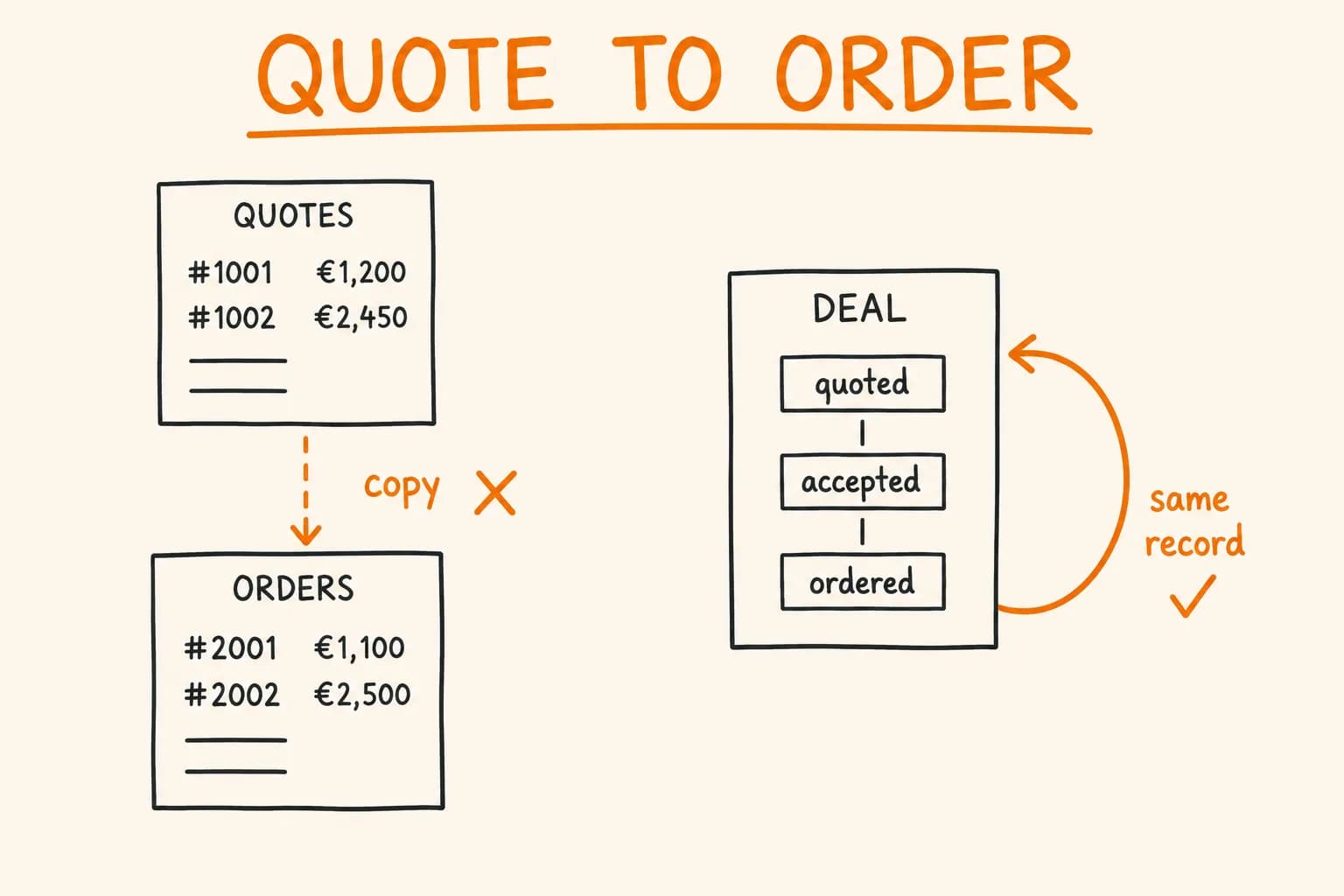
B2B quote-to-order flow in Next.js: RFQ → quote → order state machine, per-deal line items, guarded transitions, and quote conversion without data drift.
Databases